Otty icon
Otty icon

Otty

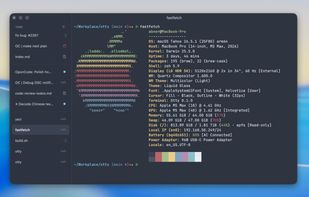
Native GPU-accelerated terminal with keyboard-first design, agent compatibility, Unicode, ligatures, inline images, true color, tabs, panes, splits, session recovery, rich color schemes, real-time notifications, fuzzy search, custom layouts, and quick navigation.
Otty screenshot 1

Cost / License

  • Free
  • Proprietary

Application type

Platforms

  • Mac
0likes
0comments
0articles

Features

Properties

  1.  Support for Themes

Features

  1.  Autocompletion
  2.  No registration required
  3.  No Tracking
  4.  AI Agents friendly
  5.  Support for Keyboard Shortcuts
  6.  GPU Acceleration
  7.  Code Snippets
  8.  Vertical Tabs
  9.  Keyboard-First
  10.  Support for Unicode
  11.  Tabbed interface
  12.  Support for Multiple threads
  13.  Colored Text

Otty News & Activities

Highlights All activities

Recent activities

Otty information

  • Developed by

    CN flagappmakes
  • Licensing

    Proprietary and Free product.
  • Pricing

    One time purchase (perpetual license).
  • Alternatives

    51 alternatives listed
  • Supported Languages

    • English
    • Chinese

AlternativeTo Categories

DevelopmentOS & UtilitiesSystem & Hardware

Popular alternatives

View all
Otty was added to AlternativeTo by abnerlee on and this page was last updated .
No comments or reviews, maybe you want to be first?

What is Otty?

Otty is a terminal application that combines a simple interface with advanced development features. It is designed for users who prefer a keyboard-centric interface and is compatible with many code agents. Otty is a GPU-accelerated terminal that includes programming ligatures, multi-codepoint emojis, full Unicode support, and rich text styles. It supports true color and allows viewing images directly in the scrollback. It offers adjustable color schemes, interactive links, and text editing features.

The software supports multiple threads in one window and allows flexible layouts. It provides notifications for long-running jobs and offers session recovery. Otty is keyboard-friendly, offering shortcuts for commands and workflows. It integrates with AI agents, enabling users to monitor tasks. Other features include session history, fork & branch capabilities, composer and prompt queue, and the ability to pipe any output into the agent.

Official Links