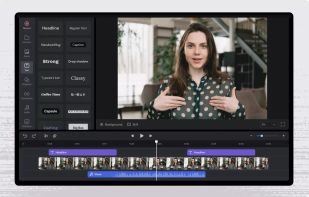

Turn static images or a boring video into captivating animated clips that really capture attention. Ideal for Dribbble shots, Twitter videos, landing page videos, feature announements.


ShotGlass is described as 'Screenshot and screen recorder app for macOS. One app instead of four. Capture multiple windows, annotate, zoom, add transitions, and drop your recording onto a 3D MacBook with a simulated lens. Everything stays local' and is a screenshot capture tool in the photos & graphics category. There are more than 100 alternatives to ShotGlass for a variety of platforms, including Windows, Mac, Google Chrome, Web-based and Linux apps. The best ShotGlass alternative is OBS Studio, which is both free and Open Source. Other great apps like ShotGlass are ShareX, Greenshot, OpenScreen and Recordly.
Turn static images or a boring video into captivating animated clips that really capture attention. Ideal for Dribbble shots, Twitter videos, landing page videos, feature announements.


PolyCapture allows you to record cameras, microphones, screens, and apps — individually or multiple at once.


Comprehensive tool supporting all video creation stages with a doc-style editor, separate scene recording, auto-sync, customizable layout, and transcript-based editing.


Free version Records up to 15 minutes, premium is $20/year or $48/year depending on features (as of January 2020).


Native macOS screen recording and editing with auto-zoom following every action, built-in editor for quick trims, super-fast Metal-accelerated 4K export, no subscription, customizable backgrounds, movable camera overlay, shadow effects, and AI-driven features.

ShadowPlay is a graphics-accelerated overlay to record and share high-quality gameplay videos, screenshots, and livestreams.


Capture the whole page or any portion, annotate it with rectangles, circles, arrows, lines and text, one-click upload to share.


Designed for content creators, Elgato Game Capture is a professional videogame recording and live-streaming software for Windows.


Annotate screenshots on macOS with drawing tools, brushes, shapes, text, and pointer emojis. All processing is local for privacy. Preview and export in JPEG, PNG, or WebP, downscale high-res images, set export paths, and enjoy a small, responsive app.


You're busy. OneNote Web Clipper lets you quickly clip all or part of a web page to OneNote, and save it for later. Clip images, pdfs, videos, or a visual bookmark of a page. Best of all, you can access them from any computer, tablet, or phone - even when you're offline.