




ScreenTally
5 likes
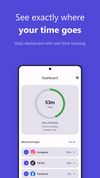
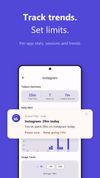
Tracks app and website usage locally on Android and Chrome devices, with no account or cloud sync needed. Provides daily, weekly, and hourly patterns, usage alerts, and focus mode schedules, with all data remaining private, no ads, and zero trackers confirmed.


+4


Cost / License
- Free
- Proprietary
Application type
Platforms
- Android
- Google Chrome

Features
Highlights All activities
ScreenTally News & Activities
Recent News
No news, maybe you know any news worth sharing?
Share a News Tip
Recent activities
 GabrielDja added ScreenTally as alternative to Screen Time: App Usage & Limits and Kibby: Screen Time Tracker
 GabrielDja added ScreenTally as alternative to Cadence: Screen Time & Focus Tracker
 Limon-Das added ScreenTally as alternative to Displon
 Vitalii Kizlov added ScreenTally as alternative to Cloister
 TBTechs added ScreenTally as alternative to FocusFlow
 Ebrahim Khadivar added ScreenTally as alternative to EBI Space
 Sanan Irigoyen added ScreenTally as alternative to Kalma
 SylviaVasilik added ScreenTally as alternative to PIM (Please Inconvenience Me)
- Me_long added ScreenTally as alternative to Holdfast
 Coral Focus added ScreenTally as alternative to Coral Focus


Developed by
 Tora Labs LLC
 Licensing
Proprietary and Free product.Alternatives
87 alternatives listedBadge
Get an embeddable badge for ScreenTallySupported Languages



No comments or reviews, maybe you want to be first?