




Screen Time: App Usage & Limits
1 like
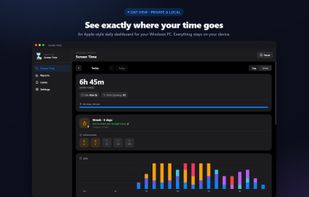
Screen Time shows you exactly how you spend your day on your Windows PC and helps you take it back. It runs quietly in the system tray, measures the app in the foreground, and turns it into a clean, Apple-style dashboard you'll actually want to open.

Cost / License
- Freemium (Pay once)
- Proprietary
Application type
Platforms
- Windows


Features
Highlights All activities
Screen Time: App Usage & Limits News & Activities
Recent activities
- GabrielDja liked Screen Time: App Usage & Limits
- GabrielDja added Screen Time: App Usage & Limits
- GabrielDja updated Screen Time: App Usage & Limits
 GabrielDja added Screen Time: App Usage & Limits as alternative to StayFree, ActivityWatch, TimeScribe, Orkana and 4 more


Developed by
stargazer07Licensing
Proprietary and Freemium product.Pricing
One time purchase (perpetual license) that costs from $10 + free version with limited functionality.Alternatives
8 alternatives listedBadge
Get an embeddable badge for Screen Time: App Usage & LimitsSupported Languages


No comments or reviews, maybe you want to be first?