


Cloister
Like
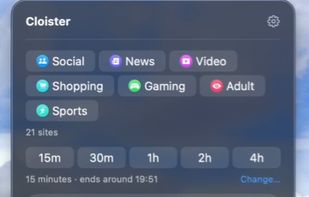
Cloister blocks the websites you choose, in every browser on your Mac, until the timer ends. A running session can't be cancelled: there is no Stop button, no hidden setting and no back door, and quitting the app, stopping its background process from Terminal, editing the...

Cost / License
- Pay once
- Proprietary
 EU
EUPlatforms
- Mac


Features
Highlights All activities
Cloister News & Activities
Recent activities
- Vitalii Kizlov added Cloister
 Vitalii Kizlov added Cloister as alternative to Mindful : Focus & Screen Time, Cold Turkey, Plucky, Focus Firewall and 47 more

Developed by
 Vitalii Kizlov
 Licensing
Proprietary and Commercial product.Pricing
One time purchase (perpetual license) ranging between $39 and $79.Alternatives
51 alternatives listedBadge
Get an embeddable badge for CloisterSupported Languages


No comments or reviews, maybe you want to be first?