
FocusFlow icon
FocusFlow icon

FocusFlow

Windows app blocker that forcibly closes processes, blocks websites system-wide, and enforces schedules or daily limits. PIN-protected focus sessions offer Pomodoro cycles and a kiosk-style desktop mode, while local tasks, habits, notes, and reports stay offline.
FocusFlow screenshot 1

Cost / License

Platforms

  • Windows  If u want an anti-uninstall feature, please download EXE from our Github as the MSIX in Microsoft Store doesn't support that.
1like
0articles
Save

Features

Properties

  1.  Distraction-free
  2.  Privacy focused

Features

  1.  No Tracking
  2.  Works Offline
  3.  Dark Mode
  4.  Pomodoro Timer
  5.  No registration required
  6.  Ad-free
  7.  Goal Setting
  8.  Task Time Tracking
  9.  Block Distraction

FocusFlow News & Activities

Highlights All activities

Recent activities

FocusFlow information

AlternativeTo Category

Office & Productivity

GitHub repository

  •  1 Stars
  •  0 Forks
  •  0 Open Issues
  •   Updated  
View on GitHub
FocusFlow was added to AlternativeTo by TBTechs on and this page was last updated .

No comments or reviews, maybe you want to be first?

Official Links

What is FocusFlow?

FocusFlow is a productivity tool for Windows that blocks distractions and helps you concentrate on your work. It can block any Windows applications, such as Chrome, Discord, Steam, Spotify, etc., that you find distracting. You can set the blocks to be always on, scheduled, or tied to active focus sessions.

You can also start a timed focus session for any task with the duration of your choice. The Pomodoro mode allows for automatic work/break cycles. A timer keeps your session visible and a live countdown appears in your taskbar.

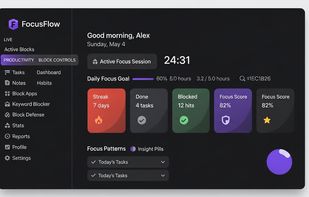
The daily dashboard shows your focus streak, tasks completed, blocked app attempts, and a focus score. Weekly reports provide insights into your productivity patterns.

The app allows you to schedule tasks with time slots, durations, and priority levels, and track daily habits. All your session notes and daily logs are stored locally.

FocusFlow also includes a Block Defense feature that prevents you from overriding the blocks, and a Nuclear Mode for maximum focus.

The app is private by design, requiring no account and no cloud sync. All data is stored locally on your device. It runs quietly in the system tray and remains active even when the window is closed. It is designed for Windows 10 and Windows 11.