PointerFocus AlternativesCursor Highligters & Keystroke Visualizers like PointerFocus

PointerFocus is described as 'Allows you to highlight the cursor using either the toolbar or hotkeys. Options include spotlight, highlight, drawing on the screen, magnifier or show keystrokes' and is a cursor highligter in the os & utilities category. There are more than 10 alternatives to PointerFocus for Windows, Mac, Linux and GNOME. The best PointerFocus alternative is SHARA, which is free. Other great apps like PointerFocus are Googly Eyes, Dockitty, Key'n'Stroke and Spot on the Mouse.

Copy a direct link to this comment to your clipboard
PointerFocus alternatives page was last updated

Alternatives list

  1. SHARA icon
     5 likes

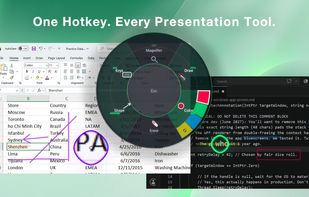
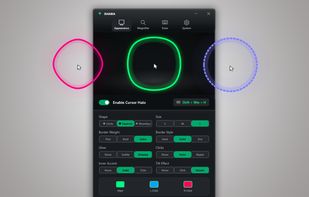
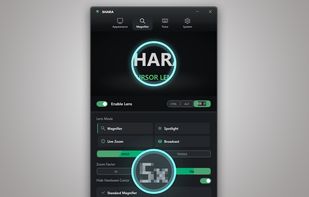
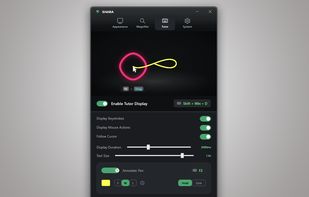
    Provides mouse pointer highlighting with animated glow and 3D tilt, lag-free click-through magnification with customizable zoom modes, and a sleek keystroke visualization overlay. Fully local, privacy-first utility for presentations, coding, streaming, and more on Windows.

    41 SHARA alternatives

    Cost / License

    • Freemium
    • Proprietary

    Platforms

    • Windows
     
  2. Googly Eyes icon
     6 likes

    Animated eyes are added to your macOS menu bar, following every mouse movement on the primary display and blinking when you click, offering whimsical, purely visual amusement with minimal CPU use. No impact on workflow or notifications, and smooth animation across M1 and Intel Macs.

    18 Googly Eyes alternatives

    Cost / License

    • Free
    • Proprietary

    Application type

    Platforms

    • Mac
     
  3. Dockitty icon
     4 likes

    Tiny animated cat lives in your Mac Dock, letting users select, name, and interact via right-clicks and feeding by dropping files. Lightweight, non-intrusive design adds personality to the desktop without disrupting other icons and requires no extra setup.

    18 Dockitty alternatives

    Cost / License

    • Freemium
    • Proprietary

    Application type

    Platforms

    • Mac
     
  4. Key'n'Stroke  icon
     15 likes

    Displays keystrokes, mouse clicks, cursor position, shortcuts, and special keys in a fully customizable overlay. Offers click-through mode, opacity, resizable window, history of pressed keys, high-dpi and multi-dpi screen support, and notification area icon.

    15 Key'n'Stroke alternatives

    Cost / License

    Alerts

    • Discontinued

    Platforms

    • Windows
     
    |
    2
    Discontinued

    The project seems no longer developed. Last version, 1.1.0, released in February 2022), can be still downloaded from Github

    Key'n'Stroke vs PointerFocus Comments
    Guest
    Positive
    0

    neat small tool to keep track of your pointer as well as your keystrokes. I personally use it for screencasting.

    jonatanolsson
    Positive
    0

    Great application for this purpose

    • Key'n'Stroke is Free and Open SourcePointerFocus is Paid and Proprietary
    • Key'n'Stroke is a Keystroke Visualization PointerFocus is a Mouse Highlighting
    • Key'n'Stroke is Customizable and LightweightPointerFocus is not according to our users
  5. Displays pointer location, click events, wheel rotation, and keypresses using halos, crosshair, animated rings, and keyboard indicators. All elements are highly adjustable in size, color, shape, and transparency, supporting clear on-screen demonstrations and tutorials.

    Cost / License

    • Freemium
    • Proprietary

    Alerts

    • Discontinued

    Platforms

    • Windows
     
    |
    2
    Discontinued

    The program seems no longer updated. Last version, 2.8.1, relesed in February 2021, can be still downloaded and bought from the official website

    Spot on the Mouse vs PointerFocus Comments
    Guest
    Negative
    0

    pointerfocus has not only highlight function. but spotonthemouse has only highlight function with worse graphic.

    so it can't be alternative.

    Guest
    Positive
    -2

    more function compare to pointerfocus

    • Spot on the Mouse is Freemium and ProprietaryPointerFocus is Paid and Proprietary
  6. Highlights the pointer with a moving ring, animates mouse clicks for emphasis, dims surroundings to focus attention, and enables real-time screen drawing—ideal for teaching, video tutorials, presentations, or demonstrations requiring clear visual cues and explanations.

    Cost / License

    • Freemium
    • Proprietary

    Application type

    Platforms

    • Mac
     
  7. PenAttention icon
     4 likes

    Displays a visible highlight, pencil, or pointer at the pen's location on Windows devices, enhancing audience visibility during presentations and screen sharing, with customizable styles, low resource usage, real-time on/off toggling, and compatibility for teachers and presenters.

    Cost / License

    • Free
    • Proprietary (MIT)

    Application type

    Platforms

    • Windows
     
  8. Kokomite icon
     1 like

    Kokomite is a software that draws semi-transparent circles (or rings) around the mouse cursor to make the focus easier to understand in a presentation.

    Cost / License

    • Free
    • Proprietary

    Application type

    Platforms

    • Windows
     
  9. Demo your keyboard shortcuts, easy as pie.

    Cost / License

    • Freemium
    • Proprietary

    Application type

    Platforms

    • Mac
     
  10. The highlight feature creates a spotlight-effect on your screen, so you can point, click, and rest assured that your audience is following along.

    Cost / License

    • Free
    • Proprietary

    Application type

    Platforms

    • Windows
     
  11. Jiggle icon
     1 like

    Jiggle is a Gnome Shell extension that highlights the cursor position when the mouse is moved rapidly.

    Cost / License

    Platforms

    • Linux
    • GNOME
     
12 of 19 PointerFocus alternatives