Pointer Cue icon
Pointer Cue icon

Pointer Cue

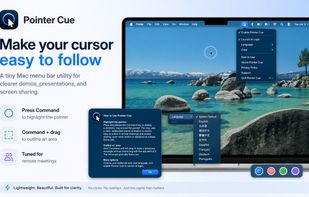
Pointer Cue is a lightweight cursor-highlighting utility for macOS and Windows. It helps audiences follow on-screen actions during presentations, software demos, training sessions, tutorials, online meetings, and screen sharing.

Pointer Cue screenshot 1

Cost / License

  • Pay once
  • Proprietary

Application type

Platforms

  • Windows  Requires Windows 10 version 19041.0 or later.
  • Mac  Requires macOS Sequoia 15.6 or later and Input Monitoring permission. Supports both Intel and Apple silicon Macs.
0likes
0comments
0articles

Features

Properties

  1.  Lightweight
  2.  Privacy focused

Features

  1.  No Tracking
  2.  Dark Mode
  3.  Works Offline
  4.  No registration required
  5.  Ad-free
  6.  Mouse Highlighting

Pointer Cue News & Activities

Highlights All activities

Recent activities

Pointer Cue information

  • Developed by

    JP flagToybird Labs
  • Licensing

    Proprietary and Commercial product.
  • Pricing

    One time purchase (perpetual license) ranging between $1 and $4.
  • Alternatives

    10 alternatives listed
  • Supported Languages

    • English
    • Japanese

AlternativeTo Categories

OS & UtilitiesOffice & Productivity

Popular alternatives

View all
Pointer Cue was added to AlternativeTo by miino on and this page was last updated .
No comments or reviews, maybe you want to be first?

What is Pointer Cue?

Pointer Cue is a lightweight cursor-highlighting utility for macOS and Windows. It helps audiences follow on-screen actions during presentations, software demos, training sessions, tutorials, online meetings, and screen sharing.

Use a simple keyboard action to display a clear shrinking ring around the mouse pointer, or hold the shortcut and drag to outline an important area with a temporary rectangle. The visual cues guide attention without accidentally interacting with the application underneath.

Pointer Cue focuses on the two cues most useful during live explanations: showing where the pointer is and indicating which area deserves attention. It is not a screen recorder, magnifier, whiteboard, or full annotation suite.

Cue colors can be customized, and all processing runs locally on the computer. The Windows version includes a 30-day free trial.

Pointer Cue Videos

Official Links