


Markpad - Markdown Editor
8 likes
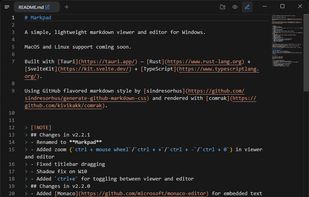
A simple, lightweight Markdown viewer and text editor for Windows, macOS, and Linux.

Cost / License
- Free
- Open Source (BSD-3-Clause)
Application typeApplication types
Platforms
- Mac
- Windows
- Linux


Features

Highlights All activities
Markpad - Markdown Editor News & Activities
Recent activities
 James Cupps added Markpad - Markdown Editor as alternative to Slate Text Editor
 proximab added Markpad - Markdown Editor as alternative to QuasarPad
Good, but not perfect. What I miss is a full screen mode and a Table of Contents.
What I like is, that you can set the font, fontsize, position of linebreak and much more.
- tuva-hayabi liked Markpad - Markdown Editor
 spaquet added Markpad - Markdown Editor as alternative to Markify | Markdown Editor
 ed-999 added Markpad - Markdown Editor as alternative to TypoZen
 Mysdes added Markpad - Markdown Editor as alternative to Frset
 Shreyam-Adhikari added Markpad - Markdown Editor as alternative to Quillpane
- stevexu added Markpad - Markdown Editor as alternative to notePad++++
- Robin_P liked Markpad - Markdown Editor




Linux MUSTS (Almost All Nice & Modern UI/UX)
A simple list of Applications I use daily, hopefully you haven't seen all of these before. But, in this list you'll generally find apps that look modern, as UI is pretty important to me. I know there aren't too many "Linux with Pretty UI" lists, so here's this one. Let me know if there are any you'd add!


Microsoft Windows
A list with 14 apps by DarkSystemCD without a description.
Developed by
 alecdotdev
 Licensing
Open Source (BSD-3-Clause) and Free product.Written in
Rating
Average rating of 4.7Alternatives
19 alternatives listedBadge
Get an embeddable badge for Markpad - Markdown EditorSupported Languages

AlternativeTo Categories
Office & Productivity, DevelopmentGitHub repository
- 1,262 Stars
- 97 Forks
- 27 Open Issues
- Updated



Comments and Reviews
It is very light and efficient. No need to install a 300MB program with electron or whatever just to edit and preview a markdown.
Good, but not perfect. What I miss is a full screen mode and a Table of Contents.
What I like is, that you can set the font, fontsize, position of linebreak and much more.
finally the markdown app that really small & fast without any bloat. I use this app as my supplementary app of Obsidian. really useful for quick reviewing and fast-editing. i highly recommend!