


Quillpane
1 like
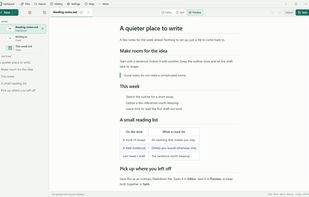
Quillpane, formerly Markpad, is a native desktop Markdown notepad for individual local files. Write in the editor, read the rendered preview, or use Split view to keep both visible. Notes remain ordinary files on your device, with recovery drafts, session restore, and...

Cost / License
- Free
- Open Source (MIT)
Application typeApplication types
Platforms
- Mac
- Windows
- Linux


Features
Highlights All activities
Quillpane News & Activities
Recent activities
- tuva-hayabi added Live Preview as a feature to Quillpane
- tuva-hayabi added Text Editors as a feature to Quillpane
- tuva-hayabi added Support for Themes as a feature to Quillpane
I miss a fullscreen mode and the setting of the font (only font size seems possible).
Everything else is great, like Table of contents, tabs, preview or split view, themes and so on.
- tuva-hayabi liked Quillpane
- Shreyam-Adhikari updated Quillpane
- Shreyam-Adhikari updated Quillpane
- Shreyam-Adhikari added Quillpane


Developed by
Shreyam AdhikariLicensing
Open Source (MIT) and Free product.Written in
Alternatives
13 alternatives listedBadge
Get an embeddable badge for QuillpaneSupported Languages

AlternativeTo Category
Office & ProductivityGitHub repository
- 4 Stars
- 0 Forks
- 11 Open Issues
- Updated




Comments and Reviews
I miss a fullscreen mode and the setting of the font (only font size seems possible).
Everything else is great, like Table of contents, tabs, preview or split view, themes and so on.