TypoZen is a Markdown editor and an ePub reader in one quiet window: somewhere to write in the morning and somewhere to read in the evening, without switching apps or going near the internet.
It opens .md, .txt and .epub files, plus PDFs, images and media, and brings you back exactly where you left off in your documents and books.
WRITING
Dual-mode editing: switch between WYSIWYG preview and raw Markdown source without losing your place.
Live block editing for headings, lists, tables, task lists, emphasis and fenced code.
Built for long documents: only the part on screen is rendered, so a 200,000-character manuscript scrolls like a short note, and Find and Replace still covers every word of it, including the parts not currently displayed.
Focus mode, typewriter scrolling and auto-hiding chrome when you want the window out of the way.
Spelling underlined as you type, with replacements, Ignore, a personal dictionary, and a document-wide check.
Atomic saves in UTF-8, and a prompt if the file changed on disk while you were working.
READING
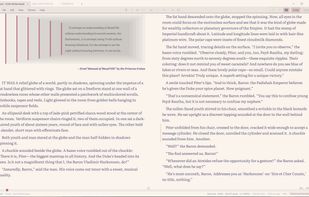
A proper ePub reader: paginated, with a true two-page spread, chapter navigation, and a scrubber that spans the whole book rather than the part currently laid out.
Books keep the publisher's own layout. Images, footnotes and links stay intact rather than being flattened into Markdown, and the text is re-sized to your chosen theme.
Reading position, bookmarks and open tabs are restored per book, across sessions.
Offline dictionary and thesaurus: nearly 150,000 definitions and over 110,000 synonym sets, with occurrence counts for the word in front of you. No lookup leaves your computer.
Highlights, notes and bookmarks that survive edits, listed in the order they appear in the text.
PDF, HTML, images, video and audio open read-only in their own tabs, never edited and never saved over.
LOOK, SESSION AND PRIVACY
25 built-in themes in dark, light and monospace, plus an editor for building your own.
Four typefaces bundled with the app (Inter, Literata, Merriweather and Source Sans 3), so a page looks the same on a machine that has none of them installed.
Margins, line spacing, justification and hyphenation are yours to set.
The whole session returns on the next launch: window, tabs, theme, margins and reading positions.
No network requests, no account, no telemetry. Privacy Mode goes further and records nothing at all: no history, no positions, no recent files.
FILES
Export to self-contained HTML, or print to PDF. Live word count, character count, line position and estimated reading time.
Free and open source (MIT). Windows 10 version 1809 or later, 64-bit, using the WebView2 runtime already present on current Windows. Available from the Microsoft Store, as a per-user installer needing no administrator rights, or as a portable zip that installs nothing.








 ed-999 added TypoZen as alternative to Joplin, Zettlr, HelixNotes, Beaver Notes and 97 more
 Ed C
Ed C 


No comments or reviews, maybe you want to be first?