


LaunchOS
8 likes
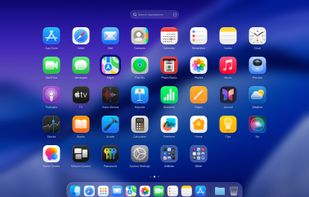
Replicates the native Launchpad for macOS, offering a familiar launcher interface with adjustable icon grid, vertical scrolling mode, customizable settings panel, and right-click shortcut operations, alongside unique options for efficient app organization.

Cost / License
- Freemium (Pay once)
- Proprietary
Application type
Platforms
- Mac


Features
Highlights All activities
LaunchOS News & Activities
Recent News
No news, maybe you know any news worth sharing?
Share a News Tip
Recent activities
 firefirstfu-Chen added LaunchOS as alternative to Liftoff by firstfu
- Andrey Neledko liked LaunchOS
 UniqueGo added LaunchOS as alternative to BuhoLaunchpad
 Danilo Venom added LaunchOS as alternative to Quick App Launcher, HotLaunch, FolderX and AppHub
- Danilo Venom updated LaunchOS
- Chang Panda liked LaunchOS
 Hirsch Studio added LaunchOS as alternative to LaunchDeck LaunchPad


Developed by
 Remix Design
 Licensing
Proprietary and Freemium product.Pricing
One time purchase (perpetual license) ranging between $7 and $17 + free version with limited functionality.Alternatives
18 alternatives listedBadge
Get an embeddable badge for LaunchOSSupported Languages


Comments and Reviews
Of all the Launchpad alternatives I've seen, this is the most similar to the system's native Launchpad.