
ModusPad icon
ModusPad icon

ModusPad

ModusPad is a full-screen app launcher for macOS 26 and later. It brings back the pages, folders and order of the classic Launchpad and adds profiles: each profile has its own launcher layout, its own hidden apps and the apps it opens.
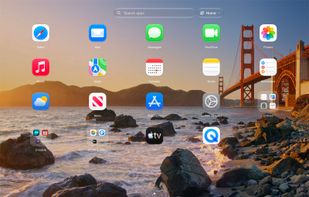
Your Launchpad, back: pages, folders, smart folders and search on macOS 26 and later.

Cost / License

  • Freemium (Pay once)
  • Proprietary

Application type

Platforms

  • Mac
0likes
0articles
Save

Features

Properties

  1.  Privacy focused

Features

  1.  Works Offline
  2.  No Tracking
  3.  Support for Gestures
  4.  Dark Mode
  5.  Support for Multiple Monitors
  6.  No registration required
  7.  Ad-free
  8.  Support for Hotkeys
  9.  Application Launchers
  10.  Focus Mode

ModusPad News & Activities

Highlights All activities

Recent activities

ModusPad information

  • Developed by

    CA flagVladyslav Zubkov
  • Licensing

    Proprietary and Freemium product.
  • Pricing

    One time purchase (perpetual license) ranging between $11 and $28 + free version with limited functionality.
  • Alternatives

    13 alternatives listed
  • Badge

    Get an embeddable badge for ModusPad
  • Supported Languages

    • English
    • French
    • German
    • Japanese

AlternativeTo Categories

Office & Productivity, OS & Utilities
ModusPad was added to AlternativeTo by Vladyslav Zubkov on and this page was last updated .

No comments or reviews, maybe you want to be first?

What is ModusPad?

ModusPad is a full-screen app launcher for macOS 26 and later. It brings back the pages, folders and order of the classic Launchpad and adds profiles: each profile has its own launcher layout, its own hidden apps and the apps it opens.

Profiles switch by themselves when a Focus mode turns on, when an external display is connected, or on a schedule. You can also switch them with a keyboard shortcut or from the menu bar.

Features:

  • Full-screen grid with pages, folders, search and drag & drop
  • Import the old Launchpad layout in one click
  • Open with a hotkey, F4, a hot corner or a trackpad gesture
  • Profiles with their own layout, hidden apps and apps that open on switch
  • Automatic switching by Focus mode, display or time of day
  • Smart folders that fill themselves by name, category, version, architecture, install date, last opened or launch count
  • Multi-select, rename in place, sorting by name, date added or last opened
  • Layout backups: save, restore, or move a layout to another Mac as a file
  • Adjustable grid (columns, rows, icon and label size) and background (wallpaper, blur, fill or your own picture)
  • Light and dark appearance;

No account and no tracking; layouts stay on your Mac.
