




LaunchDeck LaunchPad
1 like
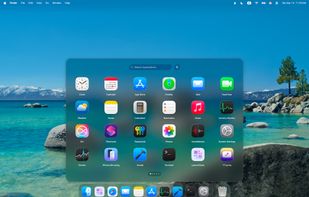
Native alternative launcher with fast keyboard access, customizable grid layouts, vertical scrolling, trackpad gestures, Hot Corners support, app renaming, hiding, and direct uninstall, plus Fluid Switch, window browsing, global shortcuts, and responsive design.

Cost / License
- Pay once
- Proprietary
Application type
Platforms
- Mac


Features
Highlights All activities
LaunchDeck LaunchPad News & Activities
Recent activities
 Vladyslav Zubkov added LaunchDeck LaunchPad as alternative to ModusPad
 EricMing added LaunchDeck LaunchPad as alternative to KidoX
 UniqueGo added LaunchDeck LaunchPad as alternative to BuhoLaunchpad
- witalihirsch added No registration required as a feature to LaunchDeck LaunchPad
- witalihirsch added Dark Mode as a feature to LaunchDeck LaunchPad
- witalihirsch added No Tracking as a feature to LaunchDeck LaunchPad
- witalihirsch added Support for Themes as a feature to LaunchDeck LaunchPad
- witalihirsch added Lightweight as a feature to LaunchDeck LaunchPad
- witalihirsch added Ad-free as a feature to LaunchDeck LaunchPad
LaunchDeck feels really natural - everything just makes sense right away, no need to figure anything out


Developed by
 Hirsch Studio
 Licensing
Proprietary and Commercial product.Pricing
One time purchase (perpetual license) that costs $7.Alternatives
16 alternatives listedBadge
Get an embeddable badge for LaunchDeck LaunchPadSupported Languages


Comments and Reviews
LaunchDeck feels really natural - everything just makes sense right away, no need to figure anything out