
KeptInFlow icon
KeptInFlow icon

KeptInFlow

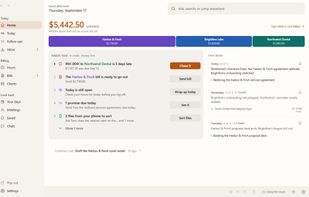
KeptInFlow is a Windows 10 and 11 app that stops you retyping what is already on your screen. It works where your cursor already is, in every app: Outlook, Word, Slack, your browser, your code editor.
KeptInFlow screenshot 1

Cost / License

  • Freemium (Pay once)
  • Proprietary

Application type

Platforms

  • Windows
0likes
0articles
Save

Features

Properties

  1.  Privacy focused

Features

  1.  Works Offline
  2.  No registration required
  3.  OCR
  4.  Screen Recording
  5.  Automatic time tracking
  6.  Text Expansion
  7.  Dictation
  8.  Autofill
  9.  Call recording

KeptInFlow News & Activities

Highlights All activities

Recent activities

KeptInFlow information

  • Developed by

    KeptInFlow
  • Licensing

    Proprietary and Freemium product.
  • Pricing

    One time purchase (perpetual license) ranging between $59 and $299 + free version with limited functionality.
  • Alternatives

    14 alternatives listed
  • Badge

    Get an embeddable badge for KeptInFlow
  • Supported Languages

    • English
KeptInFlow was added to AlternativeTo by John Whitworth on and this page was last updated .

No comments or reviews, maybe you want to be first?

What is KeptInFlow?

KeptInFlow is a Windows 10 and 11 app that stops you retyping what is already on your screen. It works where your cursor already is, in every app: Outlook, Word, Slack, your browser, your code editor.

The free plan does not expire:

  • Smart paste (Alt+Shift+V): fills the whole form in front of you from an email you copied, a snip of a document, or your own saved details. You see every value before anything is written.
  • Clipboard history (Win+V): hold the key, tap through recent copies, release to paste the one you meant. Pin the clips you use daily.
  • Verification codes: click into a code box and the code is already under it, even when it arrived in a window behind your browser. Tab takes it.
  • Snip that reads (Ctrl+Shift+Space): capture a region, a window or the whole screen, and copy the text out of it.
  • Text expansion, math and time zones: type a shortcut and it becomes your address; type a sum and get the answer in place; type <<3pm eastern in pacific>> and get 12 PM Pacific.
  • AI at your cursor with your own API key.
  • Clean paste (Ctrl+Shift+V): plain text, formatting stripped, no AI involved.

Pro adds Screen Memory, a work journal, bot-free meeting recording, dictation, timesheets and billing, for a one-time price with a 30-day free trial. No account needed. The installer is code-signed.

KeptInFlow Videos