
ilo icon
ilo icon

ilo

Supercharge your Google Tasks into a Powerful Productivity Tool.
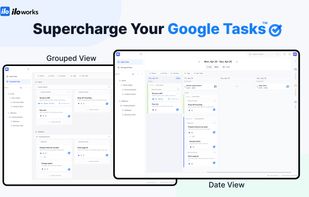
Supercharge Your Google Tasks

Cost / License

  • Free
  • Proprietary

Platforms

  • Online  Responsive web service (desktop, tablet, mobile)
  • Software as a Service (SaaS)
0likes
0comments
0articles

Features

Properties

  1.  Support for Themes

Features

  1.  Hierarchical Structure
  2.  Cloud Sync
  3. Google Calendar icon  Sync with Google Calendar
  4.  Calendar Integration
  5.  Encrypted Backup
  6.  Subtasks
  7.  Reminders
  8.  Calendar View
  9.  Kanban Board
  10.  Full-Text Search
  11.  End-to-End Encryption
  12.  Ad-free
  13.  Task Time Tracking
  14. Google Calendar icon  Google Calendar integration
  15.  Calendar Sync

ilo News & Activities

Highlights All activities

Recent activities

ilo information

  • Developed by

    Unknown
  • Licensing

    Proprietary and Free product.
  • Pricing

    Subscription.
  • Alternatives

    14 alternatives listed
  • Supported Languages

    • English
    • Korean
    • Japanese
    • Swedish
    • Danish
    • Spanish
    • Portuguese
    • Chinese
    • Italian
    • Norwegian
    • Finnish
    • German
    • Dutch
    • French
ilo was added to AlternativeTo by Lynn Lee on and this page was last updated .
No comments or reviews, maybe you want to be first?

What is ilo?

ilo is a productivity layer built on top of Google Tasks and Google Calendar.

Google Tasks is simple and fast — but once your workload grows, it starts to break: everything becomes a flat list, projects are hard to organize, and tasks across multiple accounts get scattered.

ilo solves this without forcing you to leave the Google ecosystem.

Instead of replacing your workflow, ilo extends it:

  • Manage multiple Google accounts in one unified view
  • Organize tasks with real grouping (beyond flat lists)
  • Focus on what to do today with a date-first dashboard
  • Keep everything in sync — changes flow both ways with Google Tasks and Calendar

ilo is designed for:

  • Google Tasks power users who need more structure
  • Freelancers and solo developers who want to avoid heavy tools
  • Anyone managing multiple Google accounts and scattered tasks

If you want to stay in Google, but work more clearly and efficiently, ilo fills that gap.

Official Links