


FreeCommander
404 likes
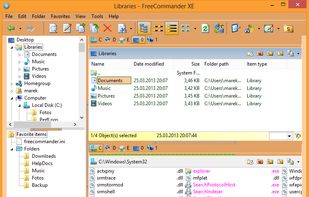
Dual-panel file manager with tabbed navigation, built-in viewer for multiple formats, ZIP/RAR/7z archive support, folder sync and comparison, batch renaming, search within archives, customizable keyboard shortcuts, DOS command integration, and full portability.

Cost / License
- Freemium (Pay once)
- Proprietary
Application typeApplication types
 EU
Since
- Since 2009
Platforms
- Windows
- PortableApps.com


Features

Highlights All activities
FreeCommander News & Activities
Recent News
No news, maybe you know any news worth sharing?
Share a News Tip
Recent activities
- Viktor Korobov liked FreeCommander
 AchoDev added FreeCommander as alternative to Dorian
 Paul added FreeCommander as alternative to FileOctopus
 hasmak added FreeCommander as alternative to Swordfish-FM
 TheTriumphantFox added FreeCommander as alternative to WinThunar
 parhelion added FreeCommander as alternative to Norte
 Mauricio B. Holguin added FreeCommander as alternative to Crust Commander
 Burk-Jackson added FreeCommander as alternative to Kepter
 Paul added FreeCommander as alternative to Strata File Manager
 Vitaly Zdanevich added FreeCommander as alternative to Youta


Windows Apps
A list with 328 apps by christineconnor without a description.



File Explorers for PC
A list with 11 apps by Shojimeguro without a description.


Daily Productivity
What apps have I been using for years for my daily production. No games!
Developed by
 Marek Jasinski - Moosburg, Germany
Licensing
Proprietary and Freemium product.Pricing
One time purchase (perpetual license) ranging between $9 and $26 + free version with limited functionality.Rating
Average rating of 3.2Alternatives
149 alternatives listedBadge
Get an embeddable badge for FreeCommanderSupported Languages


Comments and Reviews
In the free 32bit version, under Search files/folder pulldown menu Options, if you check Advanced Mode, you can use Regex.
I was a fan of NC and TC. But in Windows, I'm now adicted to FreeCommander due to its features similar to TC and TC plugin integrations Plus its own features.
I use FreeCommander several times a day. As you learn how to use FreeCommander it's the type of application where you start to wonder how people manage with it.
What I like most about it is the folder size feature.
FreeCommander is a very complete replacement for the Windows File Explorer. Unfortunately, in Windows 10 FreeCommander takes up to 6 seconds to load onscreen while the Windows File Explorer loads in 1 second flat. I really don't like the all-white-no-border File explorer, but on the other hand, once I click on a software I hate waiting for more than 2 seconds.
It works but... The UX will make you suffer. I'm moving from Total Commander which doesn't have a nice UX - I'm just used to it but this one is really made me suffer. I spent 2 hours to just set up my colors and columns and formats. And even after that, there are noticeable delays and poor UX aspects you can't configure. I ended up with Unreal Commander - delightful UX and very close to TC. I haven't tried Double Commander (who knows, maybe it's even better).
Customize any way you like, works as advertised, free (donation for 64-bit version). Better than many paid alternatives in my view. I like it a lot!