


Explzh for Windows
5 likes
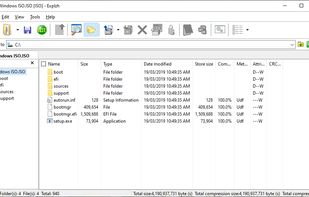
Explzh for Windows is a file operation tool created with the concept of treating archive files, CD-ROM virtual disk images (ISO-9660 / ISO-13346), and FTP hosts as virtual folders and handling them like an explorer.

Cost / License
- Free Personal
- Proprietary
Application typeApplication types
Platforms
- Windows


Features

Highlights All activities
Explzh for Windows News & Activities
Recent News
No news, maybe you know any news worth sharing?
Share a News Tip
Recent activities
 recp added Explzh for Windows as alternative to Zipy - Archive Utility
 HanFlow Team added Explzh for Windows as alternative to HanFlow Zip
 Paul added Explzh for Windows as alternative to QuikZip
- bufferer liked Explzh for Windows
 LRGEX Co added Explzh for Windows as alternative to LRGEX-Compress
 unpk added Explzh for Windows as alternative to unpk.app
 Paul added Explzh for Windows as alternative to Zipora
 Paul added Explzh for Windows as alternative to ZIP Protect
- bufferer replied to a comment / review on Explzh for Windows
Firstly, thanks to WinZip, WinRAR, and 7-Zip as they are the OGs. Explzh is the most value-added general archive tool for Windows.


Developed by
 pon software
 Licensing
Proprietary and Free Personal product.Alternatives
104 alternatives listedBadge
Get an embeddable badge for Explzh for WindowsSupported Languages


Comments and Reviews
Firstly, thanks to WinZip, WinRAR, and 7-Zip as they are the OGs. Explzh is the most value-added general archive tool for Windows.
an archiver that has a dark mode but slower than its competitors