Browse, search and preview dozens of archive formats without extracting everything.
Preview/QuickLook & Edit files inside ZIP archives and verify checksums on your Mac.
Stop unpacking entire archives just to find, inspect or change one file.
QuikZip turns archives and containers into a fast, Finder-like workspace on your Mac. Open them directly, navigate deep folder structures, find files in seconds, preview contents and extract only what you need.
FIND ANY FILE FAST
Move through large archives with outline and list views, tabs, filters and fast search across file names and paths. Keep your place while exploring nested archives, packages and containers.
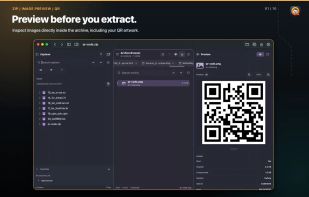
PREVIEW BEFORE YOU EXTRACT
Inspect text, images, documents, media, metadata and other supported content with inline previews and Quick Look. Open supported files in another app when you need its full toolset, or extract only the selected files and folders.
EDIT FILES INSIDE ZIP
Create new ZIP archives from files and folders. Open a file for editing and save your changes back into an existing ZIP. Add files and folders, rename or remove entries, edit comments and save the updated archive without the usual unpack-edit-repack routine.
Direct editing is available for ZIP archives. Other formats open with the actions QuikZip supports for that format.
VERIFY BEFORE YOU TRUST
Test supported archives for damage before you extract, edit or share them. Use checksum tools to verify files and catch unexpected changes. Inspect CRC values, compression methods, compressed and original sizes, dates, permissions, comments and warning states.
QuikZip clearly flags suspicious paths, name collisions, unsupported compression, encryption and damaged metadata. You can understand an unfamiliar download before writing its contents to disk.
OPEN MORE THAN ZIP
Work with dozens of archive, compression, disk image, package and container formats, including ZIP, 7z, RAR, TAR, GZIP, BZIP2, XZ, Zstandard, LZ4, CPIO, CAB, ISO, DMG, XAR, WIM, RPM and DEB.
Format support is built into QuikZip with native Swift engines. Format-aware controls show the actions available for each file, so read-only containers are never presented as editable archives.
TOOLS THAT KEEP YOU MOVING
- Run any action from the Command Palette
- Create and customize keyboard shortcuts
- Drag files between Finder, archives and the built-in File Explorer
- Keep multiple archives open in tabs
- Copy paths and inspect detailed file and archive metadata
- Cancel long-running work without losing control of the app
SAFE AND PRIVATE BY DESIGN
Your archive work stays local. No ads, no account, no cloud upload and no remote processing. Extraction and ZIP updates use safe staging, overwrite protection, source-change checks and cancellation-aware operations.
From everyday downloads to large backups, installers and build artifacts, QuikZip helps you see what is inside, verify what matters, get to the right file and move on.







No comments or reviews, maybe you want to be first?