Zipora icon
Zipora icon

Zipora

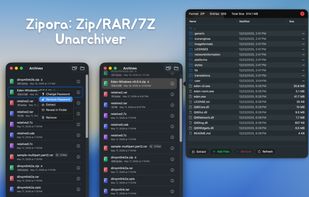
Zipora is a native macOS archive tool built with Swift / SwiftUI, designed for everyday desktop compression, extraction, preview, and archive organization.

Zipora screenshot 1

Cost / License

  • Free
  • Proprietary

Platforms

  • Mac
0likes
0comments
0articles

Features

  1.  No registration required
  2.  Works Offline
  3.  Supports RAR files
  4.  Dark Mode
  5.  Live Preview
  6.  Supports Zip files
  7.  Ad-free
  8.  Drag and Drop
  9.  Password protection

Zipora News & Activities

Highlights All activities

Recent activities

Zipora information

  • Developed by

    CN flagWang Chujiang
  • Licensing

    Proprietary and Free product.
  • Alternatives

    51 alternatives listed
  • Supported Languages

    • English

AlternativeTo Category

File Management

Popular alternatives

View all
Zipora was added to AlternativeTo by Paul on and this page was last updated .
No comments or reviews, maybe you want to be first?

What is Zipora?

Zipora is a native macOS archive tool built with Swift / SwiftUI, designed for everyday desktop compression, extraction, preview, and archive organization.

It is not just an unzip utility. Zipora provides a complete archive workflow:

  • Drag and drop files or folders to quickly create a new archive
  • Open archives and preview tree structure, file sizes, and modified timestamps directly
  • Extract to a selected directory and quickly locate results in Finder
  • Keep a recent archive history for reopening, extracting, or continuing work
  • Enter passwords during open or extract when a protected archive requires it
  • Organize rebuildable archives by adding or removing files
  • Add password protection to existing ZIP archives

Features

  • Native macOS app built with Swift / SwiftUI
  • Supports macOS 14 and later
  • Home screen supports drag-and-drop for archive preview/extract, or dropping multiple files/folders to create archives
  • Supports recent items, availability status, and encryption status recognition
  • Supports archive content preview with current-folder search and hierarchical browsing
  • Supports selecting extraction destination with progress display
  • Supports entering passwords to continue opening or extracting protected archives
  • Supports creating ZIP, 7Z, TAR, TAR.GZ, TAR.BZ2, and TAR.XZ
  • Supports creating encrypted ZIP archives
  • Supports archive editing for rebuildable formats: add files and remove files
  • Supports adding password protection to existing ZIP archives