Directory Opus Alternatives for Mac

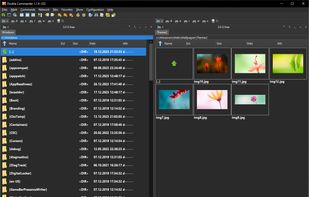
Directory Opus is not available for Mac but there are plenty of alternatives that runs on macOS with similar functionality. The best Mac alternative is Double Commander, which is both free and Open Source. If that doesn't suit you, our users have ranked more than 50 alternatives to Directory Opus and many of them are available for Mac so hopefully you can find a suitable replacement. Other interesting Mac alternatives to Directory Opus are Spacedrive, Midnight Commander, ForkLift and CoverFlowFinder.

filter to find the best alternatives

Directory Opus alternatives are mainly File Managers, but if you're looking for FTP Clients or File Compressors you can filter on that. Other popular filters include Mac, Linux, Windows + Free and Free. These are just examples - use the filter bar below to find more specific alternatives to Directory Opus.
Copy a direct link to this comment to your clipboard
Directory Opus alternatives page was last updated

Alternatives list

  1. Double Commander icon
     604 likes

    Open-source file manager with dual-panel interface, inspired by Total Commander. Supports plugin use, advanced search, tabbed browsing, and runs smoothly with background operations. Unicode and multi-platform compatibility enhance its versatility.

    135 Double Commander alternatives

    Cost / License

    Application type

    Platforms

    • Mac
    • Windows
    • Linux
    • BSD
     
    |
    3
    Double Commander vs Directory Opus Comments
    Guest
    Negative
    1

    It's not like moderate new Directory Opus (year 2000+) at all. It's more like Finder.

    Review by a new / low-activity user.
    bVork
    Positive
    0

    It has features that are only in the $89 AUD version of Directory Opus like flat file view and full customization of the toolbar. I bought the $49 AUD Directory Opus Light version and prefer to use Double Commander.

    Guest
    Positive
    -1

    Because it has the same and/or similar features and functionality as Directory Opus.

    Review by a new / low-activity user.
    • Double Commander is Free and Open SourceDirectory Opus is Paid and Proprietary
    • Double Commander is Lightweight and Privacy focusedDirectory Opus is not according to our users
  2. Spacedrive icon
     158 likes

    Open-source file explorer integrates cloud, local, and offline storage across devices using a secure virtual distributed filesystem in Rust, enabling unified management, file syncing, privacy control, intuitive interface, and ownership without centralized servers.

    81 Spacedrive alternatives

    Cost / License

    Application types

    Platforms

    • Mac
    • Windows
    • Linux
     
  3. Text-mode file manager for terminals with dual-pane interface enables copying, moving, deleting, and searching files locally or via remote shells. Includes internal viewer, text editor, subshell integration, broad terminal compatibility, and works over SSH.

    106 Midnight Commander alternatives

    Cost / License

    • Free
    • Open Source

    Application types

    Platforms

    • Mac
    • Windows
    • Linux
    • BSD
    • Cygwin
    • MacPorts
     
  4. Brings iconic 3D Cover Flow file browsing to macOS, includes dual pane navigation, Quick Look integration, sidebar access to volumes, instant file sorting, context menus, type-ahead search, familiar Finder-like interface, and open source availability.

    53 CoverFlowFinder alternatives

    Cost / License

    • Free
    • Open Source (MIT)

    Application type

    Platforms

    • Mac
     
  5. Path Finder icon
     56 likes

    Path Finder is a standalone Finder replacement that takes the Finder's familiar interface and adds numerous powerful features and interface innovations to help anyone be more productive on macOS.

    Cost / License

    • Paid
    • Proprietary

    Application type

    Platforms

    • Mac
     
  6. fman icon
     233 likes

    The most modern dual-pane file manager. For Windows, Mac and Linux.

    109 fman alternatives

    Cost / License

    • Freemium
    • Proprietary

    Application type

    Platforms

    • Mac
    • Windows
    • Linux
     
  7. Finder icon
     63 likes

    The Finder is the first thing that you see when your Mac finishes starting up. It opens automatically and stays open as you use other apps. It includes the Finder menu bar at the top of the screen and the desktop below that.

    145 Finder alternatives

    Cost / License

    • Free
    • Proprietary

    Application type

    Platforms

    • Mac
     
  8. Tokie icon
     9 likes

    A document, a database, and a browser, all in your folders.

    Cost / License

    • Paid
    • Proprietary

    Application type

    Platforms

    • Mac
     
  9. The finest replacement for Finder with powerful tools to streamline your workflow, enhance productivity, and keep everything organized at your fingertips.

    Cost / License

    • Paid
    • Proprietary

    Application type

    Platforms

    • Mac
     
  10. Efficient macOS file manager with native SwiftUI offers familiar Windows-style cut and paste, tabs, multi-panel browsing, deep sidebar navigation, Quick Look, file previews, conflict handling, external drive support, advanced search, and multi-language localization.

    Cost / License

    • Paid
    • Proprietary

    Application type

    Platforms

    • Mac
     
12 of 26 Directory Opus alternatives