DAEMON Tools Alternatives for Windows

There are many alternatives to DAEMON Tools for Windows if you are looking for a replacement. The best Windows alternative is WinCDEmu, which is both free and Open Source. If that doesn't suit you, our users have ranked more than 25 alternatives to DAEMON Tools and many of them are available for Windows so hopefully you can find a suitable replacement. Other interesting Windows alternatives to DAEMON Tools are Virtual CloneDrive, ImgBurn, CDBurnerXP and PowerISO.

filter to find the best alternatives

DAEMON Tools alternatives are mainly ISO Mounting Tools, but if you're looking for ISO Creators or Disc Burners you can filter on that. Other popular filters include Linux, Open Source, Windows, Flathub, Free, Mac and Linux + ISO Mounting. These are just examples - use the filter bar below to find more specific alternatives to DAEMON Tools.
Copy a direct link to this comment to your clipboard
DAEMON Tools alternatives page was last updated

Alternatives list

  1. WinCDEmu icon
     528 likes
    Copy a direct link to this comment to your clipboard

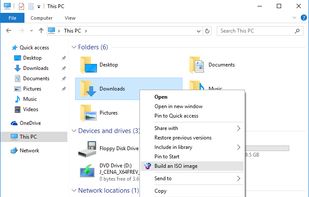
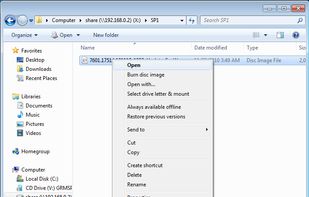
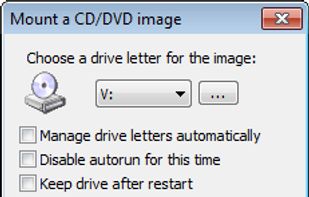
    WinCDEmu is an open-source CD/DVD/BD emulator - a tool that allows you to mount optical disc images by simply clicking on them in Windows Explorer. If you have downloaded an ISO image and want to use it without burning it to a blank disc, WinCDEmu is the easiest way to do it.

    39 WinCDEmu alternatives

    Cost / License

    • Free
    • Open Source

    Alerts

    • Discontinued

    Platforms

    • Windows
    • PortableApps.com
     
    |
    19
    234
    Comments about WinCDEmu as an Alternative to DAEMON Tools
    Comment summary: WinCDEmu is praised for its lightweight, open-source nature, ease of use, and lack of ads or unwanted software. It is often preferred over DAEMON Tools, with some users citing it as a reliable and free alternative. However, it lacks support for specific features such as handling old mixed data CDs and SCSI, which DAEMON Tools can manage. While Windows 10 is noted for ISO mounting capabilities, WinCDEmu is still seen as a necessary and reliable tool.
    Top Positive Comment
    Guest
    6

    It works great, is open-source, extremely lighweight and comes with few useful options.

    Review by a new / low-activity user.
    Top Negative Comment
    rboehme
    2

    In contrast to Daemon Tools, WinCDEmu doesn't support audio CDs.

    Hexaae
    Positive
    0

    WinCDEmu is very good for data CDs/DVDs, but unfortunately can't for example handle old mixed data CDs (e.g. old games from Win98/Amiga era with data+music). Daemon Tools Lite can do that instead, just for example.

    Show more comments
    3 of 19 comments
    DAEMON Tools Icon
    WinCDEmu icon
    • Almost everyone thinks WinCDEmu is a great DAEMON Tools alternative.

    • WinCDEmu is the most popular Windows alternative to DAEMON Tools.

    • WinCDEmu is the most popular Open Source & free alternative to DAEMON Tools.

    • WinCDEmu is Free and Open SourceDAEMON Tools is Freemium and Proprietary
    • WinCDEmu is LightweightDAEMON Tools is not according to our users
  2. Copy a direct link to this comment to your clipboard

    Virtual CloneDrive works and behaves just like a physical CD/DVD drive, however it exists only virtually. Image files of various formats (.iso, .bin, etc) can be mounted onto a virtual drive from your hard-disk or from a network drive and used in the same manner as inserting...

    32 Virtual CloneDrive alternatives

    Cost / License

    • Free
    • Proprietary

    Application type

    Platforms

    • Windows
     
    |
    1
    57
    Comments about Virtual CloneDrive as an Alternative to DAEMON Tools
    bystro
    Positive
    1

    Very simplistic interface and easy to use. Unlike Daemon Tools' complicated one

    DAEMON Tools Icon
    Virtual CloneDrive icon
    • Almost everyone thinks Virtual CloneDrive is a great DAEMON Tools alternative.

    • Virtual CloneDrive is Free and ProprietaryDAEMON Tools is Freemium and Proprietary
  3. ImgBurn icon
     1523 likes
    Copy a direct link to this comment to your clipboard

    ImgBurn is a lightweight CD / DVD / HD DVD / Blu-ray burning application (39 languages) that everyone should have in their toolkit. ImgBurn supports a wide range of image file formats. It can burn Audio CDs from any file type supported via DirectShow / ACM.

    57 ImgBurn alternatives

    Cost / License

    • Free
    • Proprietary

    Alerts

    • Discontinued

    Platforms

    • Windows
     
  4. CDBurnerXP icon
     610 likes
    Copy a direct link to this comment to your clipboard

    CDBurnerXP is a free application to burn CDs and DVDs, including Blu-Ray and HD-DVDs. It also includes the feature to burn and create ISOs, as well as a multilanguage interface. Everyone, even companies, can use it for free.

    50 CDBurnerXP alternatives

    Cost / License

    • Free Personal
    • Proprietary

    Alerts

    • Discontinued

    Platforms

    • Windows
     
  5. PowerISO icon
     166 likes
    Copy a direct link to this comment to your clipboard

    Powerful tool supporting a variety of disc image files, including ISO, BIN, and NRG. Enables ISO creation, editing, conversion, CD/DVD/Blu-Ray burning, and audio CD ripping. Features advanced DAA support for compression and encryption, allows bootable USB creation and ISO mounting.

    53 PowerISO alternatives

    Cost / License

    • Pay once
    • Proprietary

    Application types

    Alerts

    • Bundleware
    • Warning

    Platforms

    • Mac
    • Windows
    • Linux
    • Flathub
     
    |
    32
    • Most users think PowerISO is a great DAEMON Tools alternative.

    • PowerISO is the most popular Mac & Linux alternative to DAEMON Tools.

    • PowerISO is the most popular commercial alternative to DAEMON Tools.

    • PowerISO is Paid and ProprietaryDAEMON Tools is Freemium and Proprietary
    • PowerISO is LightweightDAEMON Tools is not according to our users
  6. UltraISO icon
     178 likes
    Copy a direct link to this comment to your clipboard

    Directly edit and extract ISO or DVD image files, manage directories and boot info, create images from hard drive or physical media, convert between formats, optimize file structure, integrate with shell, and handle virtual drives and bootable media.

    52 UltraISO alternatives

    Cost / License

    • Pay once
    • Proprietary

    Alerts

    • Discontinued

    Platforms

    • Windows
     
    |
    17
  7. Copy a direct link to this comment to your clipboard

    ImDisk is a virtual disk driver for Windows NT through Windows 10. It can create virtual hard disk, RAM Disk, floppy or CD/DVD drives using image files or system memory.

    37 ImDisk Virtual Disk Driver alternatives

    Cost / License

    • Free
    • Open Source

    Application type

    Alerts

    • Discontinued

    Platforms

    • Windows
    • BSD
     
    |
    10
  8. Alcohol icon
     128 likes
    Copy a direct link to this comment to your clipboard

    Alcohol is a powerful Windows CD and DVD burning software that makes it easy to create backups of DVDs* and CDs. In addition, the program lets you store your most used CDs as images on your computer, so you can call them up at the click of a button.

    37 Alcohol alternatives

    Cost / License

    • Freemium (Pay once)
    • Proprietary

    Application types

    Alerts

    • Bundleware

    Platforms

    • Windows
     
    |
    13
  9. Copy a direct link to this comment to your clipboard

    Emulates up to 18 virtual DVD, Blu-ray, and Ultra HD drives on Windows, mounts and unmounts .iso, .img, .miniso, .nrg, and other formats, integrates with Windows Explorer, supports shell context menu, offers auto-mount, auto-unmount, multilingual UI, and is free to use.

    Cost / License

    • Free
    • Proprietary

    Platforms

    • Windows
     
  10. Copy a direct link to this comment to your clipboard

    A comprehensive multimedia software suite for Windows PCs offering over 200 tools for media handling, AI editing, system optimization, and cloud backup, with a newly designed user interface for seamless system and media management.

    119 Nero Platinum Suite alternatives

    Cost / License

    • Pay once
    • Proprietary

    Platforms

    • Windows
     
  11. OSFMount icon
     25 likes
    Copy a direct link to this comment to your clipboard

    OSFMount allows you to mount local disk image files (bit-for-bit copies of a disk partition) in Windows with a drive letter. You can then analyze the disk image file with PassMark OSForensics by using the mounted volume's drive letter.

    30 OSFMount alternatives

    Cost / License

    • Free
    • Proprietary

    Application type

    Platforms

    • Windows
     
  12. WinArchiver icon
     8 likes
    Copy a direct link to this comment to your clipboard

    WinArchiver is a powerful archive utility, which can open, create, and manage archive files. It supports almost all archive formats, including zip, rar, 7z, iso, and other popular formats. WinArchiver can also mount the archive to a virtual drive without extraction.

    Cost / License

    • Paid
    • Proprietary

    Platforms

    • Windows
     
    |
    1
    Comments about WinArchiver as an Alternative to DAEMON Tools
    Guest
    Positive
    0

    lightweight and easy to use

    Review by a new / low-activity user.
    DAEMON Tools Icon
    WinArchiver icon
    • WinArchiver is Paid and ProprietaryDAEMON Tools is Freemium and Proprietary
12 of 34 DAEMON Tools alternatives