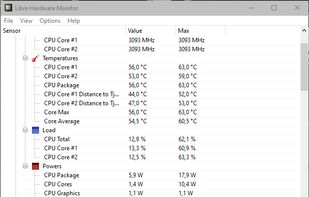
Libre Hardware Monitor, a fork of Open Hardware Monitor , is free software that can monitor the temperature sensors, fan speeds, voltages, load and clock speeds of your computer.

Core Temp is described as 'Compact, no fuss, small footprint, yet powerful program to monitor processor temperature and other vital information' and is a popular system information utility in the system & hardware category. There are more than 25 alternatives to Core Temp for a variety of platforms, including Windows, Mac, Linux, iPhone and Android apps. The best Core Temp alternative is Libre Hardware Monitor, which is both free and Open Source. Other great apps like Core Temp are Open Hardware Monitor, AIDA64, SpeedFan and Stats.
Libre Hardware Monitor, a fork of Open Hardware Monitor , is free software that can monitor the temperature sensors, fan speeds, voltages, load and clock speeds of your computer.

The Open Hardware Monitor is a free open source software that monitors temperature sensors, fan speeds, voltages, load and clock speeds of a computer.


Comprehensive diagnostics utility with support for Windows, Android, iOS, and Tizen, 64-bit CPU, GPU, and memory benchmarking, advanced system stability testing, extensive real-time hardware monitoring, detailed GPU analysis, and export options in HTML, CSV, or XML formats.


SpeedFan is a program that monitors voltages, fan speeds and temperatures in computers and controls the fans if possible.


Menu bar tool for macOS shows real-time CPU, GPU, memory, disk, network, battery status, sensor data, fan speed, Bluetooth device info, multi-time zone clocks, customizable widgets, and historical graphs while ensuring privacy.

HWMonitor for Windows® x86/x64 is a hardware monitoring program that reads PC system's main health sensors : voltages, temperatures, powers, currents, fans speed, utilization, clock speeds…

Offers at-a-glance hardware monitoring for CPU, RAM, GPU, network, and drives through a customizable sidebar with alerts, hotkey support, multi-DPI compatibility, an integrated clock, themes, and clear graphical statistics on the Windows desktop.


Shows real-time network speed, CPU, and memory usage on Windows via a floating window or taskbar widget. Features customizable skins, historical traffic stats, resource monitoring, and lightweight operation for home or advanced users. Free and open-source.


Advanced Mac utility with menubar monitoring for CPU, GPU, memory, disks, network, and sensors, including fan control, S.M.A.R.T status, Bluetooth battery tracking, weather, notifications, and deep customization. Combines multiple stats in a single view while prioritizing privacy.


Lightweight macOS tool that tracks thermal pressure and throttling, shows real time CPU temperature and fan speed, provides 10-minute history graphs, statistics for thermal states, and customizable notifications, all without requiring administrator privileges.

Lm-Sensors is a free and open-source application that provides tools and drivers for monitoring temperatures, voltage, and fans.

Displays macOS CPU thermal throttling, temperature, scheduler limit, available CPUs, and system thermal pressure with color-coded alerts. Offers real-time sensor graphs and at-a-glance hardware health feedback for both Intel and Apple Silicon Macs from the menu bar.


Monitors a wide range of system stats in a very simple application.