RIGStats is a free, open-source hardware monitor and control center for Windows gaming PCs.
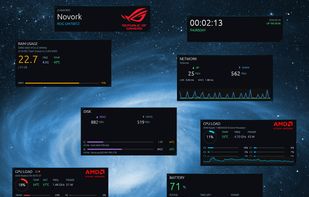
It runs as a native Windows app — no browser, no WebView — and shows your rig on a dedicated side screen (a portrait strip or a landscape bar), as individual floating panels on any monitor, drawn into the desktop wallpaper behind your icons, or as a compact click-through overlay on top of your game (Ctrl+Alt+O).
It reads sensor data from several sources: LibreHardwareMonitor through a background service (kernel-level temperatures, clocks, power and fan speeds), Windows' own counters (CPU load, RAM, disk I/O, network throughput, processes, per-app GPU usage) and WMI (GPU model, RAM spec, battery, system brand). That means per-core CPU clocks, GPU hot-spot temperature, D3D engine workload, DDR5/DDR4 DIMM temperature and NVMe temperature — not just what Task Manager shows.
Thirteen live panels cover CPU, GPU, RAM, network, storage, motherboard, processes, GPU apps, system power, battery, wireless peripherals, clock and system identity. Seven are shown by default; the rest are opt-in. Each panel keeps a sparkline history, so you see trends, not just a single value. Warning and critical thresholds for temperatures, load and battery trigger Windows notifications.
The Control Center bundles everything into profiles — Silent, Balanced, Gaming, Eco and your own — switched from the tray or Ctrl+Alt+P. A profile sets the Windows power plan, per-fan curves (with fan identification and temperature safety limits), AMD Ryzen power limits and Curve Optimizer, the Radeon or GeForce power limit, and RGB lighting with ASUS Aura Sync, Windows Dynamic Lighting and Philips Hue — no Armoury Crate needed. Fan curves run in the background service, so they keep working with the app closed. New CPU and GPU limits are tried for 15 seconds and revert unless you keep them.
Profiles can switch by themselves while a program runs (app rules) — Gaming while your game is open, back when it closes. Each profile also has its own dashboard look and overlay, and can set your desktop: a background picture per profile or per screen, and Wallpaper Engine wallpapers per screen — paused while you game, or turned off in a profile of its own.
Also included: battery levels of ROG wireless headsets, keyboards and mice; session recording with charts; auto-detected gaming brand logos (ROG, MSI, Alienware, Legion, OMEN, Razer, Predator, AORUS and more); a status window with dependency health, GPU driver versions and a debug log; and signed, verified updates. No accounts. No cloud. No telemetry.






 EU
EU


 Paul added RIGStats as alternative to Aurora Hardware Monitor
 Fla added RIGStats as alternative to Tray Monitor
 dvalfrid added RIGStats as alternative to EF System Monitor
 dvalfrid added RIGStats as alternative to GPU-Z, PassMark BurnInTest, PCMark, Core Temp and 1 more
 dvalfrid added RIGStats as alternative to Castro system info, OCCT, System Spec, CPU Info and 6 more
 dvalfrid added RIGStats as alternative to System Examiner, DevCheck, Novabench, ASTRA32 and 22 more


 dvalfrid


No comments or reviews, maybe you want to be first?