RIGStats Alternatives

RIGStats is described as 'Real-time hardware monitor for Windows gaming PCs — built for a dedicated secondary display. Free, open source, no telemetry' and is an app in the system & hardware category. There are more than 25 alternatives to RIGStats for a variety of platforms, including Windows, Android, Linux, Mac and PortableApps.com apps. The best RIGStats alternative is CPU-Z, which is free. Other great apps like RIGStats are HWiNFO (32/64), Libre Hardware Monitor, Speccy and GPU-Z.

Copy a direct link to this comment to your clipboard
RIGStats alternatives page was last updated

Alternatives list

  1. CPU-Z icon
     721 likes

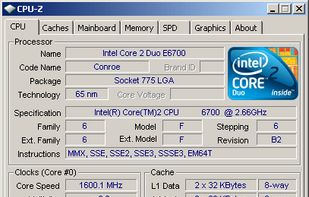
    Freeware system profiler detecting CPU, RAM, and chipset details for Windows and Android. It operates offline, ad-free, and is more detailed than Windows XP hardware tools. Portable with no installation or registration required, ideal for hardware monitoring.

    85 CPU-Z alternatives

    Cost / License

    • Free
    • Proprietary

    Platforms

    • Windows
    • Android
    • PortableApps.com
     
  2. HWiNFO (32/64) icon
     329 likes

    Designed for Windows, this tool provides real-time temperature monitoring and extensive hardware diagnostics. Suitable for technical experts, manufacturers, and system integrators with report export capabilities.

    123 HWiNFO (32/64) alternatives

    Cost / License

    • Free Personal
    • Proprietary

    Platforms

    • Windows
    • PortableApps.com
     
  3. Speccy icon
     478 likes

    Get an advanced and fast system info tool that provides a detailed overview of your PC's hardware. Enjoy real-time temperature monitoring, snapshot sharing, and offline capability. Available as an installer or portable version, without ads.

    91 Speccy alternatives

    Cost / License

    • Freemium
    • Proprietary

    Application type

    Alerts

    • Bundleware

    Platforms

    • Windows
     
  4. GPU-Z icon
     295 likes

    Streamlined tool providing crucial details about video cards, handling NVIDIA, AMD, ATI, Intel devices. Displays clocks, tests PCI-Express, backs up BIOS, works on many Windows versions, and requires no installation.

    Cost / License

    • Free
    • Proprietary

    Application type

    Platforms

    • Windows
    • PortableApps.com
     
  5. AIDA64 icon
     178 likes

    Comprehensive diagnostics utility with support for Windows, Android, iOS, and Tizen, 64-bit CPU, GPU, and memory benchmarking, advanced system stability testing, extensive real-time hardware monitoring, detailed GPU analysis, and export options in HTML, CSV, or XML formats.

    108 AIDA64 alternatives

    Cost / License

    • Paid
    • Proprietary

    Platforms

    • Windows
    • Android
    • iPhone
    • Android Tablet
    • HUAWEI AppGallery
    • iPad
    • Tizen OS
     
  6. The Open Hardware Monitor is a free open source software that monitors temperature sensors, fan speeds, voltages, load and clock speeds of a computer.

    Cost / License

    • Free
    • Open Source

    Application type

    Alerts

    • Discontinued

    Platforms

    • Windows
    • Mono
     
  7. HWMonitor icon
     117 likes

    HWMonitor for Windows® x86/x64 is a hardware monitoring program that reads PC system's main health sensors : voltages, temperatures, powers, currents, fans speed, utilization, clock speeds…

    44 HWMonitor alternatives

    Cost / License

    • Freemium
    • Proprietary

    Application type

    Platforms

    • Windows
     
  8. OCCT icon
     45 likes

    OCCT allows you to thoroughly monitor, test and certify your system, ensuring a comprehensive assessment of its stability.

    Cost / License

    • Freemium
    • Proprietary

    Platforms

    • Windows
    • Linux
     
  9. Cinebench icon
     36 likes

    Free cross-platform benchmarking tool evaluating real-world CPU and GPU performance through a consistent scene file, utilizing the Redshift engine with support for x86/64, Apple Silicon, and Arm64 CPUs, providing reliable results for diverse hardware.

    Cost / License

    • Free
    • Proprietary

    Platforms

    • Mac
    • Windows
     
  10. UNIGINE benchmarks can be effectively used to determine the stability of a GPU under extremely stressful conditions, as well as check the cooling system's potential under maximum heat output.

    Cost / License

    • Freemium
    • Proprietary

    Application type

    Platforms

    • Mac
    • Windows
    • Linux
     
12 of 45 RIGStats alternatives