
cadenas icon
cadenas icon

cadenas

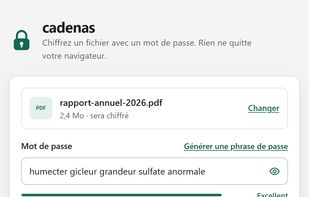
Encrypt a file with a password right in your browser: nothing is uploaded, and it also works offline, on the command line and self-hosted.
cadenas screenshot 1

Cost / License

  • Free
  • Open Source (MIT)

Platforms

  • Online
  • Windows
  • Mac
  • Linux
  • Self-Hosted
0likes
0articles
Save

Features

Properties

  1.  Lightweight
  2.  Privacy focused

Features

  1.  No Tracking
  2.  Dark Mode
  3.  No registration required
  4.  Ad-free
  5.  Works Offline
  6.  Portable
  7.  Command line interface
  8.  Password protection

cadenas News & Activities

Highlights All activities

Recent activities

cadenas information

AlternativeTo Categories

Security & Privacy, OS & Utilities

GitHub repository

  •  1 Stars
  •  0 Forks
  •  0 Open Issues
  •   Updated  
View on GitHub
cadenas was added to AlternativeTo by PierreEbele on and this page was last updated .

No comments or reviews, maybe you want to be first?

Official Links

What is cadenas?

cadenas encrypts and decrypts files with a password, directly in your browser. No file and no password ever leaves your device: the page is technically forbidden from opening any network connection (Content Security Policy connect-src 'none').

Drop a file, several files or a whole folder, choose a password (or generate a random passphrase), and download the result. cadenas detects on its own whether a file must be encrypted or decrypted. After a first visit, the website works offline and can be installed as an app.

It uses Argon2id and XChaCha20-Poly1305, and detects any modification of an encrypted file. It can also produce and read files in the age format, so they can be opened with age or rage.

The same tool exists as a command-line program (npm, or standalone executables for Windows, macOS and Linux) and as a Docker image for self-hosting. Free and open source software (MIT license).