


BetterDisplay
5 likes
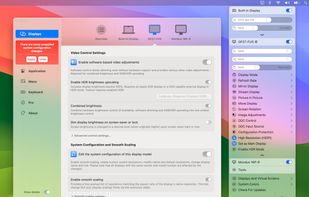
Unlock your displays on your Mac! Smooth scaling, HiDPI unlock, XDR/HDR extra brightness upscale, DDC, brightness and dimming, virtual screens, PIP and lots more!.

Cost / License
- Freemium (Pay once)
- Proprietary
 EU
EUPlatforms
- Mac

Features
BetterDisplay News & Activities
Highlights All activities
Recent activities
 hknttl added BetterDisplay as alternative to FreeDisplay
 Mark added BetterDisplay as alternative to DispCtrl
 Shin-Chan added BetterDisplay as alternative to LiteBright
- nickokicko liked BetterDisplay
- bat9000 liked BetterDisplay
 Ryder-Selikow added BetterDisplay as alternative to Candela
 Didrik-Galteland added BetterDisplay as alternative to Crisp - Monitor Control
 onekapisch added BetterDisplay as alternative to LUMEL
 Punshnut added BetterDisplay as alternative to Dimly
 THEODORE HQ added BetterDisplay as alternative to Solace


Featured in Lists



My Top 100 Software
A list with 71 apps by LLiN without a description.


Mac Must Haves
Just a list in case I lose my other lists within my local storage :)


macos apps
Here is a list of good macOS apps.
Free & Open Source: Audacity, Blender, Chromium, Docker, Drawio, Firefox, Homebrew, Jellyfin, KeePassXC, LibreOffice, LuLu, OBS, qBittorrent, UTM, VirtualBox, VLC, VSCode, Wireshark.
Free & Closed Source: Affinity Studio, Apple Dictionary, Discord, GarageBand, Sublime Text.
Pay and Closed Source: Anual payment ($2673) + One payment ($2327)
AutoCAD: $2,030
Audirvana Studio: $76
Adobe Photoshop/Lightroom: $240
Capture One: $327
Ableton: $600
Alfred: $45
Bartender: $28
Bitwig: $87
Final Cut Pro: $385
Cleanshot X: $29
Eagle: $30
Little Snitch: $65
Macfamilytree: $50
Parallels: $190
Photomator Pro: $80
Pixelmator Pro: $50
Procreate: $13
Sketch: $12
Transmit: $45
WiFi Explorer: $20
What is BetterDisplay?
BetterDisplay information
Developed by
 waydabber
 Licensing
Proprietary and Freemium product.Pricing
One time purchase (perpetual license) that costs $18 + free version with limited functionality.Alternatives
27 alternatives listedBadge
Get an embeddable badge for BetterDisplaySupported Languages
AlternativeTo Categories
OS & Utilities, System & HardwareGitHub repository
- 12,969 Stars
- 268 Forks
- 125 Open Issues
- Updated


Comments and Reviews
trust me, there is nothing that will replicate betterdisplaypro. Try creating a 9:16 vertical virtual display at 1440p LoDPI for using via parsec on your 2nd monitor with literally any other solution. Not to mention straight from the menu bar UI.
I loooove this software. I'm here to post how good BetterDisplay is, to repay them. Better than the competitor (? which). Worked with my Intel Mac and with works with my M4 Mac with a 43" Samsung 70NC. The monitor has the perfect dpi for Apple and is 16:9 so you get more room for cheaper than those wide but shallow monitors.
Pro paid, but more func then Monitor Control