Baobab Disk Usage Analyzer AlternativesOnly apps from the EU

The best alternative to Baobab Disk Usage Analyzer is WinDirStat, which is both free and Open Source. If that doesn't suit you, our users have ranked more than 50 alternatives to Baobab Disk Usage Analyzer and many of them are so hopefully you can find a suitable replacement. Other interesting alternatives to Baobab Disk Usage Analyzer are Filelight, SD Maid SE, TreeSize and SquirrelDisk.

filter to find the best alternatives

Baobab Disk Usage Analyzer alternatives are mainly Disk Usage Analyzers, but if you're looking for System Cleaners or Duplicate File Finders you can filter on that. Other popular filters include Windows, Linux and Mac. You can also filter by region, for example EU-based alternatives if you prefer software developed in the European Union. These are just examples - use the filter bar below to find more specific alternatives to Baobab Disk Usage Analyzer.
Copy a direct link to this comment to your clipboard
Baobab Disk Usage Analyzer alternatives page was last updated

Alternatives list

  1. WinDirStat icon
     1182 likes

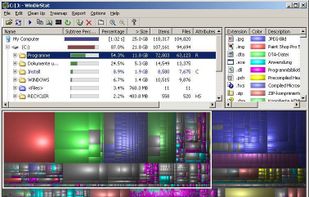
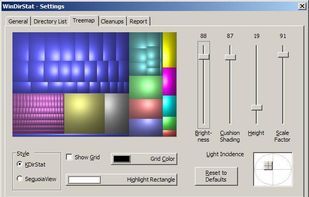
    Comprehensive disk analysis tool offering treemap visualizations to identify large files, duplicate detection, and versatile cleanup actions. Operates offline, ad-free, and open-source, it runs portably on Windows without registration, providing a lightweight solution to manage disk storage.

    115 WinDirStat alternatives

    Cost / License

    Platforms

    • Windows
     
    |
    3
    WinDirStat vs Baobab Disk Usage Analyzer Comments
    Guest
    Positive
    0

    Different visualization, same functions

    Guest
    Positive
    0

    I just can't use windows without it anymore.

    johnsohn
    Positive
    0

    while baobab is more interactive and concise, windirstat does provide a good look at space usage graphically.

    • WinDirStat is Free and Open SourceBaobab Disk Usage Analyzer is also Free and Open Source
    • WinDirStat is CustomizableBaobab Disk Usage Analyzer is not according to our users
  2. Filelight icon
     93 likes

    Provides graphical disk usage analysis using interactive segmented rings, scans local, remote and removable disks, enables navigation and file management from within the interface, displays live info on hover, and integrates with KDE file managers for efficient data management.

    81 Filelight alternatives

    Cost / License

    Platforms

    • Windows
    • Linux
    • BSD
    • KDE Plasma
    • Snapcraft
    • Flathub
     
    |
    1
    Filelight vs Baobab Disk Usage Analyzer Comments
    ivan90ge
    Positive
    0

    It has the same basic functionalities as baobab but better integrated into the KDE ecosystem

    • Filelight is Free and Open SourceBaobab Disk Usage Analyzer is also Free and Open Source
  3. SD Maid SE icon
     117 likes

    SD Maid SE (aka SD Maid 2) is a file management tool for Android that specialises in maintenance. Its core purpose is freeing up space and removing unwanted data.

    160 SD Maid SE alternatives

    Cost / License

    Platforms

    • Android
    • Android Tablet
    • F-Droid
     
  4. TreeSize icon
     303 likes

    Comprehensively analyze disk space usage with TreeSize across local, network drives, and mobile devices. Features include folder sizes, subfolders, file counts, NTFS compression rates, interactive 3D charts, and the ability to target large, temporary, and duplicate files, even via MTP and WebDAV.

    109 TreeSize alternatives

    Cost / License

    • Freemium
    • Proprietary

    Platforms

    • Windows
    • PortableApps.com
     
  5. SquirrelDisk icon
     65 likes

    SquirrelDisk shows you exactly what's taking up all that space and helps you clear it out. Using SquirrelDisk is a matter of clicking one button to easily find all the huge files on your computer.

    103 SquirrelDisk alternatives

    Cost / License

    Alerts

    • Discontinued

    Platforms

    • Mac
    • Windows
    • Linux
     
  6. QDirStat icon
     43 likes

    QDirStat is a graphical disk usage utility. The successor of KDirStat without any KDE dependencies.

    Cost / License

    Application type

    Platforms

    • Linux
    • BSD
    • Flathub
    • Flatpak
     
    |
    2
    QDirStat vs Baobab Disk Usage Analyzer Comments
    costanza6221
    Positive
    0

    I don't want load of GTK4 dependencies anymore. Filelight has KDE dependencies either.

    brunetton
    Positive
    0

    This is also open source, and fast. But QDirStat is way more complete

    • QDirStat is Free and Open SourceBaobab Disk Usage Analyzer is also Free and Open Source
  7. GrandPerspective is a small utility application for Mac that graphically shows the disk usage within a file system. It can help you to manage your disk, as you can easily spot which files and folders take up the most space.

    91 GrandPerspective alternatives

    Cost / License

    • Free Personal
    • Open Source

    Application type

    Platforms

    • Mac
     
  8. JDiskReport icon
     94 likes

    JDiskReport enables you to understand how much space the files and directories consume on your disk drives, and it helps you find obsolete files and folders.

    82 JDiskReport alternatives

    Cost / License

    • Free
    • Proprietary

    Application type

    Platforms

    • Mac
    • Windows
    • Linux
    • BSD
     
    |
    1
    JDiskReport vs Baobab Disk Usage Analyzer Comments
    Guest
    Positive
    0

    Similar interface and easy to use compared to other alternatives

    • JDiskReport is Free and ProprietaryBaobab Disk Usage Analyzer is Free and Open Source
  9. Scanner icon
     57 likes

    This tool uses a sunburst chart to display the usage of your hard disk or other media. The chart shows all major files and folders from all directory levels at once.

    Cost / License

    • Free
    • Proprietary

    Application type

    Alerts

    • Discontinued

    Platforms

    • Windows
     
    |
    2
    Discontinued

    The program seems to be no longer updated. Last version, 2.13, released in July 2012, is fully working and can be still downloaded from the official website.

    Scanner vs Baobab Disk Usage Analyzer Comments
    Guest
    Positive
    0

    Simple and intuitive interface to display the files and their sizes compared to other programs.

    Guest
    Positive
    0

    It works (but is only windows)!

    • Scanner is Free and ProprietaryBaobab Disk Usage Analyzer is Free and Open Source
  10. disky icon
     6 likes

    disky can analyze your device and show your data split by directory. Apps are also included, so you get the full picture of what uses your storage.

    Cost / License

    Application type

    Platforms

    • Android
    • Android Tablet
    • F-Droid
     
  11.  3 likes

    dua (-> Disk Usage Analyzer) is a tool to conveniently learn about the usage of disk space of a given directory. It's parallel by default and will max out your SSD, providing relevant information as fast as possible.

    Cost / License

    • Free
    • Open Source (MIT)

    Application type

    Platforms

    • Mac
    • Windows
    • Linux
    • MacPorts
    • Homebrew
     
12 of 29 Baobab Disk Usage Analyzer alternatives