
AutoShot icon
AutoShot icon

AutoShot

Menu bar app for Mac that takes a screenshot of every display on a timer, sorts them into a folder per day, and turns any day into a timelapse video.
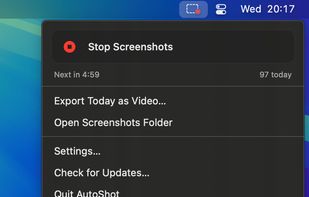
AutoShot in the menu bar: the countdown to the next screenshot and how many it has taken today.

Cost / License

  • Pay once
  • Proprietary

Application type

Platforms

  • Mac
3likes
0articles
Save

Features

Properties

Features

Highlights All activities

AutoShot News & Activities

Recent News

No news, maybe you know any news worth sharing?

Share a News Tip

Recent activities

AutoShot information

  • Developed by

    Arthur Smith
  • Licensing

    Proprietary and Commercial product.
  • Pricing

    One time purchase (perpetual license) that costs $13.
  • Alternatives

    36 alternatives listed
  • Badge

    Get an embeddable badge for AutoShot
  • Supported Languages

    • English

AlternativeTo Category

Photos & Graphics

Our users have written 1 comments and reviews about AutoShot, and it has gotten 3 likes

AutoShot was added to AlternativeTo by Mauricio B. Holguin on and this page was last updated .

Comments and Reviews

   
grokomo
0

Simple and useful.

What is AutoShot?

AutoShot takes a screenshot of every connected display at the interval you choose: 1, 5, 10 or 30 minutes, or a custom one down to 5 seconds. Screenshots go into a folder per day, with the date, time and display in every file name.

  • Every display saved as its own file
  • PNG, or JPEG with adjustable quality
  • Exclude apps like your password manager: their windows never appear in a screenshot
  • Pause capture when idle
  • Automatic cleanup: screenshots older than 1 hour to 1 month move to the Trash
  • Export any day as a timelapse video, one MP4 per display
  • Start and stop from the menu bar or with a keyboard shortcut, can start at login
  • Everything stays on your Mac. No account, no cloud.

macOS 14 Sonoma or later. 14-day free trial, then a one-time purchase.