





Always On Dock
1 like
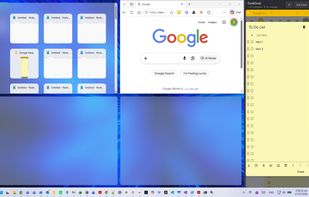
Reserve space on your desktop for three always-visible apps that never get covered. Supports notes, chat, reference, calculators, video calls, or tutorials. Easily dock, resize, reorder, or hide the area. Compatible with all Windows programs and works fully offline.

Cost / License
- Pay once
- Proprietary
Platforms
- Windows


Features
Always On Dock News & Activities
Highlights All activities
Recent activities
 Mauricio B. Holguin added Always On Dock as alternative to AquaSnap, Actual Window Manager, Microsoft PowerToys, MaxTo and 4 more
- Mauricio B. Holguin updated Always On Dock
- doc-picks-apps added Always On Dock
- doc-picks-apps added Split-screen view as a feature to Always On Dock
- doc-picks-apps A comment was removed from Always On Dock
- doc-picks-apps liked Always On Dock
 doc-picks-apps added Always On Dock as alternative to DesktopCoral


Always On Dock information
Developed by
UnknownLicensing
Proprietary and Commercial product.Pricing
One time purchase (perpetual license) that costs up to $10.Alternatives
9 alternatives listedBadge
Get an embeddable badge for Always On DockSupported Languages


No comments or reviews, maybe you want to be first?