
StayOnTop icon
StayOnTop icon

StayOnTop

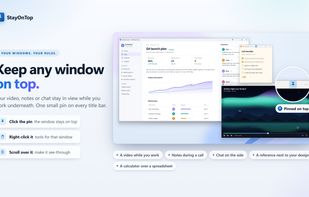
Pin any window on top of all others with one click or a global hotkey, with adjustable opacity. Make any pinned window semi-transparent by scrolling over its pin, or turn on click-through so your clicks land on whatever is underneath.
StayOnTop screenshot 1

Cost / License

  • Pay once
  • Proprietary

Platforms

  • Windows
0likes
0articles
Save

Features

Properties

Features

Highlights All activities

StayOnTop News & Activities

Recent activities

StayOnTop information

  • Developed by

    GB flagWEEDSEE.COM
  • Licensing

    Proprietary and Commercial product.
  • Pricing

    One time purchase (perpetual license) that costs $10.
  • Alternatives

    17 alternatives listed
  • Badge

    Get an embeddable badge for StayOnTop
  • Supported Languages

    • English
    • German
    • Polish
    • Portuguese
    • Spanish
    • Italian
    • Dutch
    • Swedish
    • Danish
    • Norwegian Bokmål
    • Finnish
    • Czech
    • Hungarian
    • Romanian
    • Turkish
    • Greek
    • Russian
    • Ukrainian
    • Japanese
    • Korean
    • Chinese
    • Vietnamese
    • Indonesian
StayOnTop was added to AlternativeTo by Czopp on and this page was last updated .

No comments or reviews, maybe you want to be first?

Official Links

What is StayOnTop?

StayOnTop keeps the window you choose above all other windows, so a video, notes, a calculator or a meeting stays in view no matter what you are working on.

Windows has no built-in way to keep any window on top. StayOnTop adds it in the simplest way: pick a window from the list or press a hotkey, and it stays visible above other apps until you unpin it.

Features:

  • One-click pinning: a list of open windows with a pin button next to each
  • Global hotkey: Ctrl+Alt+T pins or unpins the active window from anywhere
  • Adjustable opacity: make a pinned window semi-transparent to see what is underneath
  • Clear marking: a subtle border around pinned windows, so you always know what is on top
  • Tray menu: quick access to pinned windows and the main actions
  • Starts with Windows and runs quietly in the system tray with minimal resource use
  • Click-through
  • Transparent windows / Opacity
  • Global hotkeys
  • System tray
  • Ghost mode
  • Screensavers
  • Fast and light on system

You can pin several windows at once. Pinned windows stay above normal ones and keep the order you last used them in.

Great for watching a video or presentation while taking notes, following a chat while you work, comparing documents, or keeping a calculator over a spreadsheet.

Available on the Microsoft Store for Windows 10 and Windows 11.
