Adobe Scan icon
Adobe Scan icon

Adobe Scan

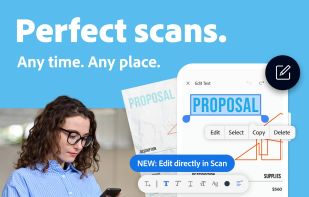
The Adobe Scan scanner app turns your device into a powerful portable scanner that recognizes text automatically (OCR) and allows you to save to multiple file formats including PDF and JPEG.
Adobe Scan screenshot 1

Cost / License

  • Freemium (Pay once or Subscription)
  • Proprietary

Application type

Platforms

  • Android
  • iPhone
  • Android Tablet
  • iPad
14likes
0articles
Save

Features

  1.  Scanner
  2.  Scan documents
  3.  Built-in editor
  4.  Scan to PDF
  5.  OCR
  6.  Dark Mode
  7.  Built-in viewer
  8.  Mobile Scanner
  9.  Combine PDF
  10.  Cloud Sync
  11.  Fill PDF Forms
  12.  Full-Text Search
  13.  PDF OCR

Adobe Scan News & Activities

Highlights All activities

Recent News

No news, maybe you know any news worth sharing?

Share a News Tip

Recent activities
  • CamScanPDF icon
    Gert Prinsloo added Adobe Scan as alternative to CamScanPDF
  • OddSnap icon
    Graziella added Adobe Scan as alternative to OddSnap
  • implements Doc Scanner icon
    Xhulio Jamaku added Adobe Scan as alternative to implements Doc Scanner
  • Nescanner icon
    Ruslan-Malymon added Adobe Scan as alternative to Nescanner
  • DocuScanr icon
    robtothetower added Adobe Scan as alternative to DocuScanr
  • LensUp icon
    benchwright added Adobe Scan as alternative to LensUp
  • Fabiano Braga reviewed Adobe Scan  

    Adobe Scan is a polished and reliable scanner app that integrates seamlessly with the broader Adobe Acrobat ecosystem. Its automated boundary detection is accurate, and the built-in OCR does a commendable job of generating clean, searchable PDFs without placing watermarks on your documents.

    The main trade-off is its heavy reliance on an Adobe account and cloud connection. You must sign in to use it, and documents are automatically uploaded to Adobe Document Cloud, which may not appeal to users...

  • PDFgear Scan icon
    Croco Loki added Adobe Scan as alternative to PDFgear Scan, Zoho Scanner and Zency
  • Yfolio AI icon
    yuvalf added Adobe Scan as alternative to Yfolio AI
  • Glyfo icon
    LVLE added Adobe Scan as alternative to Glyfo

Adobe Scan information

  • Developed by

    US flagAdobe
  • Licensing

    Proprietary and Freemium product.
  • Pricing

    One time purchase and / or subscription + free version with limited functionality.
  • Alternatives

    145 alternatives listed
  • Badge

    Get an embeddable badge for Adobe Scan
  • Supported Languages

    • English
    • Czech
    • Danish
    • Dutch
    • Finnish
    • French
    • German
    • Italian
    • Japanese
    • Korean
    • Norwegian Bokmål
    • Polish
    • Portuguese
    • Russian
    • Chinese
    • Spanish
    • Swedish
    • Turkish

AlternativeTo Categories

Office & Productivity, OS & Utilities, Photos & Graphics, System & Hardware

Apple AppStore

  •   Updated 
  •   4.88 avg rating
View in AppStore

Our users have written 2 comments and reviews about Adobe Scan, and it has gotten 14 likes

Adobe Scan was added to AlternativeTo by Danilo Venom on and this page was last updated .

Comments and Reviews

   
Top Positive Comment
Fabiano Braga
1
Founder & Lead Developer at 4U.IA.BR Labs

Adobe Scan is a polished and reliable scanner app that integrates seamlessly with the broader Adobe Acrobat ecosystem. Its automated boundary detection is accurate, and the built-in OCR does a commendable job of generating clean, searchable PDFs without placing watermarks on your documents.

The main trade-off is its heavy reliance on an Adobe account and cloud connection. You must sign in to use it, and documents are automatically uploaded to Adobe Document Cloud, which may not appeal to users who prefer local-only storage or quick, account-free scanning. Additionally, several advanced features (such as exporting to Microsoft Office formats or editing PDFs) require an expensive Acrobat subscription.

In summary, it is a great choice for users already embedded in the Adobe ecosystem who value high-quality searchable PDFs, though it can feel a bit restrictive for those seeking a fast, offline, and lightweight utility.

Prabhat
1

Easy to use and user-friendly.

Featured in Lists

Core, Development & Services

A list with 807 apps by AmileyaRyver without a description.
By AmileyaRyver807 appsUpdated

My Android applications

A small list of Android applications I use daily on my Xiaomi Redmi Note 4. I didn't include Google applications that I also use. These are for example Google Maps or Google Fit and so on. Everything runs on the newest Android with a custom ROM.
By Martin Choutka62 appsUpdated

Picks

A list with 87 apps by dbriggs without a description.

By Duncan Briggs87 appsUpdated

Official Links

Page may contain affiliate links. Affiliate links never affect ranking.

What is Adobe Scan?

The Adobe Scan scanner app turns your device into a powerful portable scanner that recognizes text automatically (OCR) and allows you to save to multiple file formats including PDF and JPEG.

The most intelligent scanner app. Scan anything — receipts, notes, documents, photos, business cards, whiteboards — with text you can reuse from each PDF and photo scan.

HOW IT WORKS • With the Adobe Scan scanner app, you can make anything scannable. • Use the PDF scanner to quickly create a photo scan or PDF scan. • Scan any document and convert to PDF.

CAPTURE • Scan anything with precision with this mobile PDF scanner. • Advanced image technology automatically detects borders, sharpens scanned content, and recognizes text (OCR).

ENHANCE • Touch up scans or photos from your camera roll. • Whether it’s a PDF or photo scan, you can preview, reorder, crop, rotate, and adjust color.

CLEANUP UP YOUR SCANS • Remove and edit imperfections, erase stains, marks, creases, even handwriting.

REUSE • Turn your photo scan into a high-quality Adobe PDF that unlocks text through automated text recognition (OCR). • Reuse text from each PDF scan thanks to OCR.

SCAN ANYTHING, ANYWHERE, ANYTIME • Capture forms, receipts, notes, and business cards with this mobile PDF scanner. • The amazing new High-Speed Scan tool uses AI to bulk scan larger documents in seconds.

RECYCLE CONTENT • The Adobe Scan PDF scanner makes any content scannable and reusable. • Free, built-in optical character recognition (OCR) lets you reuse scanned text and content by creating a high-quality PDF you can work with in the free Adobe Acrobat Reader app. • You can even turn Adobe Scan into a tax receipt scanner to highlight expenses with ease.

QUICKLY FIND DOCUMENTS IN PHOTO LIBRARY • This powerful scanner app automatically finds documents and receipts in your photos and turns them into PDF scans, so you don't have to. • Automatic OCR turns text into content you can edit, resize, and reuse in other documents.

SAVE BUSINESS CARDS TO CONTACTS • Scan a business card and Adobe Scan turns into a fast business card scanner and reader. • Contact information will be automatically extracted so you can quickly add to your device contacts — no typing needed.

GET MORE DONE ON THE GO • Save each scan to Adobe Document Cloud for instant access and sharing. • Even lengthy legal documents become manageable and scannable with the Adobe Scan scanner app, which lets you search, select, and copy text. • You can also open a PDF scan in Acrobat Reader to highlight key sections, add comments, fill and sign.

IN-APP PURCHASE Subscribe for even more scanning power. Subscriptions work across Scan and Reader mobile apps and Acrobat on the web. • Combine scans into one file so you can take multiple scans and consolidate into one document. • Export PDFs to Microsoft Word or PowerPoint file formats to integrate with your workflows. • Increase OCR capacity from 25 to 100 pages so that you can find text in multiple scans.
