
LensUp icon
LensUp icon

LensUp

LensUp is a free online document scanner that runs in the web browser. Take a photo of a page with your phone, or choose images or a PDF, and LensUp finds the page, straightens the perspective and whitens the paper background, then exports a printable PDF, JPG or PNG.
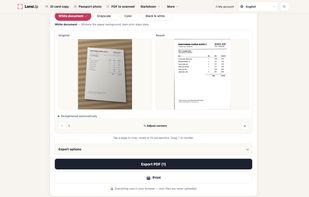
A phone photo of an invoice (left) straightened and turned into a clean white page (right), with effect options and PDF export.

Cost / License

  • Freemium
  • Proprietary

Application type

Platforms

  • Online
0likes
0articles
Save

Features

  1.  PDF compression
  2.  Scan documents
  3.  Scanner
  4.  Convert images to PDF

 Tags

LensUp News & Activities

Highlights All activities

Recent activities

LensUp information

  • Developed by

    Springtide Labs LLC
  • Licensing

    Proprietary and Freemium product.
  • Pricing

    free version with limited functionality.
  • Alternatives

    11 alternatives listed
  • Badge

    Get an embeddable badge for LensUp
  • Supported Languages

    • English
LensUp was added to AlternativeTo by benchwright on and this page was last updated .

No comments or reviews, maybe you want to be first?

What is LensUp?

LensUp is a free online document scanner that runs in the web browser. Take a photo of a page with your phone, or choose images or a PDF, and LensUp finds the page, straightens the perspective and whitens the paper background, then exports a printable PDF, JPG or PNG.

Scanning happens locally in the browser, so the documents you scan are not uploaded to a server. There is no sign-up and no watermark.

Main features:

  • Automatic page detection and perspective correction, with manual corner adjustment when detection misses
  • Effects: white document, grayscale, color, black and white
  • Remove shadows and uneven lighting from photographed pages
  • Merge several photos into one multi-page PDF and reorder pages
  • Compress a PDF or image toward a size limit such as 200 KB (best effort; the real output size is shown)
  • Put both sides of an ID card on a single A4 page
  • Crop passport and visa photos to standard sizes (manual crop, no face detection)
  • Opens JPEG, PNG, WebP, iPhone HEIC/HEIF, AVIF, BMP, GIF, multi-page TIFF and PDF
  • Interface available in 20 languages

Text recognition lives on separate pages that convert images and PDFs to Markdown on the device; an optional paid Pro mode sends only the pages you confirm for higher-accuracy recognition.