
Glyfo icon
Glyfo icon

Glyfo

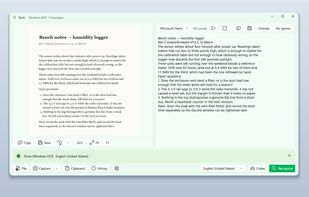
Glyfo turns pictures of words back into words. Drag a box around part of the screen with Alt+Z, open an image or a PDF with Ctrl+O, paste from the clipboard, or send a file over from Explorer, Photos or Snipping Tool.
Glyfo screenshot 1

Cost / License

  • Free
  • Open Source (MIT)

Application type

Platforms

  • Windows  Requires Windows 10 version 2004 (build 19041) or later. Native on both x64 and ARM64. Distributed through the Microsoft Store; there is no standalone installer.
0likes
0articles

Features

Properties

  1.  Privacy focused

Features

  1.  Works Offline
  2.  Text to Speech
  3.  Ad-free
  4.  OCR
  5.  Full-Text Search
  6.  Built-in viewer
  7.  Dark Mode
  8.  No registration required
  9.  Batch processing
  10.  Offline
  11.  Barcode Scanner

Glyfo News & Activities

Highlights All activities

Recent activities

Glyfo information

  • Developed by

    LVLE
  • Licensing

    Open Source (MIT) and Free product.
  • Written in

  • Alternatives

    51 alternatives listed
  • Badge

    Get an embeddable badge for Glyfo
  • Supported Languages

    • English
    • Chinese
    • Japanese
    • Korean
    • German
    • French
    • Spanish
    • Portuguese
    • Russian
    • Italian
    • Polish
    • Dutch
    • Czech
    • Turkish
    • Swedish
    • Danish
    • Norwegian Bokmål
    • Finnish
    • Greek
    • Hungarian
    • Romanian
    • Ukrainian
    • Vietnamese
    • Thai
    • Indonesian
    • Malay
    • Hindi
    • Bengali
    • Arabic
    • Hebrew
    • Persian
    • Tagalog

AlternativeTo Categories

Photos & GraphicsSystem & HardwareOffice & Productivity

GitHub repository

  •  1 Stars
  •  0 Forks
  •  0 Open Issues
  •   Updated  
View on GitHub
Glyfo was added to AlternativeTo by LVLE on and this page was last updated .
No comments or reviews, maybe you want to be first?

Official Links

What is Glyfo?

Glyfo turns pictures of words back into words. Drag a box around part of the screen with Alt+Z, open an image or a PDF with Ctrl+O, paste from the clipboard, or send a file over from Explorer, Photos or Snipping Tool. A PDF can be read a page at a time or all at once; drop a folder of scans on the window and every one of them goes through in a single run. Save the result as .txt or .md, one file or one per page.

It also reads QR codes and barcodes out of the same picture, keeps a searchable history that survives a restart, reads the result aloud in any voice installed on your PC, and puts hard line breaks back into paragraphs — or strips the spaces that Chinese, Japanese and Korean text picks up during recognition.

Recognition uses the OCR engine that ships with Windows, on your machine. Glyfo makes no network connections at all: no account, no telemetry, no ads. Free and open source under the MIT licence.

It gives you the text, not a searchable PDF — no text layer is written back into the original file. Translation and the enhanced-accuracy recognition model require a Copilot+ PC.