DocuScanr icon
DocuScanr icon

DocuScanr

A private document scanner for Android that encrypts every scan on the device, works fully offline, and needs no account or cloud.
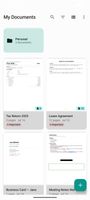
Library with folders, tags and page counts; everything stored encrypted on the device
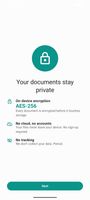
AES-256 on-device encryption, no cloud, no account, no tracking
+6
Automatic edge detection with auto-capture once the page is held steady

Cost / License

  • Freemium (Pay once)
  • Proprietary

Application type

Platforms

  • Android
  • Android Tablet
0likes
0articles
Save

Features

Properties

  1.  Privacy focused

Features

  1.  Encrypted Backup
  2.  No Tracking
  3.  Mobile Scanner
  4.  Ad-free
  5.  No registration required
  6.  Combine PDF
  7.  Dark Mode
  8.  OCR
  9.  Full-Text Search
  10.  File Tagging
  11.  Works Offline
  12.  Biometric Authentication
  13.  PDF annotation
  14.  Split PDF files
  15.  Built-in viewer
  16.  Scanner
  17.  Folders
  18.  Scan to PDF
  19.  Tagging
  20.  Scan documents
  21.  Document Annotations
  22.  PDF Redaction
  23.  Password protection
  24.  Client side encryption
  25.  Export to PDF

DocuScanr News & Activities

Highlights All activities

Recent activities

DocuScanr information

  • Developed by

    US flagToTheTower Labs LLC
  • Licensing

    Proprietary and Freemium product.
  • Pricing

    One time purchase (perpetual license) that costs $5 + free version with limited functionality.
  • Alternatives

    12 alternatives listed
  • Badge

    Get an embeddable badge for DocuScanr
  • Supported Languages

    • English
    • German
    • French
    • Italian
    • Dutch
    • Spanish
    • Portuguese
DocuScanr was added to AlternativeTo by robtothetower on and this page was last updated .

No comments or reviews, maybe you want to be first?

Official Links

What is DocuScanr?

DocuScanr is a document scanner for Android that keeps your scans on your phone. Every page is encrypted at rest with AES-256 and hardware-backed keys, there is no account or sign-in, and scanning, text recognition and export all run offline. The app makes no network connections in normal use; crash reporting is opt-in and off by default.

Scanning uses automatic edge detection and perspective correction, with auto-capture once the page is held steady. Pages can also be imported from the gallery, from PDFs and from ZIP archives, combined into multi-page documents, reordered, and cleaned up with Auto, Color and Grayscale filters.

On-device text recognition (OCR) makes scans searchable and lets you copy or read their text. Documents are organized in folders and subfolders with full-text search.

Privacy tools include an app lock with fingerprint or PIN, screenshot blocking, a recovery key that restores access without any server, and encrypted backup archives. The app flags sensitive numbers such as card, bank account and national ID numbers and offers a review-and-redact step before a document is shared.

Documents export as PDF, JPEG or PNG, with size presets for email.

DocuScanr is free for everyday scanning. A one-time Pro purchase, with no subscription, adds batch scanning, the black-and-white filter, annotation, signing and redaction, password-protected PDF and ZIP export, encrypted PDF and ZIP import, ID card scanning, tags, watermarks, auto-OCR with search across all documents, and scheduled automatic backups.