• Godot Engine icon
  • VSCodium icon
  • Blender icon
  • Material Maker icon
  • LibreSprite icon
  • +12

The Linux gamedev toolkit on a budget.

Zami GamiZami Gami17 appsUpdated
Copy a direct link to this comment to your clipboard

A set of tools I use to create full games on Linux, most are free and open source, with some paid/proprietary options if you're willing to spend a little and compromise on the full FOSS experience.

The development environment

You need a solid framework to build your game upon, here are the tools I use during production.

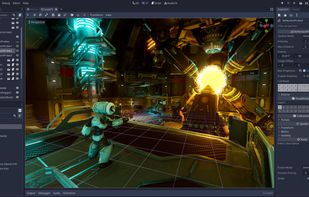
  1. Godot Engine is a feature-packed, cross-platform game engine to create 2D and 3D games from a unified interface. It provides a comprehensive set of common tools, so that users can focus on making games without having to reinvent the wheel.

    Cost / License

    • Free
    • Open Source

    Application type

    Platforms

    • Mac
    • Windows
    • Linux
    • Online
    • Android
    • Epic Games Store
    • Flathub
    • F-Droid
    • Haiku
    • Steam
    • FreeBSD
    • Flatpak
    • itch.io
    • Meta Quest
    Godot Engine screenshot 1
    Fully-dedicated 2D engine
    XR (VR and AR) support
    +6
    Gorgeous 3D graphics
    Zami GamiZami Gami’s note

    Godot is the golden standard for open source game engines, and game engines as a whole! It is laser-focused on game development, custom built for them even. It's intuitive, lightweight, gets out of the way, and it makes development fun!

  2. VSCodium icon
     Like

    This repository contains a build file to generate FLOSS release binaries of Microsoft's Visual Studio Code - Open Source ("Code - OSS") project, the open source core of the proprietary Visual Studio Code icon Visual Studio Code.

    Cost / License

    • Free
    • Open Source

    Application type

    Platforms

    • Mac
    • Windows
    • Linux
    • Flathub
    • Electron
    • Snapcraft
    • Homebrew
    • Chocolatey
    VSCodium screenshot 1
    Zami GamiZami Gami’s note

    VSCodium is a great alternative to Visual Studio for programming in all types of languages. I generally stick to Godot's built-in scripting interface, but this is a great extra to have around.

3D asset toolset

I specialize in 3D art and assets, these are the tools I find most useful for authoring them.

  1. Blender icon
     Like

    Free open-source 3D software for modeling, texturing, rigging, animation, rendering, compositing, video editing, and simulation.

    Cost / License

    • Free
    • Open Source

    Application type

    Platforms

    • Mac
    • Windows
    • Linux
    • BSD
    • Snapcraft
    • Flathub
    • PortableApps.com
    • Haiku
    • Steam
    • Flatpak
    Splash Artwork for Blender 4.3
    Cycles Render Engine
    Modeling, Sculpt, UV
    +9
    VFX
    Zami GamiZami Gami’s note

    The darling superstar of the open source world, blender is a display of how FOSS can go really well. It's a full 3D suite for creating all sorts of 3D assets from start to finish, more and more capable with every passing month!

  2. Material Maker is a free and open-source, procedural texture authoring tool based on Godot Engine icon Godot Engine. Its user interface is based on Godot's GraphEditor: textures are described as interconnected texture generators and operators.

    Cost / License

    • Free
    • Open Source

    Platforms

    • Mac
    • Windows
    • Linux
    • Godot Engine
    • itch.io
    • Chocolatey
    Material Maker screenshot 1
    Material Maker screenshot 1
    Material Maker screenshot 2
    +1
    Material Maker screenshot 3
    Zami GamiZami Gami’s note

    A great side-dish for blender, material maker can help you create complex procedural materials a la substance designer.

2D asset toolset

This isn't a very strong suit for me, but 2D assets are important even in a 3D game! Here is my modest toolset to make 2D assets and art.

  1. LibreSprite is a free and open source program for creating and animating your sprites.

    Cost / License

    • Free
    • Open Source

    Application type

    Platforms

    • Mac
    • Windows
    • Linux
    LibreSprite screenshot 1
    LibreSprite screenshot 1
    Zami GamiZami Gami’s note

    The free alternative to Aseprite. It has the important features you need to get by. Aseprite is definitely worth the money, but to keep things free this is a fantastic tool!

  2. Krita icon
     Like

    A free, open-source painting program for professional artists offering customizable UI, 9 brush engines, layer support, and color management.

    Cost / License

    • Free
    • Open Source

    Application type

    Platforms

    • Mac
    • Windows
    • Linux
    • Android Tablet
    • KDE Plasma
    • Epic Games Store
    • PortableApps.com
    • F-Droid
    • Steam
    • AppImage
    Krita screenshot 1
    Krita screenshot 1
    Krita screenshot 2
    +6
    Main Window
    Zami GamiZami Gami’s note

    Krita is an excellent painting and image editing program. I am not all too familiar with the requirements for raster-based 2D assets for 2D games, but Krita fulfills my admittedly less demanding needs.

  3. Inkscape icon
     Like

    Open source vector graphics editor supporting SVG with features like custom brushes, pressure sensitivity, and layer management across multiple platforms.

    Cost / License

    • Free
    • Open Source

    Application type

    Platforms

    • Mac
    • Windows
    • Linux
    • BSD
    • Snapcraft
    • Flathub
    • PortableApps.com
    • Haiku
    Inkscape screenshot 1
    Inkscape screenshot 1
    Inkscape screenshot 2
    +8
    Inkscape screenshot 3
    Zami GamiZami Gami’s note

    The FOSS vector editor by excellence, Inkscape lets me create UI elements that scale to fit my game scenes seamlessly.

Audio

A silent game is a sad game, here's how I make very basic music and sounds.

  1. Audacity icon
     Like

    Free open-source multi-track audio editor and recorder with 32-bit float processing. Supports many formats and plugins for Windows, macOS, Linux.

    Cost / License

    • Free
    • Open Source

    Application type

    Platforms

    • Mac
    • Windows
    • Linux
    • BSD
    • AppImageHub
    • Flathub
    • PortableApps.com
    • Haiku
    Audacity screenshot 1
    Audacity screenshot 1
    Audacity screenshot 2
    +6
    Audacity screenshot 3
    Zami GamiZami Gami’s note

    This helps me record easily and allows me to add effects and make edits. I use it a lot to do Foley sound effect work.

  2. LMMS icon
     Like

    Free cross-platform DAW supporting VST plugins, MIDI, and lossless audio. Offers music loopers and sequencers with privacy, no ads, and offline capability.

    Cost / License

    • Free
    • Open Source

    Application type

    Platforms

    • Mac
    • Windows
    • Linux
    • BSD
    • Flathub
    • PortableApps.com
    • Haiku
    • Flatpak
    LMMS screenshot 1
    LMMS screenshot 1
    LMMS screenshot 2
    +2
    LMMS screenshot 3
    Zami GamiZami Gami’s note

    Admittedly this is not the tool I am most familiar with, and it may not be the best, but for FOSS music production this is a solid pick!

Versioning

You can't just go full commando and run into gamedev without a good version control system! To keep things orderly and keep mistakes from getting real expensive, these are my versioning tools of choice.

  1. Git icon
     Like

    Git is a free & open source, distributed version control system designed to handle everything from small to very large projects with speed and efficiency.

    Cost / License

    • Free
    • Open Source

    Application type

    Platforms

    • Mac
    • Windows
    • Linux
    • Android
    • iPhone
    • Chrome OS
    • Android Tablet
    • BSD
    • Linux Mobile
    • Haiku
    Zami GamiZami Gami’s note

    You know git, don't you? It's the de-facto version control system used by all sorts of software projects all over the world! If it ain't broke...

  2. Gitea icon
     Like

    Private, Fast, Reliable DevOps Platform. A self-hosted DevOps platform that gives teams and developers high-efficiency, easy-to-run operations from planning to production. Gitea is a fork of Gogs icon Gogs.

    Cost / License

    • Freemium
    • Open Source

    Application type

    Platforms

    • Mac
    • Windows
    • Linux
    • Online
    • BSD
    • Self-Hosted
    • Raspberry Pi
    • Cloudron
    • Chocolatey
    Gitea screenshot 1
    Gitea screenshot 1
    Gitea screenshot 2
    +3
    Gitea screenshot 3
    Zami GamiZami Gami’s note

    My projects are done solo or with a very small team, so I feel no need to host my code on GitHub and risk it getting leaked or used to train some bogus corporate AI model. Gitea can be self-hosted and a small team accessing my instance will barely make a difference in my monthly bandwidth use.

  3. Gitnuro icon
     Like

    A FOSS Git multiplatform client for newbies and pros.

    Cost / License

    • Free
    • Open Source

    Application type

    Platforms

    • Mac
    • Windows
    • Linux
    • Flathub
    Gitnuro screenshot 1
    Zami GamiZami Gami’s note

    A sleek and beautiful git GUI for Linux. It's simple, but simple is all I need, baby!

Team and project management

Did that header give you corpo-dev PTSD? Same! But managing tasks and teammates is an important part of the job, even if you're the only teammate! These tools are simple little things I use to stay on top of what's going on.

  1. Vikunja icon
     Like

    Think of Vikunja like the notebook you have with all your things to keep track of. But better.

    Cost / License

    • Free Personal
    • Open Source

    Application type

    Platforms

    • Windows
    • Linux
    • Self-Hosted
    • Android
    • Debian
    • Fedora
    • Arch Linux
    • Docker
    • Nix Package Manager
    • FreeBSD
    • Kubernetes
    • Online
    Vikunja screenshot 1
    Vikunja screenshot 1
    Vikunja screenshot 2
    +3
    Vikunja screenshot 3
    Zami GamiZami Gami’s note

    This is somewhat of an all-in-one productivity app. It allows an individual or team to view tasks through kanban boards, Gantt charts and others to keep a closer eye on what needs to be done.

  2. TiddlyWiki is a single html file with all the characteristics of a wiki - including all of the functionality (including editing, saving, tagging and searching) and the style sheet. Because its a single file, its very portable - you can email it, put it on a web server or share...

    Cost / License

    • Free
    • Open Source

    Application type

    Platforms

    • Mac
    • Windows
    • Linux
    • Online
    • BSD
    • Self-Hosted
    • Xfce
    • RemoteStorage
    TiddlyWiki screenshot 1
    Zami GamiZami Gami’s note

    Tiddlywiki is a lesser used but still handy tool to keep a central single-source-of-truth game design document everyone can reference.

If you're willing to pay

If you have a little bit of budget to make your games, here are some fairly priced tools you can add to your setup that can make your life easier!

  1. Armor paint is a standalone software for 3d texture painting in PBR. It is entirely GPU based, and supports windows and linux.

    Cost / License

    • Paid
    • Open Source

    Application type

    Platforms

    • Mac
    • Windows
    • Linux
    ArmorPaint screenshot 1
    ArmorPaint screenshot 1
    ArmorPaint screenshot 2
    Zami GamiZami Gami’s note

    This is a decent alternative to substance painter. It's not as feature rich and the pre-compiled binaries are paid, but you can build it yourself for free and it integrates with blender well.

  2. REAPER icon
     Like

    Cross-platform DAW for multitrack audio and MIDI recording, editing, mixing, mastering, scriptable automation, plugin support, and customizable workflow.

    Cost / License

    • Paid
    • Proprietary

    Application type

    Platforms

    • Mac
    • Windows
    • Linux
    • Flathub
    • Flatpak
    Default theme
    Full screen in Linux with inline MIDI editor using REA Evolution theme
    Analog Default theme
    +3
    Dark_Side_Imperial theme
    Zami GamiZami Gami’s note

    This is a much fancier music production program that I found easier to maneuver around. It's paid but well worth the money.

  3. Aseprite icon
     Like

    Aseprite (previously ASE, aka Allegro Sprite Editor) is a program to create animated sprites & pixel art. Sprites are little images that can be used in your website or in a video game. You can draw characters with movement, intros, textures, patterns, backgrounds, logos...

    Cost / License

    • Freemium
    • Source Available

    Application type

    Platforms

    • Mac
    • Windows
    • Linux
    Aseprite screenshot 1
    Aseprite screenshot 1
    Aseprite screenshot 2
    +4
    Aseprite screenshot 3
    Zami GamiZami Gami’s note

    This is more feature-rich than Libresprite, well worth the cost if you are delving deeper into pixel art.

There you go! You can use these tools to make a game top to bottom, inside and out. Do you have recommendations for other tools that can replace or enhance what I've shared? Let me know!

No comments so far, maybe you want to be first?

The Linux gamedev toolkit on a budget. | AlternativeTo