• Obsidian icon
  • Orca Slicer icon
  • Gitnuro icon
  • ZapZap icon
  • KeePassXC icon
  • +18

My Linux ecosystem

Zami GamiZami Gami23 appsUpdated
Copy a direct link to this comment to your clipboard

I love the idea of my devices talking to each other, keeping themselves in sync and making my life easier, but I hate walled gardens and subscription models! These are apps and services I use across my home server and Linux/Android devices to minimize costs and vendor lock-ins while maximizing convenience and interoperability.

Desktop conveniences and tools

Little tools I use on my desktop PC to have easy access to important information, as well as making interfacing with my PC a little less annoying.

  1. Obsidian icon
     Like

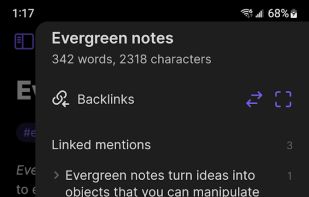
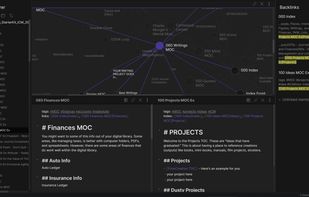
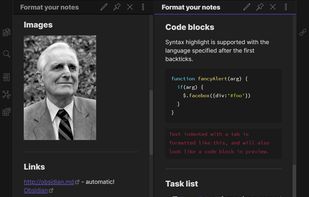
    Obsidian is a note-taking app that lets you create a personal knowledge graph with ease. It is designed for non-linear thinking and allows you to easily link your notes together wiki-style.

    Cost / License

    • Freemium
    • Proprietary

    Application type

    Platforms

    • Mac
    • Windows
    • Linux
    • Android
    • iPhone
    • Android Tablet
    • iPad
    • Snapcraft
    • Microsoft Edge
    • Google Chrome
    • Flathub
    • Safari
    • AppImage
    • Mozilla Firefox
    Obsidian screenshot 1
    Obsidian screenshot 1
    Obsidian screenshot 2
    +6
    Obsidian screenshot 3
    Zami GamiZami Gami’s note

    The best notes app out there for me after testing MANY alternatives. I keep it in sync between devices and it works wonders for random little notes or work related info. Yes, yes, it's proprietary! But there is nothing better that I have found. Looking into Opensidian though!

  2. G-code generator for 3D printers (Bambu, Prusa, Voron, VzBot, RatRig, Creality, etc.).

    Cost / License

    • Free
    • Open Source

    Application type

    Platforms

    • Mac
    • Windows
    • Linux
    Orca Slicer screenshot 1
    Orca Slicer screenshot 1
    Zami GamiZami Gami’s note

    This connects seamlessly to my Qidi Q1 Pro 3D printer over the network and lets me monitor my print through the camera from the comfort of my desk.

  3. Gitnuro icon
     Like

    A FOSS Git multiplatform client for newbies and pros.

    Cost / License

    • Free
    • Open Source

    Application type

    Platforms

    • Mac
    • Windows
    • Linux
    • Flathub
    Gitnuro screenshot 1
    Zami GamiZami Gami’s note

    Simple but pretty-lookign GIT GUI to better visualize my projects and manage branches within them.

  4. ZapZap icon
     Like

    WhatsApp desktop application written in Pyqt6 + PyQt6-WebEngine.

    Cost / License

    • Free
    • Open Source

    Platforms

    • Linux
    • Flathub
    Zami GamiZami Gami’s note

    Lets me keep up with whatsapp on my desktop for when I don't wanna have my phone around as a distraction but still need to answer work-related messages.

  5. KeePassXC icon
     Like

    Open-source password manager storing passwords, notes, and attachments offline with AES-256 encryption, browser extensions, cross-platform support, and TOTP.

    Cost / License

    • Free
    • Open Source

    Application type

    Platforms

    • Mac
    • Windows
    • Linux
    • AppImageHub
    • Snapcraft
    • Microsoft Edge
    • Google Chrome
    • Flathub
    • PortableApps.com
    • Flatpak
    • Homebrew
    • Chocolatey
    • Mozilla Firefox
    Welcome Screen
    Unlock Database
    New Database Wizard
    +13
    New Database Wizard
    Zami GamiZami Gami’s note

    A pretty effective password manager, works on android and Linux so it does all I need with little fuss.

  6. Handy STT icon
     Like

    Free, open source speech-to-text app for desktop, works fully offline, prioritizes privacy, extensibility, cross-platform support, and accessibility.

    Cost / License

    • Free
    • Open Source

    Application type

    Platforms

    • Mac
    • Windows
    • Linux
    Handy STT screenshot 1
    Handy STT screenshot 1
    Handy STT screenshot 2
    Zami GamiZami Gami’s note

    This quietly sits in the background ready for me to dictate to my PC at the press of a button. It's very helpful for the times when I don't want to type stuff out manually.

  7. HandBrake icon
     Like

    An open-source multithreaded video transcoder, HandBrake compresses and converts digital media, supporting MP4, MKV formats, and offers hardware-accelerated conversion.

    Cost / License

    • Free
    • Open Source

    Application type

    Platforms

    • Mac
    • Windows
    • Linux
    • BSD
    • Snapcraft
    • Flathub
    • Haiku
    • Flatpak
    HandBrake screenshot 1
    HandBrake screenshot 1
    HandBrake screenshot 2
    Zami GamiZami Gami’s note

    This helps convert files for my jellyfin server, particularly blu-ray rips!

Syncing and sharing

Tools I use to keep my devices connected and talking to one another.

  1. Smb4K icon
     Like

    Smb4K is an advanced network neighborhood browser and Samba share mounting utility. It is based on the KDE Frameworks 5, Samba's client library (libsmbclient) and, optionally, the KDSoap WS-Discovery client.

    Cost / License

    • Free
    • Open Source

    Platforms

    • Linux
    Zami GamiZami Gami’s note

    The bookmarks functionality allows me to quickly mount server drives I may not use often onto my main PC.

  2. FreeFileSync is a folder comparison and synchronization software that creates and manages backup copies of all your important files. Instead of copying every file every time, FreeFileSync determines the differences between a source and a target folder and transfers only the...

    Cost / License

    • Freemium
    • Open Source

    Application type

    Platforms

    • Mac
    • Windows
    • Linux
    • Flathub
    • PortableApps.com
    • Chocolatey
    Windows
    macOS
    openSUSE Linux
    +7
    Expressive progress dialogs
    Zami GamiZami Gami’s note

    This plus the associated realtimesync helps me keep a backup of my personal files constantly up to date.

  3. Facilitates device communication, enabling notifications, SMS replies, file sharing, and remote control across multiple operating systems.

    Cost / License

    • Free
    • Open Source

    Platforms

    • Mac
    • Windows
    • Linux
    • Android
    • iPhone
    • Android Tablet
    • HUAWEI AppGallery
    • iPad
    • KDE Plasma
    • F-Droid
    • Sailfish OS
    • Plasma Mobile
    • Chocolatey
    • OpenAPK
    KDE Connect screenshot 1
    System Settings Module
    KDE Connect screenshot 2
    +4
    KDE Connect screenshot 3
    Zami GamiZami Gami’s note

    I use something else for quick file transfers, but this does well with larger files. I mostly make use of the remote input tool however, as it lets me control my devices from the comfort of my bed!

  4. LocalSend icon
     Like

    Free open-source tool offers secure, end-to-end encrypted file and message sharing over local networks across major desktop and mobile operating systems.

    Cost / License

    • Free
    • Open Source

    Platforms

    • Windows
    • Chocolatey
    • Mac
    • Homebrew
    • iPhone
    • iPad
    • Android
    • Android Tablet
    • F-Droid
    • Obtainium
    • OpenAPK
    • Linux
    • AppImage
    • Flatpak
    • Flathub
    • Snapcraft
    • Arch Linux
    • Nix Package Manager
    LocalSend screenshot 1
    LocalSend screenshot 1
    LocalSend screenshot 2
    +5
    LocalSend screenshot 3
    Zami GamiZami Gami’s note

    This is a more streamlines file sharing tool a la airdrop, for quickly moving photos or small PDFs and such between devices in my home.

Home server

Stuff I run on my home server. Mostly to manage libraries and files.

  1. Immich icon
     Like

    Self-hosted solution enabling photo and video backup, privacy-driven local AI search, facial recognition, map-based tagging, and multi-user sharing.

    Cost / License

    • Free
    • Open Source

    Application type

    Platforms

    • Online
    • Android
    • iPhone
    • Android Tablet
    • iPad
    • Self-Hosted
    • F-Droid
    • Cloudron
    • Docker
    Immich screenshot 1
    Immich screenshot 1
    Immich screenshot 2
    +9
    Immich screenshot 3
    Zami GamiZami Gami’s note

    I mostly use this for photos off my phone or my camera. The object and face detection is handy to find pictures with specific visual contents.

  2. Jellyfin icon
     Like

    Free open-source media system alternative to proprietary options, supports Chromecast, 4K streaming, plugin extensions, with privacy focus.

    Cost / License

    • Free
    • Open Source

    Application type

    Platforms

    • Mac
    • Windows
    • Linux
    • Android
    • iPhone
    • Android Tablet
    • iPad
    • Self-Hosted
    • Flathub
    • Tizen OS
    • F-Droid
    • Android TV
    • Cloudron
    • Kodi
    • Docker
    • Fire TV
    • Roku
    • Kindle Fire
    • Chrome OS
    • Flatpak
    • AppImage
    • Apple TV
    • Xbox
    Jellyfin screenshot 1
    Jellyfin screenshot 1
    Jellyfin screenshot 2
    +5
    Jellyfin screenshot 3
    Zami GamiZami Gami’s note

    A lovely tool for managing and accessing my anime, tv shows and movies.

  3. calibre icon
     Like

    Free e-book manager offering library management, multi-format conversion, syncing to devices, news download as e-books, built-in viewer, editor, and privacy.

    Cost / License

    • Free
    • Open Source

    Application type

    Platforms

    • Mac
    • Windows
    • Linux
    • BSD
    • Self-Hosted
    • Flathub
    • PortableApps.com
    • Homebrew
    • Haiku
    calibre screenshot 1
    calibre screenshot 1
    calibre screenshot 2
    +3
    calibre screenshot 3
    Zami GamiZami Gami’s note

    To manage my e-books, it's not the prettiest but it works a charm.

  4. Navidrome icon
     Like

    Open source self-hosted streamer with Subsonic API compatibility, low resource usage, multi-user support, remote access, and broad audio format streaming.

    Cost / License

    • Free
    • Open Source

    Application type

    Platforms

    • Mac
    • Windows
    • Linux
    • BSD
    • Self-Hosted
    • Raspberry Pi
    • Cloudron
    Navidrome screenshot 1
    Navidrome screenshot 1
    Navidrome screenshot 2
    +1
    Navidrome screenshot 3
    Zami GamiZami Gami’s note

    I can host my music here and make playlists that become available on my music player frontends. I can have my FLACs stored and stream/download music in far better quality than Spotify offers.

  5. Gitea icon
     Like

    Private, Fast, Reliable DevOps Platform. A self-hosted DevOps platform that gives teams and developers high-efficiency, easy-to-run operations from planning to production. Gitea is a fork of Gogs icon Gogs.

    Cost / License

    • Freemium
    • Open Source

    Application type

    Platforms

    • Mac
    • Windows
    • Linux
    • Online
    • BSD
    • Self-Hosted
    • Raspberry Pi
    • Cloudron
    • Chocolatey
    Gitea screenshot 1
    Gitea screenshot 1
    Gitea screenshot 2
    +3
    Gitea screenshot 3
    Zami GamiZami Gami’s note

    I keep my little projects here since I try to avoid github for anything I don't need to be public. I am not a super serious developer or anything but gitea does what I need for version control and project hosting.

  6. Syncthing icon
     Like

    Open-source, decentralized alternative ensuring data ownership with encrypted communication and peer-to-peer sync, void of central server reliance.

    Cost / License

    • Free
    • Open Source

    Application type

    Platforms

    • Mac
    • Windows
    • Linux
    • BSD
    • Self-Hosted
    • Terminal
    • Cloudron
    • Termux
    Syncthing screenshot 1
    Zami GamiZami Gami’s note

    Keeps files on my home server, desktop PC and my phone in sync, useful for password managers and notes apps where I want them to always be up to date across devices.

  7. RomM icon
     Like

    Self-hosted ROM manager for scanning, organizing, and playing games, with support for 400+ platforms, custom metadata, browser-based play, sharing, and achievements.

    Cost / License

    • Free
    • Open Source

    Application type

    Platforms

    • Self-Hosted
    • Python
    • Cloudron
    • Docker
    RomM screenshot 1
    RomM screenshot 1
    RomM screenshot 2
    +10
    RomM screenshot 3
    Zami GamiZami Gami’s note

    Helps me manage my game ROMs, as well as easily download them onto my steam deck as if they were normal steam games, with the help of retrodeck.

  8. AMP is an easy to install, self-hosted, web-based management panel for game servers. It supports dozens of applications including Minecraft, CS:GO, Rust, 7 Days to Die, Starbound, Factorio and many more. Supports both Windows and Linux.

    Cost / License

    • Paid
    • Proprietary

    Platforms

    • Windows
    • Linux
    • Online
    • Self-Hosted
    Application Management Panel (AMP) screenshot 1
    Application Management Panel (AMP) screenshot 1
    Application Management Panel (AMP) screenshot 2
    +2
    Application Management Panel (AMP) screenshot 3
    Zami GamiZami Gami’s note

    This one-time purchase easily lets me set up game servers to play with my friends.

  9. Sync-in icon
     Like

    Sync-in is a sovereign, open-source platform for file storage, sharing, synchronization, and collaboration. It is intended for individuals, businesses, public-sector entities, and institutions seeking a controlled, scalable solution suited to their operational requirements.

    Cost / License

    • Free
    • Open Source

    Application type

    Platforms

    • Mac
    • Windows
    • Linux
    • Self-Hosted
    • Cloudron
    • Docker
    • Docker Hub
    • npm
    • YunoHost
    Sync-in screenshot 1
    Sync-in screenshot 1
    Desktop application
    +6
    Files metadata
    Zami GamiZami Gami’s note

    This lets me store files a la google drive and share them when necessary when paired with the right networking stack. I use it to access my personal files backup too.

Networking services and tools

Living in a country where CGNAT is the norm means you have to be very network-savvy or rely on external services to keep yourself tethered to your home server when out and about. These services help me achieve that with minimal inconvenience for a reasonable price!

  1. The 1984 Hosting Company was established in 2006 by a couple of Free Software and civil rights enthusiasts. We have since grown to become Iceland's biggest web hosting company by far. Our goal is to offer high quality web hosting and VPS services at a competitive price...

    Cost / License

    • Paid
    • Proprietary

    Application type

    Platforms

    • Online
    Zami GamiZami Gami’s note

    An icelandic VPS provider that respects my privacy more than other options. I use it to route traffic through to my home network from anywhere else.

  2. WireGuard icon
     Like

    WireGuard® is an extremely simple yet fast and modern VPN that utilizes state-of-the-art cryptography. It aims to be faster, simpler, leaner, and more useful than IPsec, while avoiding the massive headache. It intends to be considerably more performant than OpenVPN.

    Cost / License

    • Free
    • Open Source

    Application type

    Platforms

    • Mac
    • Windows
    • Linux
    • Android
    • iPhone
    • BSD
    • iPad
    • Self-Hosted
    • openSUSE
    • Arch Linux
    • Gentoo
    • Fedora
    • Ubuntu
    • Debian
    • FreeBSD
    • OpenWrt
    • Alpine Linux
    • Slackware
    • Termux
    • OpenBSD
    WireGuard screenshot 1
    WireGuard screenshot 1
    WireGuard screenshot 2
    +6
    WireGuard screenshot 3
    Zami GamiZami Gami’s note

    I use a wireguard tunnel between my home server and VPS to keep communications open.

  3. Porkbun icon
     Like

    Porkbun is an ICANN-accredited domain registrar based in Portland, OR. With a passion for all things Internet, the Porkbun team came together to create an effortless website naming system for the creative professionals and businesses of the world.

    Cost / License

    • Paid
    • Proprietary

    Application type

    Platforms

    • Online
    Zami GamiZami Gami’s note

    Prokbun provides me with my web domain at an affordable price, not much else to say here.

I'm a novice in networking and the like, so this is a very rudimentary setup. Let me know what you'd do differently!

No comments so far, maybe you want to be first?