
Clippy approved Browsers

An up to date list of the best browsers

Factors behind this selection:

  • Fast
  • Private/Security Focused
  • Open Source
  • User friendly
  • Dedicated devs
  • Cross platform support
  • Least amount of headache (I have yet to find a browser without any)
Clippy
Clippy List by Clippy , last updated 
Copy a direct link to this comment to your clipboard
  1. Top pick

  2. Brave icon
     Like

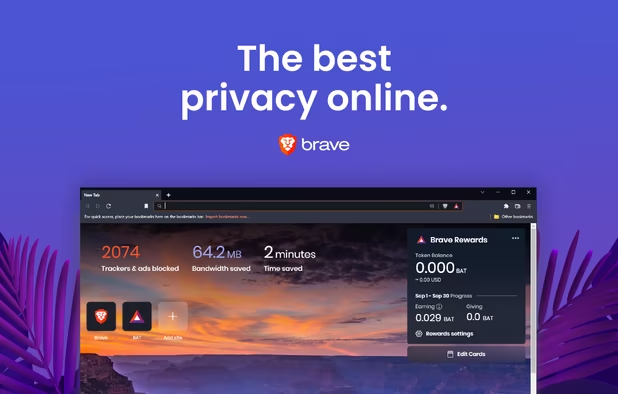
    Fast, secure browser with built-in ad block, privacy controls, and global tracking protections. Optimizes data, speed, and battery life.

    Cost / License

    • Free
    • Open Source

    Application types

    Platforms

    • Mac
    • Windows
    • Linux
    • Android
    • iPhone
    • Android Tablet
    • iPad
    • Snapcraft
    • Flathub
    • Samsung Galaxy Store
    • Homebrew
    • Chocolatey
    Brave screenshot 1
    Brave screenshot 1
    Brave screenshot 2
    +7
    Brave screenshot 3
  3. Best

  4. Privacy-centric, open-source browser with unique UI features like vertical tabs, Split View, and Zen Glance, focusing on security and tranquility.

    Cost / License

    • Free
    • Open Source

    Application type

    Platforms

    • Mac
    • Windows
    • Linux
    • Arch Linux
    • Flathub
    • Flatpak
    • AppImage
    Zen Browser screenshot 1
    Zen Browser screenshot 1
    Zen Browser screenshot 2
    +8
    Zen Browser screenshot 3
  5. Chromium-based browser with preinstalled open-source blockers, default anti-tracking features, no data collection, full extension support, and a minimal interface.

    Cost / License

    • Free
    • Open Source

    Application type

    Platforms

    • Mac
    • Windows
    • Linux
    Helium Browser screenshot 1
    Helium Browser screenshot 1
    Helium Browser screenshot 2
  6. A Floorp fork with custom branding and KDE patches by OpenSUSE. Features include pre-installed extensions like Ublock Origin and canvasblocker.

    Cost / License

    • Free
    • Open Source

    Application type

    Platforms

    • Mac
    • Windows
    • Linux
    • Flathub
    FireDragon screenshot 1
    FireDragon screenshot 1
    FireDragon screenshot 2
  7. Good options

  8. Open-source browser disables Google integration and background services, increasing privacy, stripping binaries, and offering user control with full transparency.

    Cost / License

    • Free
    • Open Source

    Application type

    Platforms

    • Mac
    • Windows
    • Linux
    • Flathub
    ungoogled-chromium screenshot 1
    ungoogled-chromium screenshot 1
    ungoogled-chromium screenshot 2
    +1
    ungoogled-chromium screenshot 3
  9. Floorp icon
     Like

    Open-source web browser built on Firefox, prioritizing privacy and anonymity while offering a Chromium-like interface, user customization, and robust tracking protection.

    Cost / License

    • Free
    • Open Source

    Application type

    Platforms

    • Mac
    • Windows
    • Linux
    • Snapcraft
    • Flathub
    • Flatpak
    Floorp screenshot 1
    Floorp screenshot 1
    Floorp screenshot 2
    +1
    Vertical tabs
  10. Waterfox icon
     Like

    Waterfox is an open-source, privacy-focused browser based on the popular open source browser with a red panda as a mascot. It is designed to be a drop-in replacement for said browser that offers enhanced privacy features, performance improvements, and customizability while...

    Cost / License

    • Free
    • Open Source

    Platforms

    • Mac
    • Windows
    • Linux
    • Android
    • Android Tablet
    • Flathub
    Desktop
    Mobile
  11. LibreWolf icon
     Like

    Privacy-focused browser with over 500 settings for enhanced security and performance, independent of Firefox, and not affiliated with Mozilla.

    Cost / License

    • Free
    • Open Source

    Application type

    Platforms

    • Mac
    • Windows
    • Linux
    • AppImageHub
    • Linux Mint
    • Arch Linux
    • Gentoo
    • Flathub
    • Fedora
    • Ubuntu
    • Debian
    • Homebrew
    • Chocolatey
    • OpenBSD
    Homeage
    Settings
  12. Chromium icon
     Like

    Open-source browser project forming the codebase for other browsers, with strong security, stability, frequent updates, and wide platform compatibility.

    Cost / License

    • Free
    • Open Source

    Application type

    Platforms

    • Mac
    • Windows
    • Linux
    • Android
    • BSD
    • TrueOS
    • Xfce
    • Flathub
    • Snapcraft
    Start Page
    Settings
    Addons Shop
  13. Niche

    Not as accessible as other options for everyday use

  14. The Mullvad Browser is a privacy-focused web browser developed in a collaboration between Mullvad VPN and the Tor Project. It’s designed to minimize tracking and fingerprinting. You could say it’s a Tor Browser to use without the Tor Network.

    Cost / License

    • Free
    • Open Source

    Application types

    Platforms

    • Mac
    • Windows
    • Linux
    • Flathub
    • Flatpak
    • Mozilla Firefox
    Mullvad Browser screenshot 1
    Mullvad Browser screenshot 1
    Mullvad Browser screenshot 2
    +1
    Mullvad Browser screenshot 3
  15. Enhance privacy with a secure, portable browser that hides your IP and encrypts connections on multiple platforms, maintaining anonymity.

    Cost / License

    • Free
    • Open Source

    Platforms

    • Mac
    • Windows
    • Linux
    • Android
    • Flathub
    • Tor
    • OpenBSD
    Tor Browser screenshot 1
    Tor Browser screenshot 1
    Tor Browser 10.0.3 is now based on the new version of Firefox for Android.
    +1
    Tor browser for android alpha
  16. Vanadium icon
     Like

    Privacy and security enhanced releases of Chromium for GrapheneOS. Vanadium provides the WebView and standard user-facing browser on GrapheneOS.

    Cost / License

    • Free
    • Open Source

    Application type

    Platforms

    • Android
    Vanadium screenshot 1
  17. Trivalent icon
     Like

    Trivalent is a specialized, security-hardened Chromium browser for desktop Linux, primarily targeting Fedora and other RPM-based distributions. Developed by secureblue and inspired by the Vanadium browser from the GrapheneOS project, Trivalent applies additional patches, sandbox...

    Cost / License

    • Free
    • Open Source

    Application type

    Platforms

    • Linux
    Trivalent screenshot 1
  18. Upcoming

    Note: Ladybird and Servo have their own browser engines (not Chromium, Gecko, or Webkit)

  19. Ladybird icon
     Like

    Ladybird is an open-source web browser currently in development, with an alpha version expected to launch in 2026.

    Cost / License

    • Free
    • Open Source

    Application type

    Platforms

    • Mac
    • Linux
    Ladybird screenshot 1
    Ladybird screenshot 1
  20. Servo icon
     Like

    Memory-safe, modular web rendering engine with parallel processing, advanced graphics support, cross-platform compatibility, and open-source codebase.

    Cost / License

    • Free
    • Open Source

    Application types

    Platforms

    • Mac
    • Windows
    • Linux
    • Android
    • Rust
    • KaiOS
    • Firefox OS
    Servo screenshot 1
    Servo screenshot 1
    Servo screenshot 2

Comments

Amir-101
1

What about firefox ? It’s free, open source, secure and is one of the rare that runs on it’s own engine.

1 reply
Clippy

Vanilla Firefox used to be a great browser. Unfortunately, Mozilla is slowly destroying it. If you prefer not to use chromium, I suggest using a config or fork of Firefox like Zen Browser, Floorp, Librewolf, etc

Clippy
1

Vivaldi is better than most, but it is closed source. Web browsers are one of the most important pieces of software that people use on a daily basis... if Vivaldi introduces bad features, sell to another company, or gets hacked - there is no recourse for users who want to continue to use it. Clippy wont stand for it

Zatra
-1

¿Por qué Vivaldi esta último en la miniatura? 😭

Gu