• Windows Backup and Restore icon
  • Redo Rescue icon
  • Paragon Backup & Recovery icon
  • FreeFileSync icon
  • EaseUS ToDo BackUp icon
  • +6

Backup and Restore for PC

Shoji VRShoji VR11 appsUpdated
Copy a direct link to this comment to your clipboard

Backup and restore on PC !

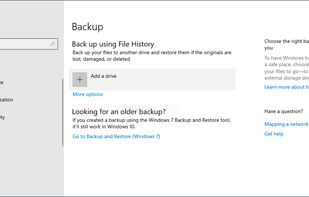
  1. Windows Backup and Restore (formerly Windows Backup and Restore Center) is a component of Microsoft Windows introduced in Windows Vista and included in later versions that allow users to create backups and restore from backups created earlier.

    Cost / License

    • Free
    • Proprietary

    Platforms

    • Windows
    Windows Backup and Restore screenshot 1
    Windows Backup and Restore screenshot 1
    Shoji VRShoji VR’s note
    • Incremental, Scheduled backup supported, has Good UI, has Live CDm Preinstalled on Windows 7 or later
    • but Backup are not resumable, has Slow Performance, only works on windows platform !
  2. Redo Rescue is an easy-to-use backup and recovery solution that can restore a fully working system from a backup image, even to a blank new hard disk.

    Cost / License

    • Free
    • Open Source

    Application type

    Platforms

    • Self-Hosted
    Redo Rescue screenshot 1
    Redo Rescue screenshot 1
    Redo Rescue screenshot 2
    +9
    Redo Rescue screenshot 3
    Shoji VRShoji VR’s note
    • only runs on Live CD Only
    • This apps is discontinued on November 2012
  3. Paragon Backup & Recovery is an advanced backup and recovery software. You may backup files, volumes and disks entirely or pick one at a time. Select the OS partition, and you get all the necessary boot partitions. If your operating system crashes, you can recover it easily.

    Cost / License

    • Free Personal
    • Proprietary

    Application type

    Platforms

    • Windows
    • Mac
    Paragon Backup & Recovery screenshot 1
    Paragon Backup & Recovery screenshot 1
    Paragon Backup & Recovery screenshot 2
    +9
    Features and System Requirements
    Shoji VRShoji VR’s note
    • User Friendly
    • Disadvantages of Free edition: no scheduling or automatical cleanup of backups, with 343 MB one of the highest space-demands on the hard-disk
  4. FreeFileSync is a folder comparison and synchronization software that creates and manages backup copies of all your important files. Instead of copying every file every time, FreeFileSync determines the differences between a source and a target folder and transfers only the...

    Cost / License

    • Freemium
    • Open Source

    Application type

    Platforms

    • Mac
    • Windows
    • Linux
    • Flathub
    • PortableApps.com
    • Chocolatey
    Windows
    macOS
    openSUSE Linux
    +7
    Expressive progress dialogs
    Shoji VRShoji VR’s note
    • Most Popular Open Source with Portableapps Support and has Backup, Incremental, Cloud, Scheduled Backup
    • but has Bad UI
  5. Creates full, incremental, or differential backups, restores files, partitions, or OS, supports cloning, backup templates, scheduling, encryption, and disaster recovery.

    Cost / License

    • Freemium
    • Proprietary

    Application type

    Platforms

    • Windows
    System Backup
    Files Backup
    Disk/Partition Backup
    +1
    Smart backup
    Shoji VRShoji VR’s note
    • Supports Incremental, Cloud, Scheduled backup, has Good UI, has Live CD
    • System backup available
    • but Live CD tested on virtualbox and not working
  6. Duplicati icon
     Like

    Securely store encrypted, incremental, compressed backups on local, cloud, and remote servers. Runs on multiple OSes and offers command line interface.

    Cost / License

    • Freemium
    • Open Source

    Application type

    Platforms

    • Mac
    • Windows
    • Linux
    • BSD
    Duplicati screenshot 1
    Duplicati screenshot 1
    Duplicati screenshot 2
    +3
    Duplicati screenshot 3
    Shoji VRShoji VR’s note
    • Supports Incremental, Scheduled, Cloud backup, has Good UI
    • but Require Web Browser to open its GUI
  7. DriveImage XML is a reliable program for easy imaging and backing up partitions and logical drives. Image creation uses Microsofts Volume Shadow Services (VSS), allowing you to create safe "hot images" even from drives currently in use.

    Cost / License

    • Free Personal
    • Proprietary

    Application type

    Platforms

    • Windows
    Private Edition Free - 5 Languages
    Creation of a bootable CD-ROM with Bart's PE Builder
    Runtime Live Data Recovery CD for DriveImage XML
    Shoji VRShoji VR’s note

    only runs on Live CD , only full backup supported

  8. CrashPlan icon
     Like

    Continuous automated cloud backup platform for businesses with secure, scalable protection and recovery for servers, endpoints, and major SaaS environments.

    Cost / License

    • Paid
    • Proprietary

    Application type

    Platforms

    • Mac
    • Windows
    • Linux
    • Online
    • Software as a Service (SaaS)
    CrashPlan screenshot 1
    CrashPlan screenshot 1
    CrashPlan screenshot 2
    +4
    CrashPlan screenshot 3
    Shoji VRShoji VR’s note
    • Supports Incremental, Cloud, Scheduled, Live CD
    • has Bad UI, Sluggish and high resource Usage
    • Crashplan has been bought out by Carbonite and will be effectively gone by October 23rd, 2018.
  9. Open-source partition and disk imaging solution with multicast support, capable of cloning over 40 computers simultaneously. Offers free disaster recovery and deployment features.

    Cost / License

    • Free
    • Open Source

    Application type

    Platforms

    • Mac
    • Windows
    • Linux
    Choices to save or restore partition or disk in clonezilla
    Device to image or device to device clone
    Enter clonezilla or shell command
    +2
    Setup the clonezilla image home directory
    Shoji VRShoji VR’s note

    only runs on Live CD , only full backup supported

  10. Backup, disk cloning, system migration, and bare-metal restore for Windows PCs and Servers. Automated, selective, and encrypted backup with flexible recovery.

    Cost / License

    • Freemium
    • Proprietary

    Application type

    Platforms

    • Windows
    AOMEI Backupper screenshot 1
    AOMEI Backupper screenshot 1
    AOMEI Backupper screenshot 2
    +3
    AOMEI Backupper screenshot 3
    Shoji VRShoji VR’s note
    • it has Good UI, and supports Live CD,
    • but only full backup supported
  11. Full image backup and disk cloning for Windows, macOS, iOS, and Android with ransomware protection, cloud storage, and fast recovery options.

    Cost / License

    • Paid
    • Proprietary

    Application type

    Platforms

    • Mac
    • Windows
    • Android
    • iPhone
    • Android Tablet
    • iPad
    Acronis True Image screenshot 1
    Acronis True Image screenshot 1
    Acronis True Image screenshot 2
    Shoji VRShoji VR’s note

    It is Commercial tool that supports Incremental, Cloud, Scheduled backup, has Good UI, and supports Live CD

Comments

JohnDangerbrooks
0

I threw a lot of these into the trash can in disgust.

Paragon Backup & Recovery was a particularly painful one. Every time Windows 10 upgraded itself (e.g. 1607 to 1703,) this backup app required a license reactivation. Long story short, one day, I needed to restore my system and I discovered it hadn't been backing anything up for a month!

Acronis True Image is the second painful one. It has everything one desires, but since it kept corrupting my backups, I had to let it go. It's been six years since then, so maybe I should give it another try.

My favorite backup apps right now are Veeam Agent and Macrium Reflect.

redorescue
1

Redo Rescue is actively being developed as of 2020. This article says it was "discontinued on November 2012", but it was recently updated with a new release!

XarBuXar
3

How about this one ? Macrium Reflect icon Macrium Reflect

1 reply
Replying to @XarBuXar

i havent tried that one, will try it if got some time