• Dolphin File Manager icon
  • Double Commander icon
  • File Explorer icon
  • Files icon
  • Finder icon
  • +16

file-man

David7ce21 appsUpdated
Copy a direct link to this comment to your clipboard

List of best file managers, as Graphical user Interface (GUI) and Terminal User Interface (TUI).

GUI

Graphical User Interface

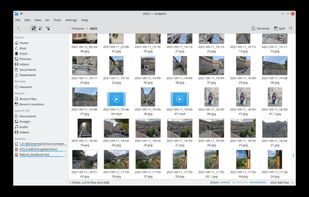
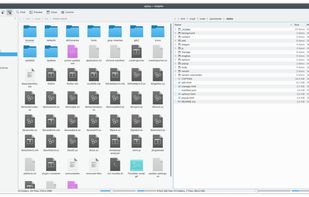
  1. Usability-focused file manager with tabbed browsing, dual panes, remote protocol support, archive browsing, integrated renaming, and file type previews.

    Cost / License

    • Free
    • Open Source

    Application type

    Platforms

    • Windows
    • Linux
    • KDE Plasma
    • Flathub
    Dolphin File Manager screenshot 1
    Dolphin File Manager screenshot 1
    Dolphin File Manager screenshot 2
    +2
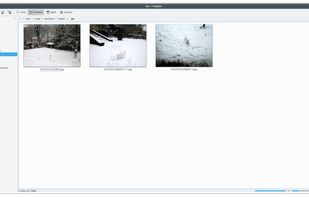
    Dolphin File Manager screenshot 3
    David7ce’s note

    The default file manager for KDE (Linux DE). It's my favorite!

  2. Cross-platform file manager with dual-panel design based on Total Commander. Features include advanced searching, tabbed browsing, and plugin support.

    Cost / License

    • Free
    • Open Source

    Application type

    Platforms

    • Mac
    • Windows
    • Linux
    • BSD
    Double Commander screenshot 1
    Double Commander screenshot 1
    Double Commander screenshot 2
    +7
    Double Commander screenshot 3
  3. Manage files effortlessly with a graphical interface offering offline access, dark mode, ad-free usage, and zip support, optimized for Windows.

    Cost / License

    • Free
    • Proprietary

    Application type

    Platforms

    • Windows
    File Explorer screenshot 1
    File Explorer screenshot 1
    File Explorer screenshot 2
    +1
    File Explorer screenshot 3
    David7ce’s note

    The default file manager for Microsoft Windows, it's good. I like the design on Windows 11.

  4. Files icon
     Like

    Modern Windows file manager with tabbed browsing, dual-pane view, column navigation, integrated archive tools, file tagging, QuickLook support, and appearance customization.

    Cost / License

    • Free
    • Open Source

    Application type

    Platforms

    • Windows
    Files screenshot 1
    Files screenshot 1
    Files screenshot 2
    +4
    Files screenshot 3
    David7ce’s note

    Similar purpose as File explorer developed on GitHub.

  5. Finder icon
     Like

    The Finder is the first thing that you see when your Mac finishes starting up. It opens automatically and stays open as you use other apps. It includes the Finder menu bar at the top of the screen and the desktop below that.

    Cost / License

    • Free
    • Proprietary

    Application type

    Platforms

    • Mac
    Finder screenshot 1
    Finder screenshot 1
    Finder screenshot 2
    +1
    Finder screenshot 3
    David7ce’s note

    The default file manager for macOS, very basic and few options.

  6. GNOME Files, formerly known as Nautilus, is the official file manager for the GNOME desktop, giving the user a simple way to navigate and manage its files.

    Cost / License

    • Free
    • Open Source

    Application type

    Platforms

    • Mac
    • Linux
    • GNOME
    • MacPorts
    • XQuartz
    • Linux Mobile
    GNOME Files screenshot 1
    GNOME Files screenshot 1
    GNOME Files screenshot 2
    +2
    GNOME Files screenshot 3
    David7ce’s note

    The default file manager for GNOME (Linux DE), very simple.

  7. Nemo icon
     Like

    Nemo is the official file manager for the Linux Mint icon Linux Mint operating system running the Cinnamon icon Cinnamon desktop. It re-introduced several features removed from the file manager Nautilus, from which it originated.

    Cost / License

    • Free
    • Open Source

    Application type

    Platforms

    • Linux
    Nemo screenshot 1
    David7ce’s note

    The default file manager for Cinnamon (Linux DE).

  8. Dual-pane Windows file manager with Miller Columns view, tabs, customizable themes, long path support, regex renaming, image converter, metadata viewing, and batch file operations.

    Cost / License

    • Freemium
    • Proprietary

    Application type

    Platforms

    • Windows
    OneCommander screenshot 1
    OneCommander screenshot 1
    OneCommander screenshot 2
    +7
    OneCommander screenshot 3
  9. PCMan File Manager (PCManFM) is a file manager application, developed by Hong Jen Yee from Taiwan, which is meant to be a replacement for GNOME Files, Dolphin and Thunar. PCManFM is the standard file manager in LXDE, also developed by the same author in conjunction with other...

    Cost / License

    • Free
    • Open Source

    Application type

    Platforms

    • Linux
    • LXDE
    • GTK
    • Qt
    PCMan File Manager screenshot 1
    PCMan File Manager screenshot 1
    PCMan File Manager screenshot 2
  10. Ritt icon
     Like

    Ritt supercharges your existing file structure and uses a novel tag-tree approach to help you better organize your files and quickly retrieve what you need.

    Cost / License

    • Freemium
    • Proprietary

    Application type

    Platforms

    • Windows
    Tag-centric file manager
    Easy tagging
    Tag intersection
    +7
    Advanced search
  11. Stagsi icon
     Like

    Hackable SQLite-based tagging, any file format, with scripts and C# plugins, powerful search query language, 100k+ files managed with ease.

    Cost / License

    • Free Personal
    • Proprietary

    Platforms

    • Windows
    Stagsi screenshot 1
  12. Open-source, cross-platform explorer with a distributed filesystem in Rust, organizing files securely across cloud and local storage on multiple devices.

    Cost / License

    • Free
    • Open Source

    Application type

    Platforms

    • Mac
    • Windows
    • Linux
    Spacedrive screenshot 1
    Spacedrive screenshot 1
    Spacedrive screenshot 2
    +3
    Spacedrive screenshot 3
  13. Thunar icon
     Like

    Thunar is a modern file manager for the Xfce Desktop Environment. Thunar has been designed from the ground up to be fast and easy-to-use. Its user interface is clean, intuitive, and customizable. Thunar is fast and responsive with a good start up time and directory load time.

    Cost / License

    • Free
    • Open Source

    Application type

    Platforms

    • Mac
    • Linux
    • BSD
    • Xfce
    • MacPorts
    • XQuartz
    Thunar screenshot 1
    Thunar screenshot 1
    Thunar screenshot 2
    David7ce’s note

    The default file manager for XFCE (Linux DE).

  14. XYplorer icon
     Like

    Tabbed browsing, powerful file search, dual pane options, scripting, customizable interface, bulk renaming, portable use, and advanced preview for files.

    Cost / License

    • Paid
    • Proprietary

    Application type

    Platforms

    • Windows
    XYplorer screenshot 1
    XYplorer screenshot 1
    Thumbnails of image files in one of three fully configurable thumbnails views. Supported are PNG, JPG, GIF, TIF, TGA, WMF, PSD, ICO, BMP, and all RAW photo formats that you have CODECs for. Thumbnails support XYplorer's unique and famous Mouse Down Blow Up functionality.
    +7
    Tabbed Browsing: Have an unlimited number of Browse Tabs, individually customizable and remembered between sessions, and Search Tabs, which are one-click triggers to fully customizable search tasks.

TUI

Terminal User Interface

  1. exa icon
     Like

    exa is a modern replacement for the command-line program ls that ships with Unix and Linux operating systems. This command is used by terminal users, administrators, and developers hundreds of times daily, as well as being useful when writing automated scripts.

    Cost / License

    • Free
    • Open Source

    Platforms

    • Mac
    • Linux
    Examples
  2. Visual, text-based file manager for terminals supporting copying, moving, deleting, searching, and editing files remotely and locally in full-screen mode.

    Cost / License

    • Free
    • Open Source

    Application type

    Platforms

    • Mac
    • Windows
    • Linux
    • BSD
    • Cygwin
    • MacPorts
    Midnight Commander screenshot 1
    Midnight Commander screenshot 1
    Midnight Commander screenshot 2
    +1
    Midnight Commander screenshot 3
  3. nnn icon
     Like

    Initially forked from noice file browser icon noice file browser, nnn is a super fast and resource-sensitive, terminal-based file browser.

    Cost / License

    • Free
    • Open Source

    Application type

    Platforms

    • Linux
    nnn screenshot 1
    nnn screenshot 1
  4. ranger icon
     Like

    Terminal file manager with VI key bindings. It provides a minimalistic and nice curses interface with a view on the directory hierarchy. The secondary task of ranger is to psychically guess which program you want to use for opening particular files.

    Cost / License

    • Free
    • Open Source

    Application type

    Platforms

    • Mac
    • Linux
    • BSD
    • Cygwin
    ranger screenshot 1
    ranger screenshot 1
    ranger screenshot 2
    +1
    ranger screenshot 3
  5. Superfile icon
     Like

    Terminal-based file manager featuring customizable themes, multi-panel views, keyboard shortcuts, offline support, no tracking, ad-free operation, and plugin extensibility.

    Cost / License

    • Free
    • Open Source

    Application type

    Platforms

    • Mac
    • Windows
    • Linux
    Superfile screenshot 1
  6. Vifm icon
     Like

    Vifm is a file manager with curses interface, which provides Vi[m]-like environment for managing objects within file systems, extended with some useful ideas from mutt.

    Cost / License

    • Free
    • Open Source

    Application type

    Platforms

    • Windows
    • Linux
    Vifm with light theme in iTerm2 with Inconsolata font on OS X
    Vifm with dark solarized theme on OS X
    Popup style completion of input and tree-view
    +3
    Search highlight and directory tree preview
  7. xplr icon
     Like

    xplr is a terminal UI based file explorer that aims to increase our terminal productivity by being a flexible, interactive orchestrator for the ever growing awesome command-line utilities that work with the file-system.

    Cost / License

    • Free
    • Open Source

    Application type

    Platforms

    • Mac
    • Linux
    • BSD
    xplr screenshot 1

Comments

RemovedUser
0

pcman-fm is pretty good. comes in both gtk2 and qt versions