• Executor icon
  • Wox Launcher icon
  • Flow Launcher icon
  • Keypirinha icon
  • Microsoft PowerToys icon
  • +1

Finding The Best Windows Application Launcher

JiaChen ZENG6 appsUpdated
Copy a direct link to this comment to your clipboard

The application launcher I'm currently using is Executor, which started 10+ years ago and still being maintained now. I have tried to switch to other launchers about 1~2 years ago but can't find one that fits my needs. I want to make a switch mainly because it sometimes lags. I need to wait for the searching list showing to push enter, which is a big no.

Requirements

Must have: (which are all in Executor) R1. Open/close shortcut can be set to Win+R. R2. User defined short keywords to open a specific app. For example, ed for Microsoft Edge Dev. And more importantly, it should show at the very top of the searching list. R3. Indexing applications to search and open.

  1. Executor icon
     Like

    A multi purpose launcher and more advanced and customizable freeware windows run replacement and more. Executor is available also as a portable app and can be integrated in LiberKey.

    Cost / License

    • Free
    • Proprietary

    Application type

    Platforms

    • Windows
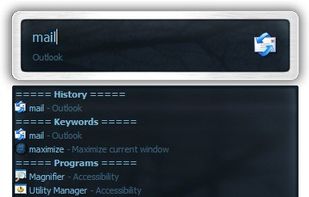
    Executor screenshot 1
    Executor screenshot 1
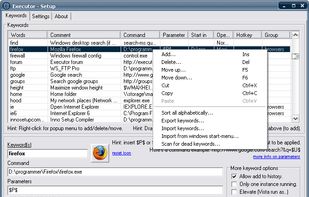
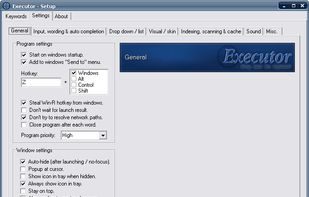
    Executor screenshot 2
    JiaChen ZENG’s note

    The application launcher I've been using for these years, mainly because the old Microsoft Edge doesn't support searching via a certain website, so I was in the need to find a launcher that supports this feature. And I was using Win+R with links in a folder to quickly open apps.

    It has so many options to customize and the functionalities are very practical to use, which I probably won't have thought about if I haven't used Executor. The priority of the searching list can be fully customized. I put the keywords at the top (R2) so I can use it as if using the built-in Win+R.

    However, the UI is old and it doesn't support high DPI so it looks blurry. The software isn't open-source, and it's written in Delphi, which doesn't have a good prospect to be contributed widely even if it open-sourced someday.

  2. Wox is an open-source launcher for macOS, Linux, and Windows. It keeps local search, keyboard-first actions, and an extensible plugin system in one focused input.

    Cost / License

    • Free
    • Open Source

    Application type

    Platforms

    • Mac
    • Windows
    • Linux
    • Homebrew
    Color plugin
    Confetti
    Theme - tokyo
    +2
    Theme - glass dark
    JiaChen ZENG’s note

    The feature is very versatile and it has good support for Chinese and network proxies. It has a good design to support a good plugin ecosystem. I really wanted to love it. However, it doesn't satisfy R1 and R2.

    R1: It does have Win+R support for open/close but limited to shell commands. The shortcut to open/close to search is Alt+Space. And unfortunately, the key combination can't be changed to anyone that includes the Win key.

    R2: It can be configured to use a folder that contains links to applications to simulate keywords, but they won't always show at the top.

    Also, another downside is the development is not active recently. From GitHub issues, there are lots of seemly same bug reports. I can't find a community to ask questions.

  3. Dedicated to make your workflow flow more seamlessly. Aimed at being more than an app launcher, it searches, integrates and expands on functionalities. Flow will continue to evolve, designed to be open and built with the community at heart.

    Cost / License

    • Free
    • Open Source

    Application type

    Platforms

    • Windows
    • Chocolatey
    Flow Launcher screenshot 1
    Flow Launcher screenshot 1
    Flow Launcher screenshot 2
    +2
    Flow Launcher screenshot 3
    JiaChen ZENG’s note

    It derives from Wox and says it fixed lots of bugs. Quickly examining it, I can't find where it improves compared to Wox. R1 and R2 still can't be satisfied (see Wox). The UI renders poorly with MacType font rendering. The fonts are cut here and there.

  4. A lightning fast and flexible keystroke launcher for Windows. No installation required (portable). Extensible with Python3 plugins.

    Cost / License

    • Free
    • Proprietary

    Application type

    Platforms

    • Windows
    smart search
    customizable interface
    math expressions evaluator
    +2
    base converter
    JiaChen ZENG’s note

    Doesn't satisfy R1, and R2 maybe initially. The open/close shortcut can be configured but failed to set to Win+R due to confliction which the error showed. It will associate keywords to historically opened apps but automatically only. The keyword can't be manually set. There is a GitHub issue that has been open for two years with literally no progress. In another related issue, someone who comes from Executor seems to have figured out how to simulate manually associating keywords but no clear explanation.

    The configuration is done by a text file like Sublime Text, which is a bit geeky. The documentations are in detail. Seems appealing to programmers.

  5. Set of open-source tools enhancing Windows with features like FancyZones, PowerRename, and Keyboard Manager. Lightweight and ad-free.

    Cost / License

    • Free
    • Open Source

    Application type

    Platforms

    • Windows
    Microsoft PowerToys screenshot 1
    Microsoft PowerToys screenshot 1
    Microsoft PowerToys screenshot 2
    +4
    Microsoft PowerToys screenshot 3
    JiaChen ZENG’s note

    Microsoft PowerToys Run is an alternative. I haven't installed it but watched a tutorial video. It seems experimental and isn't so customizable at this moment. And seeing its attribution from Wox, I can imagine that it doesn't satisfy R1 and R2 (see Wox).

  6. ueli icon
     Like

    Developed with the Electron framework, ueli is the type of tool that adopts simplicity, leaving out any unnecessary options and configuration settings. It creates an icon in the system tray at startup, where it sits silently throughout its runtime, without disturbing you with...

    Cost / License

    • Free
    • Open Source

    Application type

    Platforms

    • Mac
    • Windows
    • Linux
    ueli screenshot 1
    Calculator
    Web Search
    +4
    Custom Web Search
    JiaChen ZENG’s note

    Doesn't satisfy R1, but supports R2 seems in most cases in this setting now. I set e for Microsoft Edge but it will interpret it as a Math constant e.

    The UI looks designed for Mac as the folder icon is blue. No support for Japanese or Chinese at this moment. The shortcut to open/close can't be configured to include character or number keys, which disappointed me so much.

    The search feature is done correctly in my opinion. It only indexes something like .lnk files by default, which makes the searching list surprisingly clear. What extensions to the index are configurable. (I want to note that Executor also has this feature but I didn't configure it like this. I'm going to change to a similar setting and see now😂.)

It is terrible that again, I failed to find an application launcher that satisfies my three least requirements. But maybe I should think the other way around. Because I've found this brilliant piece of software, Executor!

Comments

0
Administrator at AlternativeTo

I find myself using more and more PowerToys Run on a daily basis, since it is quite simple but at the same time I don't waste much time with the settings and the UI adapts very well to windows. Great list btw!