• Replica icon
  • Trello icon
  • Raindrop.io icon
  • Evernote Web Clipper icon
  • GGather icon
  • +20

Master >>>bookmarks-good reads-visuals<<< independent from device, browser or OS!

Devianticos25 appsUpdated
Copy a direct link to this comment to your clipboard

Find the best and universal tools on the market to organize your big or small collection of bookmarks no matter which content, browser, OS or device you use. This list focuses on platforms which have effective mechanics to save, comment, structure, filter or find bookmarks. Personally I prefer well designed, eye friendly, state of the art, timeless, intuitively usable UIs which are ready to adopt to future needs and stay up to date. (Several services in this list have behind a paywall much more valuable features to organize your bookmarks)

New and fresh Apps in the pipeline: (not yet in the database, but here in the list) www.linqes.com www.cling.com

  1. Replica icon
     Like

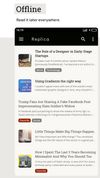
    Simple way for save articles, stories and web pages for reading: offline, organized and clean formatted.

    Cost / License

    • Free
    • Proprietary

    Application type

    Platforms

    • Android
    Replica screenshot 1
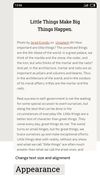
    Replica screenshot 2
    Replica screenshot 3
    Devianticos’s note

    Instapaper clone. for people who like to read and collect outstanding article.

  2. Trello icon
     Like

    Organize tasks with boards, lists, and cards, and customizable workflows. Ideal for projects, collaboration, and effortless progress tracking.

    Cost / License

    • Freemium
    • Proprietary

    Application type

    Platforms

    • Mac
    • Windows
    • Online
    • Android
    • iPhone
    • Android Tablet
    • iPad
    • Apple Watch
    • Android Wear
    • Software as a Service (SaaS)
    Trello screenshot 1
    Trello screenshot 1
    Trello screenshot 2
    +6
    Trello screenshot 3
    Devianticos’s note

    Started as scrum project management tool and developed to an universal content sharing tool. Excellent for teams sharing bookmarks and content on a highly dynamic pase.

  3. Store bookmarks with related content, organize thematically with real-time collaboration and privacy focus, offering web clipper and cloud sync.

    Cost / License

    • Freemium
    • Proprietary

    Application type

    Platforms

    • Mac
    • Windows
    • Linux
    • Online
    • Android
    • iPhone
    • Android Tablet
    • iPad
    • Microsoft Edge
    • Vivaldi
    • Google Chrome
    • Safari
    • Yandex Browser
    • Software as a Service (SaaS)
    • Opera
    • Mozilla Firefox
    Raindrop.io interface with dark theme selected
    service description (Snapshot from homepage)
    (Snapshot from homepage)
    +5
    organize feature description (Snapshot from homepage)
    Devianticos’s note

    When you prefer to sort your links in a tree structure you will love it. Has a very modern look and offers good filter options.

  4. Save anything you see online - including text, links and images - into your Evernote account with a single click.

    Cost / License

    • Free
    • Proprietary

    Application type

    Platforms

    • Online
    • Microsoft Edge
    • Internet Explorer
    • Google Chrome
    • Safari
    • Opera
    • Firefox
    Evernote Web Clipper screenshot 1
    Devianticos’s note

    The web clipper of the all time classic organizer. the moleskine under the online notebook integrates functions to save, cut and copy content from any page.

  5. GGather icon
     Like

    Collect any article you want to read later, image that inspired you or video you want to watch later. Save anything, never lose it and view it without ever leaving GGather. Organize your bookmarks with tags and notes. And GGather tags are special.

    Cost / License

    • Freemium
    • Proprietary

    Application type

    Platforms

    • Online
    • Google Chrome
    Chrome Extension Save
    Chrome Extension Library
    Library
    +2
    Discover
    Devianticos’s note

    A new comer on the bookmarking market. give it a try and collect all you want to access later on one shiny place.

  6. Enhances tab management on Chrome and Firefox with features like session management, effortless search, link organization, and category spaces.

    Cost / License

    • Freemium
    • Proprietary

    Application type

    Platforms

    • Mac
    • Windows
    • Linux
    • Google Chrome
    • Mozilla Firefox
    Toby For Tabs screenshot 1
    Toby For Tabs screenshot 1
    Toby For Tabs screenshot 2
    +2
    Toby For Tabs screenshot 3
    Devianticos’s note

    Bookmark like a browser native not like a book worm. Tab based link manager for the new age.

  7. Mix icon
     Like

    Mix is a new way to discover and curate interesting content you find on the internet. We’re not (yet another) source for breaking news -- we take you deeper into the things that interest you most, and help you discover cool stuff.

    Cost / License

    • Free
    • Proprietary

    Application type

    Platforms

    • Online
    • Android
    • iPhone
    • Android Tablet
    • iPad
    Mix screenshot 1
    Mix screenshot 1
    Devianticos’s note

    Successor of the stumble upon app. More like an intelligent interest and news curator with the potential to make you discover and store the content you didn't know you were looking for but is exactly what you wanted.

  8. Capture fullpage snapshots of your favorite websites & organize them.

    Cost / License

    • Freemium
    • Proprietary

    Application type

    Platforms

    • Online
    Hypershoot screenshot 1
    Hypershoot screenshot 1
    Hypershoot screenshot 2
    +2
    Hypershoot screenshot 3
    Devianticos’s note

    Capture fullpage snapshots of your favorite websites & organize them

  9. Pinboard icon
     Like

    Pinboard is a bookmarking website intended for people who want to reliably keep track of large numbers of links. Its goals are to be useful, fight bloat, keep things fast, and stay small. Social bookmarking for introverts. m.pinboard.

    Cost / License

    • Paid
    • Proprietary

    Application type

    Platforms

    • Online
    Bookmark
    Devianticos’s note

    One of the long lasting services. Took over the lead from delicio.us as tag based bookmark organizer. Prominent for the consequent minimalistic but extremly functional approach. less ist more in its best case.

  10. bit.ly icon
     Like

    Shortens URLs, generates customizable QR codes, tracks clicks, offers branded domains, bulk management, analytics, browser extension, and API access.

    Cost / License

    • Freemium
    • Proprietary

    Application type

    Platforms

    • Online
    • Android
    • iPhone
    • Chrome OS
    • Android Tablet
    • Google Chrome
    • Mozilla Firefox
    • iPad
    bit.ly screenshot 1
    bit.ly screenshot 1
    bit.ly screenshot 2
    +1
    bit.ly screenshot 3
    Devianticos’s note

    Originally a URL shortener. Now a powerful tool to manage and share links.

  11. Liner icon
     Like

    LINER AI Copilot, powered by ChatGPT/GPT-4 and Google Search, provides high-quality information to make your web browsing experience as enriching as possible. It's designed to help you get more done with less time and energy, offering features such as translation, sentence...

    Cost / License

    • Freemium
    • Proprietary

    Application type

    Platforms

    • Mac
    • Windows
    • Online
    • Android
    • iPhone
    • Chrome OS
    • Android Tablet
    • iPad
    • Microsoft Edge
    • Google Chrome
    • Safari
    • Opera
    Liner screenshot 1
    Devianticos’s note

    Is a web highlighter that helps you highlight, save, and organize contents on the internet. Mark and remember the text you came to look for on one place.

  12. You're busy. OneNote Web Clipper lets you quickly clip all or part of a web page to OneNote, and save it for later. Clip images, pdfs, videos, or a visual bookmark of a page. Best of all, you can access them from any computer, tablet, or phone - even when you're offline.

    Cost / License

    • Free
    • Proprietary

    Application type

    Platforms

    • Online
    • Chrome OS
    • Google Chrome
    • Firefox
    OneNote Web Clipper screenshot 1
    OneNote Web Clipper screenshot 1
    OneNote Web Clipper screenshot 2
    +2
    OneNote Web Clipper screenshot 3
    Devianticos’s note

    Web clipper from the microsoft family. If you use the MS ecosystem you can save your research or investigation results with one note in a convinient way.

  13. Stash.ai icon
     Like

    Stash is a smart, cross-device bookmark app backed by artificial intelligence. Save articles, videos and anything else. They're automatically categorized for you.

    Cost / License

    • Paid
    • Proprietary

    Application type

    Platforms

    • Online
    • iPhone
    • iPad
    • Google Chrome
    • Software as a Service (SaaS)
    Stash.ai screenshot 1
    Stash.ai screenshot 1
    Stash.ai screenshot 2
    +2
    Stash.ai screenshot 3
    Devianticos’s note

    A smarter place to save anything you find on the internet.

  14. Milanote icon
     Like

    Milanote is an easy-to-use tool to organize your ideas and projects into visual boards.

    Cost / License

    • Freemium
    • Proprietary

    Application type

    Platforms

    • Mac
    • Windows
    • Online
    • Android
    • iPhone
    • iPad
    • Software as a Service (SaaS)
    Milanote screenshot 1
    Milanote screenshot 1
    Milanote screenshot 2
    +8
    Milanote screenshot 3
    Devianticos’s note

    Modern web clipper to save bookmarks and web snippets. (Apps for different OS are under development)

  15. Pocket icon
     Like

    Save articles to read offline, with browser and app integration across multiple platforms. Enjoy ad-free, dark mode, and text-to-speech features.

    Cost / License

    • Freemium
    • Proprietary

    Application type

    Platforms

    • Online
    • Android
    • iPhone
    • Android Tablet
    • iPad
    • Microsoft Edge
    • Google Chrome
    • Safari
    • Opera
    • Mozilla Firefox
    Pocket screenshot 1
    Pocket screenshot 1
    Pocket screenshot 2
    +7
    Pocket screenshot 3
    Devianticos’s note

    Was originally a read-later-platform but developed over the years to powerful link saver. Structures links via tags and has a good layout. Made for reading and finding quality articles of your interest.

  16. Save web pages for offline reading, organize long articles and blog posts, enjoy distraction-free mode, and sync content across devices with text-to-speech support.

    Cost / License

    • Freemium
    • Proprietary

    Application type

    Platforms

    • Mac
    • Online
    • Android
    • iPhone
    • Android Tablet
    • iPad
    • Apple Watch
    • Google Chrome
    • Kindle Fire
    • Software as a Service (SaaS)
    • Mozilla Firefox
    Instapaper screenshot 1
    Instapaper screenshot 1
    Instapaper screenshot 2
    +1
    Instapaper screenshot 3
    Devianticos’s note

    For people bookmarking articles and long reads. Best read later tool with simple bookmarking opportunity.

  17. Refind icon
     Like

    Discover, save, and read what's worth your attention.

    Cost / License

    • Freemium
    • Proprietary

    Application type

    Platforms

    • Online
    • Android
    • iPhone
    • Android Tablet
    • iPad
    • Google Chrome
    Refind screenshot 1
    Refind screenshot 1
    Refind screenshot 2
    +1
    Refind screenshot 3
    Devianticos’s note

    Focuses on reading and finding quality articles of your interest. But you can use it also to save and structure links.

  18. Dragdis icon
     Like

    Drag & drop anything anywhere. Collect images, texts, links or videos to your private folders or post directly to Facebook, Tumblr, Twitter & (soon to come) Dropbox, Pinterest. More info: .

    Cost / License

    • Freemium
    • Proprietary

    Application type

    Platforms

    • Online
    • Android
    • iPhone
    • Android Tablet
    • Windows Phone
    • iPad
    Dragdis screenshot 1
    Dragdis screenshot 1
    Dragdis screenshot 2
    +2
    Dragdis screenshot 3
    Devianticos’s note

    Drag and drop all media and content into your personal list of interest.

  19. lumio icon
     Like

    Break up with bookmarks! Meet lumio.

    Cost / License

    • Freemium
    • Proprietary

    Application type

    Platforms

    • Mac
    • Windows
    • Linux
    • iPhone
    • Chrome OS
    • iPad
    • Google Chrome
    lumio screenshot 1
    lumio screenshot 1
    lumio screenshot 2
    +1
    lumio screenshot 3
    Devianticos’s note

    Grap text, links, pictures, screenshots from any page and make it part of your record of meaningful content.

  20. Dropmark icon
     Like

    Dropmark is a visual collaboration tool for creative people and teams. Drag and drop to the menu bar app, and your files are automatically uploaded to the cloud. Organize and invite colleagues to view and collaborate privately, or share your content with the world.

    Cost / License

    • Freemium
    • Proprietary

    Application type

    Platforms

    • Mac
    • Online
    • iPhone
    • iPad
    • Google Chrome
    • Safari
    Dropmark screenshot 1
    Dropmark screenshot 1
    Dropmark screenshot 2
    +3
    Dropmark screenshot 3
    Devianticos’s note

    Collect especially visual content and arrange it to a nice looking collage of reminders and interest lists.

  21. Google Bookmarks is a free online bookmark storage service, available to Google Account holders. It allows one to bookmark favorite websites and add labels or tags, and also notes.

    Cost / License

    • Free
    • Proprietary

    Application type

    Platforms

    • Online
    Google Bookmarks screenshot 1
    Devianticos’s note

    Simple way to bookmark and organize links via lables (like tagging) and it is recommended to use it in combination with the browser extension Bookmark Manager icon Bookmark Manager.

  22. Saved.io icon
     Like

    In your browsers address bar, type "saved.io/" in front of the URL of the site you want to save. Hit enter and you'll be redirected to saved.io where you can see the saved link. All you need is a web browser. You don't need to install any apps or extensions.

    Cost / License

    • Free
    • Proprietary

    Application type

    Platforms

    • Online
    07042023
    Saved.io screenshot 1
    Saved.io screenshot 2
    Devianticos’s note

    The most simplistic bookmark saver with tagging function. A unique way to save bookmarks which works best on keyboard devices and you have to get used to it.

  23. Pearltrees is a social curation tool. It lets you organize, discover and share the stuff you like on the web.

    Cost / License

    • Freemium
    • Proprietary

    Application type

    Platforms

    • Online
    • Android
    • iPhone
    • Android Tablet
    • iPad
    • Google Chrome
    • Software as a Service (SaaS)
    • Firefox
    Pearltrees screenshot 1
    Pearltrees screenshot 1
    Pearltrees screenshot 2
    +7
    Pearltrees screenshot 3
    Devianticos’s note

    Organizes bookmarks on a canvas and creates a unique look and feel for sorting bookmarks.

  24. Diigo icon
     Like

    Save, annotate, and organize web resources with highlighters, sticky notes, cross-device sync, Outliner, advanced search, and flexible sharing options.

    Cost / License

    • Freemium
    • Proprietary

    Application type

    Platforms

    • Online
    • iPhone
    • iPad
    • Google Chrome
    • Safari
    • Mozilla Firefox
    Diigo screenshot 1
    Diigo screenshot 1
    Diigo screenshot 2
    +3
    Diigo screenshot 3
    Devianticos’s note

    Good tagging and commenting system for bookmarks. from the look already out of date but good to structure bookmarks.

  25. BibSonomy icon
     Like

    BibSonomy is a system for sharing bookmarks and lists of literature (BibTex format).

    Cost / License

    • Free
    • Open Source

    Application type

    Platforms

    • Online
    BibSonomy screenshot 1
    Devianticos’s note

    Specialized on organizing scientific bookmarks and can be used as a platform to save any other bookmark collection.

No comments so far, maybe you want to be first?