Apps tagged with 'fan'

All apps in Apps tagged with 'fan' category. Use the filters below to narrow down your search. 
Copy a direct link to this comment to your clipboard
  1. HWMonitor icon
     117 likes

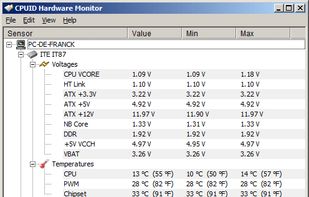
    HWMonitor for Windows® x86/x64 is a hardware monitoring program that reads PC system's main health sensors : voltages, temperatures, powers, currents, fans speed, utilization, clock speeds…

    Cost / License

    • Freemium
    • Proprietary

    Platforms

    • Windows
    HWMonitor screenshot 1
    35 alternatives
  2. iStat Menus icon
     120 likes

    iStat is a series of system monitor apps. It's available in different versions: iStat Menus, iStat for iOS and iStat Server as a companion application to the iStat for iOS app that lets you remotely monitor your computers (free for Windows and Mac).

    Cost / License

    • Paid
    • Proprietary

    Platforms

    • Mac
    • iPhone
    iStat Menus screenshot 1
    iStat Menus screenshot 1
    iStat Menus screenshot 2
    +1
    iStat Menus screenshot 3
    74 alternatives
  3. RadeonTuner icon
     1 like

    RadeonTuner is an easy to use alternative for the AMD Adrenalin Software for users that just want the basics or use the driver only install type.

    Cost / License

    • Free
    • Open Source

    Platforms

    • Windows
    RadeonTuner screenshot 1
    RadeonTuner screenshot 1
    RadeonTuner screenshot 2
    8 alternatives
  4. App Tamer icon
     8 likes

    ? Background app taming: CPU use by background apps can lead to slower performance, shorter battery life, prompt heating and trigger your Mac’s fans. App Tamer helps you to manage and reduce overall CPU usage by controlling idle apps working in the background.

    Cost / License

    • Paid
    • Proprietary

    Platforms

    • Mac
    App Tamer reduces fan noise, extend battery life and harness all of your Mac's power.
    See which apps are consuming battery and CPU even when you're not using them.
    App Tamer automatically reduces the CPU usage of apps when they're not in use.
    +5
    Built-in warnings tell you when apps use more CPU than they should.
    5 alternatives
  5. TPFanControl icon
     9 likes

    Solution to the cooling fan noise annoyances Thinkpad T4x (T40/T41/T42/T43) notebook series. Allows the user to control fan activity based on the system temperature. Win XP Visual C++ project controls the fan via port IO to the embedded controller.

    Cost / License

    • Free
    • Open Source

    Alerts

    • Discontinued

    Platforms

    • Windows
    TPFanControl screenshot 1
    15 alternatives
  6. This software detects and optionally controls speed of CPU fan of many PC-Systems. Furthermore you are able to configure the handling of the EC-registers on your own (risk). To determine the EC-registers use e.g. software like "rw everything".

    Cost / License

    • Free
    • Open Source

    Platforms

    • Windows
    NoteBook FanControl screenshot 1
    NoteBook FanControl screenshot 1
    NoteBook FanControl screenshot 2
    5 alternatives
  7. fancontrol icon
     4 likes

    fancontrol is a shell script for use with lm_sensors. It reads its configuration from a file, then calculates fan speeds from temperatures and sets the corresponding PWM outputs to the computed values.

    Cost / License

    Platforms

    • Linux
    fancontrol screenshot 1
  8. CPU Thermometer is one free CPU temperature monitor; it can help you monitor your computer CPU temperature in live time. Program can start with Windows start-up, and show live CPU temperature in your desktop tray icon, so you get this important system information at a glance.

    Cost / License

    • Free
    • Proprietary

    Platforms

    • Windows
    CPU Thermometer screenshot 1
  9. Hardware sensors monitor utilizes sensor chips on smart motherboards to track system and CPU core temperatures, voltages and cooling fans. By quickly catching an overheated computer, you can prevent disasters such as system instability or damage.

    Cost / License

    • Paid
    • Proprietary

    Platforms

    • Windows
    Main screen
    System tray details
    Settings
    +2
    S.M.A.R.T. data
  10. Fall asleep faster with two high quality fan noises. Easily adjust volume, oscillation, fade out and timer. Don't bother lugging around a sleep machine or turning on a real fan. This sleep app will help you fall asleep faster, better and cheaper.

    Cost / License

    • Freemium
    • Proprietary

    Platforms

    • iPhone
    • iPad
    Deep Sleep Fan - White Noise for Bedtime screenshot 1
    Deep Sleep Fan - White Noise for Bedtime screenshot 1
    Deep Sleep Fan - White Noise for Bedtime screenshot 2
    56 alternatives
  11. Delta Patcher is a tool that is able to create and apply xdelta patches. It supports more options than the frontends for the xdelta library, such as compression level and checksum verification. It is written in C++ and is entirely self-contained.

    Cost / License

    Platforms

    • Windows
    • Mac
    • Linux
    Patch application mode
    Patch creation mode
    Delta Patcher screenshot 2
    1 alternatives
  12. Heatsync icon
     Like

    HeatSync syncs the air*, cpu and hdd temperatures and with the rpm of their corresponding fans increasing/decreasing one as the other is raising/dropping.

    Cost / License

    • Free
    • Proprietary

    Platforms

    • Mac
    Heatsync screenshot 1
    5 alternatives
  13. Coolbook icon
     2 likes

    CoolBook is a tool for the MacBook, MacBook Air and MacBook Pro computers. It lets you monitor the frequency, voltage and temperature of the CoreDuo / Core2Duo CPU.

    Cost / License

    • Freemium
    • Proprietary

    Alerts

    • Discontinued

    Platforms

    • Mac
    The main screen