Apps with 'Emoji Picker' feature

All apps in Apps with 'Emoji Picker' feature category. Use the filters below to narrow down your search. 
Copy a direct link to this comment to your clipboard
  1. Vicinae icon
     57 likes

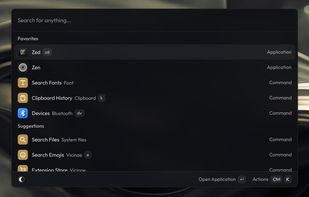
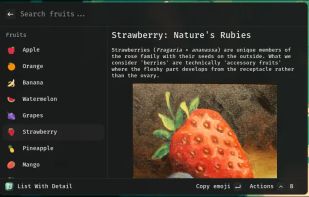
    High-performance native desktop launcher enabling fast keyboard access to system actions, development of extensions in C++ or server-side React.

    Cost / License

    Application type

    Since

    • Since 2025

    Platforms

    • Mac
    • Linux
    • GNOME
    • KDE Plasma
    • Arch Linux
    • COSMIC
    • Fedora
    • Gentoo
    • AppImage
    • Nix Package Manager
    • FR flagFrance
    • European Union flagEU
    Main
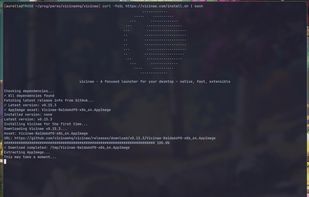
    Script-install
    Intro example
    +48
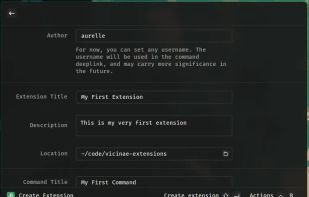
    Create extension
    73 alternatives
  2. Radial icon
     2 likes

    Create powerful macros, trigger them with a gesture. Turn repetitive workflows into single actions at your cursor. The radial menu for macOS productivity.

    Cost / License

    • Paid
    • Proprietary

    Application type

    Since

    • Since 2026

    Platforms

    • Mac
    • DK flagDenmark
    • European Union flagEU
    Radial screenshot 1
    Radial screenshot 1
    Radial screenshot 2
    +3
    Radial screenshot 3
    17 alternatives
  3. Retro Typer icon
     8 likes

    Retro Typer is a straightforward software tool designed for macOS and Windows platforms. Its primary function is to provide users with a search engine for locating memes and emojis. It incorporates a user-friendly interface that facilitates the navigation and selection of...

    Cost / License

    • Free
    • Open Source

    Since

    • Since 2023

    Platforms

    • Windows
    • Mac
    Retro Typer screenshot 1
    Retro Typer screenshot 1
    Retro Typer screenshot 2
    +1
    Retro Typer screenshot 3
    31 alternatives
  4. Rocket icon
     14 likes

    Rocket is a free Mac app that makes typing emoji faster and easier using Slack-style shortcuts.

    Cost / License

    • Freemium
    • Proprietary

    Since

    • Since 2017

    Platforms

    • Mac
    • AU flagAustralia
    Rocket screenshot 1
    32 alternatives
  5. Smile icon
     5 likes

    Smile is a simple emoji picker for linux with custom tags support.

    Cost / License

    Since

    • Since 2022

    Platforms

    • Linux
    • Flathub
    • Flatpak
    • IT flagItaly
    • European Union flagEU
    Smile screenshot 1
    Smile screenshot 2
    5 alternatives
  6. Fast and beautiful emoji picker. Easily find the perfect emoji by genre or search. Remembers your recent emojis for quick re-use.

    Cost / License

    Since

    • Since 2023

    Platforms

    • Windows
    • Linux
    • Android
    • Flathub
    Feeling Finder screenshot 1
    Feeling Finder screenshot 1
    7 alternatives
  7. Splice brings Slack-style emoji triggers and GIF search to macOS, so the right reaction is always a few keystrokes away.

    Cost / License

    • Paid
    • Proprietary

    Since

    • Since 2026

    Platforms

    • Mac
    • US flagUnited States
    Splice - Emojis & GIFs screenshot 1
    Splice - Emojis & GIFs screenshot 1
    Splice - Emojis & GIFs screenshot 2
    +1
    Splice - Emojis & GIFs screenshot 3
    29 alternatives
  8. Emote icon
     Like

    Emote is a modern emoji picker for Linux 🚀. Written in GTK3, Emote is lightweight and stays out of your way.

    Cost / License

    Since

    • New

    Platforms

    • Linux
    • Snapcraft
    Emote screenshot 1
    Emote screenshot 1
    Emote screenshot 2
    +2
    Emote screenshot 3
    5 alternatives
  9. FujiMoji icon
     Like

    Type any emoji, text snippet, or media by name from anywhere on your Mac. FujiMoji is a lightweight menu bar app that listens for your trigger key, shows fast suggestions, and pastes the selected result directly into the active text field.

    Cost / License

    • Free
    • Open Source (MIT)

    Since

    • Since 2025

    Platforms

    • Mac
    FujiMoji screenshot 1
    FujiMoji screenshot 1
    29 alternatives
  10. Mowji icon
     Like

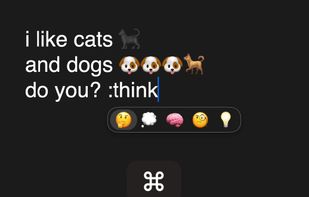
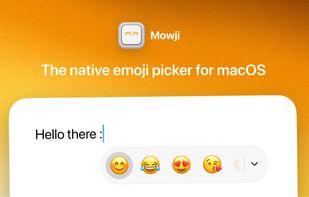
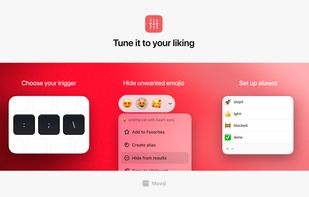
    Mowji is a native emoji picker for macOS that lets you find and insert emoji directly where you type. With the colon selected as your trigger, type a word such as :smile, use the arrow keys to choose a result, and press Return to insert it without leaving the text field.

    Cost / License

    • Paid
    • Proprietary

    Since

    • New

    Platforms

    • Mac
    • IT flagItaly
    • European Union flagEU
    Mowji screenshot 1
    Mowji screenshot 1
    Mowji screenshot 2
    +1
    Mowji screenshot 3
    30 alternatives