
SuperV icon
SuperV icon

SuperV

 1 like

Windows-style clipboard history (Super+V), emoji panel, screenshots and more Windows shortcuts for Linux, in one tiny C program.
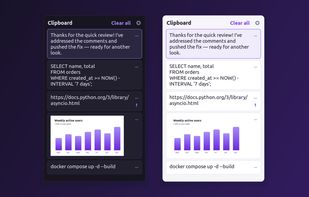
Clipboard history on Super+V: text, code, links and images, dark or light

Cost / License

  • Free
  • Open Source (MIT)

Application type

Since

  • New

Updated

  • Updated Nov 2026

Platforms

  • Linux
  • Debian
  • Ubuntu
  • Arch Linux
  • openSUSE
  • Fedora
  • Linux Mint
1like
0articles
Save

Features

Properties

Features

Highlights All activities

SuperV News & Activities

Recent activities

SuperV information

AlternativeTo Categories

Office & Productivity, Photos & Graphics

GitHub repository

  •  5 Stars
  •  0 Forks
  •  0 Open Issues
  •   Updated  
View on GitHub
SuperV was added to AlternativeTo by saikatnjm on and this page was last updated .

No comments or reviews, maybe you want to be first?

Official Links

What is SuperV?

SuperV brings Windows' most-missed shortcuts to Linux. Press Super+V for clipboard history: your last 25 texts and images, click to paste, pin favourites. It marks what you've already pasted, so working through a list is easy.

Turn on only what you want in its settings:

  • Super+. emoji panel with kaomoji and symbols, typed where you write
  • Super+Shift+S screenshots with arrows, boxes, text, blur and pinning
  • Super+Shift+T copy text from the screen (OCR, offline)
  • Super+Shift+C colour picker
  • Ctrl+Super+Alt+V paste as plain text

One small C program (about 360 KB), about 5 MB of memory, no network access, no telemetry. Works on GNOME, KDE Plasma, Cinnamon, MATE and Xfce, on Wayland and X11. Packages for Ubuntu and Linux Mint (PPA), Debian, Fedora, openSUSE and Arch.