
yabbistir icon
yabbistir icon

yabbistir

 1 like

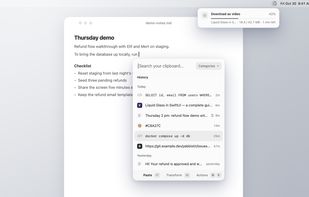
A free, open-source Paste alternative: an extensible, keyboard-first clipboard history for macOS that opens right under your text caret.
yabbistir screenshot 1

Cost / License

  • Free
  • Open Source (MIT)

Application type

Since

  • New

Updated

  • Updated Nov 2026

Platforms

  • Mac
1like
0articles
Save

Features

Properties

Features

Highlights All activities

yabbistir News & Activities

Recent activities

yabbistir information

AlternativeTo Category

Office & Productivity

GitHub repository

  •  1 Stars
  •  0 Forks
  •  0 Open Issues
  •   Updated  
View on GitHub

Popular alternatives

View all
yabbistir was added to AlternativeTo by berkaygkc on and this page was last updated .

No comments or reviews, maybe you want to be first?

Official Links

What is yabbistir?

yabbistir is a keyboard-first clipboard history for macOS that you can extend. Press ⇧⌘V and the panel opens just under your text caret (or under the mouse pointer in apps that don't report one). Start typing to search, and ↵ pastes into the app you were in.

  • Extensions: small JavaScript packages that recognize, clean, transform or act on what you copy. yabbistir draws their interface, and each one shows what it wants to do (reach websites, run a program, read your history) before you install it. Built in: UUID, Base64, Convert and Paste to Finder as a File. In the open store, which has a signed catalog: JWT, Link Cleaner, Translate, Download Video and a LastPass column. You can write your own in TypeScript.
  • Stack: copy several things in a row with ⇧⌘C, then paste them in order with ⌘V. Drag to reorder; ⌥1 or ⌥2 moves a fresh copy to the top or second place.
  • Categories: ⌘P adds an item to a category, and a category can open as its own column next to History.
  • Transforms: tap ⇧ on an item to encode Base64, convert a color to RGB, HSL, OKLCH or a SwiftUI Color, convert an image or read the text in it.
  • Import: if you use Paste from Setapp (not the App Store build), it brings over your history and pinboards; pinboards become categories.
  • Private by default: no telemetry, no background network. Password manager copies are never saved.

Free and MIT licensed. Signed and notarized. Requires macOS 26 on Apple silicon.

yabbistir Videos