


Maccy
45 likes
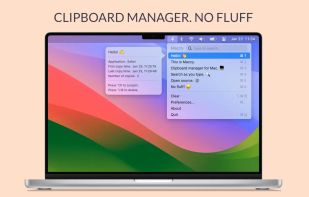
Lightweight clipboard tool for macOS storing all copy history locally, enabling fast keyboard-first navigation and search, minimal native interface, no logging of sensitive data, customizable settings, automation support, open source under MIT license, and privacy.

Cost / License
- Free
- Open Source (MIT)
Application type
Platforms
- Mac


Features
Highlights All activities
Maccy News & Activities
Recent News


Recent activities
 Hiroki Nomura added Maccy as alternative to Stacky Clipboard
 Marius Constantin Popescu added Maccy as alternative to PasteSpace
- Dharmang Hansaliya liked Maccy
 Raju Mandapati added Maccy as alternative to PasteMyClip





The macOS setup for everyone (with freeware only)
THIS LIST HAS BEEN DELETED DUE TO A BUG, SO IT MISSES SOME HONORABLE MENTIONS !
This is the apps for macOS that I would recommend to anyone who just got a Mac !
Some are the default that Apple offers but I tried to offers you free alternative to escape Apple Wall Garden if you need or want to
The same list for
Windows 10 & Windows 11 :
Linux kernel (GUI apps only) :


Mac Must Haves
Just a list in case I lose my other lists within my local storage :)

Developed by
 Alex Rodionov
 Licensing
Open Source (MIT) and Free product.Written in
Rating
Average rating of 4.4Alternatives
207 alternatives listedBadge
Get an embeddable badge for MaccySupported Languages

AlternativeTo Category
Office & ProductivityGitHub repository
- 21,952 Stars
- 1,220 Forks
- 192 Open Issues
- Updated


Comments and Reviews
Installed it with brew - free and no data collection in the process. Works amazing! Better than alternatives on Linux/Windows. Very nice interface and settings. Saves files and images (not only text), has preview for the hovered items, has search - what else do you might want here? Thanks to the developers and contributors!
You have to provide an email address in order to download from website.
Of course you can give a burner, or get on github (if you know how to do that) but this is an objectionable practice demonstrating poor judgement on behalf of the developer. Who know what other creepy stuff it going on.
Install it with brew ;-)
Or download it as a release from GitHub: no compiling required; it's just a zip of the app.
Also, if you're concerned about what's going on, the code is available on GitHub for you to see exactly what it's doing.
Best clipboard manager on macOS, hands down.
classy and efficient
It's great, you can access to the copied clipboard through contextual menu -with a keyboard shortcut- and there are keyboard shortcuts -⌘1-9- to paste them quickly.
You can install Maccy free through Homebrew https://formulae.brew.sh/cask/maccy
Strange way to download free version only through GitHub. In AppStore app costs 10 dollars. I suspect that Maccy is fork of Clipy, which is fork of ClipMenu.
Appstore - It's possible to support authors, but u can use brew to install and upgrade it.
It's very fast and pretty configurable. I just wish there were a way to keep pinned items distinct from the rest of the clipboard items.