
Stacky Clipboard icon

Stacky Clipboard

Clipboard history and snippet manager for iPhone and Mac that keeps every copy ready to paste, stored on your device and synced through your own iCloud.
Stacky Clipboard screenshot 1

Cost / License

  • Freemium (Pay once or Subscription)
  • Proprietary

Platforms

  • Mac
  • iPhone
0likes
0articles
Save

Features

Properties

Features

Highlights All activities

Stacky Clipboard News & Activities

Recent activities

Stacky Clipboard information

  • Developed by

    JP flagMirai Studio, Inc.
  • Licensing

    Proprietary and Freemium product.
  • Pricing

    One time purchase that costs $40, and / or subscription that costs $3 per month + free version with limited functionality.
  • Alternatives

    51 alternatives listed
  • Badge

    Get an embeddable badge for Stacky Clipboard
  • Supported Languages

    • English

AlternativeTo Category

Office & Productivity

Popular alternatives

View all
Stacky Clipboard was added to AlternativeTo by Hiroki Nomura on and this page was last updated .

No comments or reviews, maybe you want to be first?

Official Links

What is Stacky Clipboard?

Stacky is a clipboard history and snippet manager for iPhone and Mac, built by an indie developer.

On iPhone, copies stack up so the thing you copied earlier is never overwritten and gone. History is captured automatically when you open the app, or on demand via the share sheet's "Save Copy" or a double-tap on the back of your phone. Links, emails and phone numbers are detected and tagged automatically, so finding beats searching.

Snippets let you store the lines you retype all the time — greetings, addresses, template replies — with variables like {date} that fill in the moment you copy.

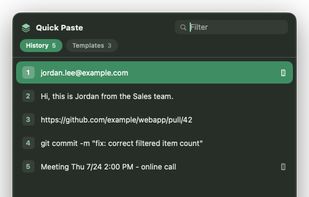
On Mac, Stacky lives in the menu bar, and the ⇧⌘V Quick Paste palette puts your history and snippets one number-key away, with instant search. Saved copies travel from iPhone to Mac through your own private iCloud database, so you can copy on the go and paste when you sit down.

Privacy is the point: for a clipboard app it has to be. Nothing is sent to external servers. There are no ads and no tracking. If you turn on iCloud sync, clips move through your own private iCloud — no third party, not even the developer, can read them.

Free tier: 50 clips of history and 10 snippets. Pro unlocks unlimited history, full-text search, custom variables and iCloud sync across iPhone and Mac.

Both apps are available now: the iPhone app on the App Store, and the Mac app as a notarized direct download.
