





Xenon Dashboard
1 like
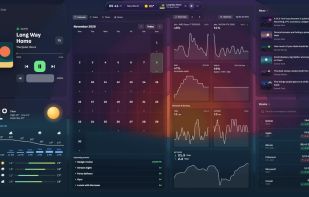
Xenon runs on your PC and puts live widgets on any screen you already have: the desktop itself, a second monitor, a small touchscreen, or an old tablet or phone that opens it in its browser over Wi-Fi, with nothing to install on that device.

Cost / License
- Free Personal
- Source Available
Application type
 EU
Since
- Since 2026
Updated
- Updated Nov 2026


Features
Highlights All activities
Xenon Dashboard News & Activities
Recent activities
- Marcello-3752 added Support for 4K as a feature to Xenon Dashboard
- Marcello-3752 added Screen Sharing as a feature to Xenon Dashboard
- Marcello-3752 added Portable as a feature to Xenon Dashboard
- Marcello-3752 added Lightweight as a feature to Xenon Dashboard
- Marcello-3752 added No Tracking as a feature to Xenon Dashboard
- Marcello-3752 liked Xenon Dashboard
- Marcello-3752 added Xenon Dashboard
 Marcello-3752 added Xenon Dashboard as alternative to Rainmeter, Xbox Game Bar and Nvidia App
- Marcello-3752 updated Xenon Dashboard

Developed by
 Xenon App
First released
2026Licensing
Source Available and Free Personal product.Written in
Alternatives
12 alternatives listedBadge
Get an embeddable badge for Xenon DashboardSupported Languages

AlternativeTo Categories
OS & Utilities, System & HardwareGitHub repository
- 123 Stars
- 16 Forks
- 5 Open Issues
- Updated


No comments or reviews, maybe you want to be first?