Apps tagged with 'Second Screen'

All apps in Apps tagged with 'Second Screen' category. Use the filters below to narrow down your search. 
Copy a direct link to this comment to your clipboard
  1. Deskreen icon
     38 likes

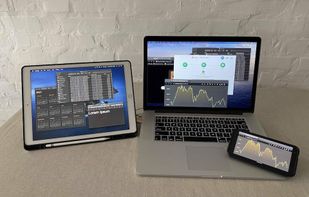
    Turns any device with a web browser into a second screen for computers, supporting entire screen or app sharing, secure encrypted streams, multiple devices, and video quality controls.

    Cost / License

    Application type

    Since

    • Since 2021 (updated Jul 2026)

    GitHub

    • GitHub stars: 21.8k

    Platforms

    • Windows
    • Mac
    • Linux
    • UA flagUkraine
    Deskreen screenshot 1
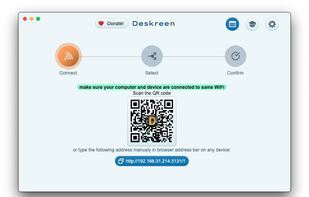
    Deskreen screenshot 2
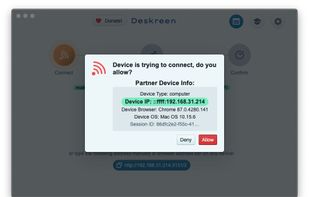
    Deskreen screenshot 3
    +6
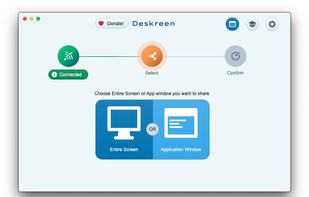
    Deskreen screenshot 4
  2. Xenon runs on your PC and puts live widgets on any screen you already have: the desktop itself, a second monitor, a small touchscreen, or an old tablet or phone that opens it in its browser over Wi-Fi, with nothing to install on that device.

    Cost / License

    • Free Personal
    • Source Available

    Since

    • Since 2026 (updated Nov 2026)

    GitHub

    • GitHub stars: 138

    Platforms

    • Windows
    • Mac
    • Linux
    • IT flagItaly
    • European Union flagEU
    Xenon on a second monitor: media, calendar, weather, system stats, news and stocks
    Widgets on the Windows desktop next to your apps
    On a phone over Wi-Fi: music, Deck keys and system stats
    Xenon Maker: build your own widget without code
    13 alternatives
  3. Engagenow icon
     9 likes

    Engage your audience on Second Screen in real-time during the conferences, events, radio programmes and TV shows. Use live Q&A, quizzes and polls.

    Cost / License

    • Freemium
    • Proprietary

    Since

    • Since 2015

    Platforms

    • Online
    • PL flagPoland
    • European Union flagEU
    Engagenow screenshot 1
    Engagenow screenshot 2
    Engagenow screenshot 3
    +4
    Engagenow screenshot 4
    35 alternatives
  4. Wing Display turns the Android tablet you already own into a real extended display for your Mac. Drag windows across, keep notes, a chat or a reference document beside your work, and arrange the tablet in System Settings like any other monitor.

    Cost / License

    • Freemium (Subscription)
    • Proprietary

    Since

    • New

    Platforms

    • Mac
    • Android Tablet
    • HU flagHungary
    • European Union flagEU
    The second screen you already own. Your Android tablet extends your computer’s desktop, over Wi-Fi.
    Two steps, and you’re set. 1. Get the free Mac app at wingdisplay.com 2. Open this app on your tablet
    Everything, one swipe away. Swipe in from the left edge: the connection, touch, pen and disconnect.
    +3
    Wi-Fi, or a cable. Switch from the tablet. USB PRO keeps the picture steady on busy networks.
    6 alternatives